
Participant
May 20, 2019
Question

I just updated to Audition CC 12.1 and now the files won't play

  • May 20, 2019
  • 1 reply
  • 2499 views

I just updated to Audition CC 12.1 and now when I hit the space bar but the file does not play.

Even if I click on the "play" transport arrow it just stalls and I get a small alert in the lower left corner that says

"Playing (Resampling to match the device sample rate 48000Hz)"
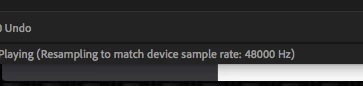
Both the session and the fie I am trying to play are 41000Hz  16bit

I have tried creating a 48000Hz session and converting the file to 48000  but I still get the same  Alert in the lower left corner ????????

I have tried reinstalling the older version 11  with the same result as 12.x

I can open a session in  Audition CS6 and it works properly

Any Ideas?

This topic has been closed for replies.

1 reply

Charles VW
Inspiring
May 20, 2019

Check that your audio device (via the hardware preferences or through the OS) are set to 44.1 kHz. The message indicates that your audio device is at 48000 Hz (48 kHz), but the source material (your session) is at 44100 Hz. Either way it should still play, but that's what the message is trying to tell you.

ryclark
Participating Frequently
May 21, 2019

This is usually a problem where Audition has lost contact with your audio interface. So check the settings in Audition's Preferences/Audio Hardware. Even if the settings appear correct it is quite often worth resetting them by switch to another Device Class and back again.

Shapeshifter12
Participating Frequently
March 16, 2024

Thanks @ryclark this fixed it for me as well, just updated in Mar 2024 and had this issue, which was weird and so thankful that your response fixed the problem