
Inspiring
June 22, 2019
Answered

Multitrack appears to be muted and won't play

  • June 22, 2019
  • 1 reply
  • 3660 views

I seldom use Audition, so this might be an easy fix.  I'm trying to make a mono lav track stereo...and I know how to do that.  BUT..when I run the track the Waveform window all is as expected.  When I look at it in the Waveform window, i see the track and when I play it I see the input meter moving but no output.  I've clicked the mute/unmute button as that is the extent of my knowledge.  Any ideas?
    This topic has been closed for replies.
    Correct answer ryclark

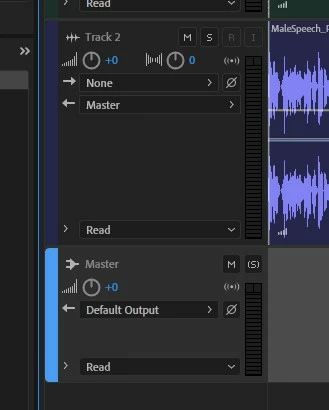
    Two things to check in the Multitrack view. First is that each Track is routed to master as it's output. And secondly that the Master track's output goes either to Default or your actual audio interface. When you play the audio you should see the meters beside each track and the Master track moving up and down as the audio plays.

    By the way what audio interface are you using to get audio in and out of Audition? And are you running Audition on a Mac or a PC with which operating system? It may help if we need to go deeper into Audio Hardware preferences.

    1 reply

    ryclark
    Participating Frequently
    June 22, 2019

    Your post is a bit confusing. Do you mean Multitrack since you talk about Waveform view in the post itself? Can you hear it when playing in Waveform view but not when playing in Multitrack? It is probably down to misrouting of the outputs to whatever your audio interface is. Check your setup in Audition's Audio Hardware preferences page and that the correct Device Class and device are selected for Audition to use.

    Andy PostAuthor
    Inspiring
    June 22, 2019

    Confusing?  That's why I started by mentioning that I seldom use the app.  It seemed more gentle than outright asking folks to help to a clueless booger eating newbie...

    But yes, you cut through the confusion correctly.  I can hear it wen playing in waveform view but not in MultiTrack. 

    It doesn't look like there are separate audio hardware setups for each view.  So do I understand that the multitrack view might not like to use the settings that seem ok to the waveform view?

    ryclark
    ryclarkCorrect answer
    Participating Frequently
    June 22, 2019

    Two things to check in the Multitrack view. First is that each Track is routed to master as it's output. And secondly that the Master track's output goes either to Default or your actual audio interface. When you play the audio you should see the meters beside each track and the Master track moving up and down as the audio plays.

    By the way what audio interface are you using to get audio in and out of Audition? And are you running Audition on a Mac or a PC with which operating system? It may help if we need to go deeper into Audio Hardware preferences.