

Recording USB Interface & Stereomix with ASIO4ALL?
Hey guys, thanks in advance for your patience and concern.
I'm not the most talented audio geek so bear with me please. My setup is Adobe Audition CC, a Focusrite Scarlett Solo USB Interface and the infamous ASIO4ALL on Windows 7 64bit.
I am trying to record, as the title suggests, microphone input via my interface while simultaneously recording a skype call via the stereo mix. Usually Windows only allows one audio device to be selected at a time.
Now I remember, from a couple of years back, when I was still using Cubase 4 LE that with ASIO4ALL there were work around for this issue. Hence I installed the driver again to split the input for the different audio track among devices as I used to. When I select ASIO4ALL in Audition I get nonsensical input channels to select however (at least I can't make sense of them). I added a screen capture below as well as the settings for the ASIO4ALL.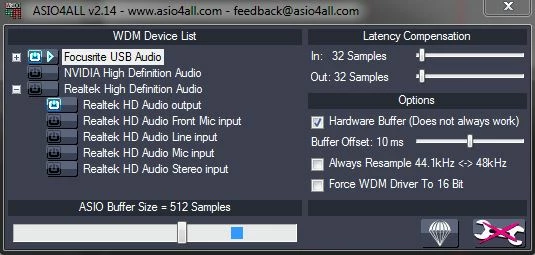
If I remember correctly I was able to select the stereo-mix and mic input separately at that point in Cubase. How do I do the trick in Audition to be able to make this virtual setup work? I would be very appreciative of a reply. Thanks!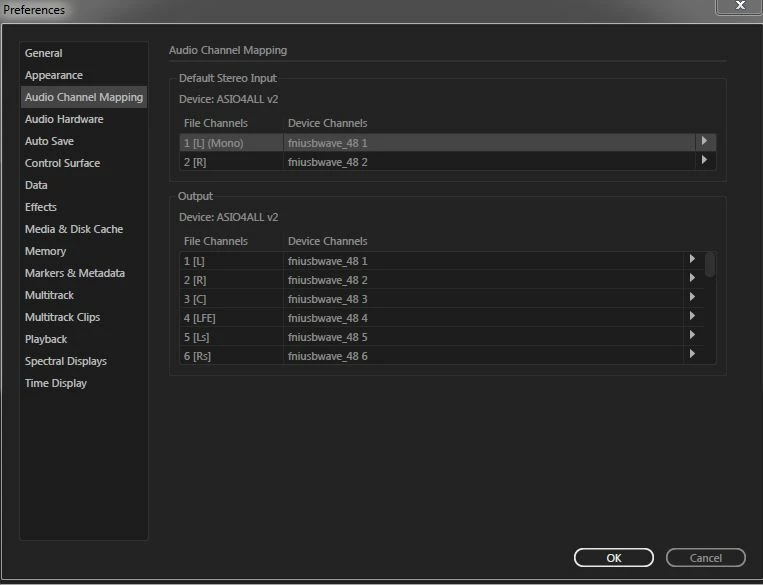
 AdChoices