


Participant
June 12, 2018
Answered

Recurring Beep in Audio - How to Remove

  • June 12, 2018
  • 1 reply
  • 3798 views

Hello,

I am a fairly new user to Audition and would really appreciate any help on this issue regarding the audio I recorded. For a recent wedding I recorded, once I imported my audio (captured through a microphone recorded to the GH4 audio jack) I hear this recurring audio beep that is constant through the audio track. Every 5 seconds or so, I hear this beep and it is very distracting.

Besides using the auto-heal tool on each individual audio beep, what are some recommended tools I can use to automatically remove these many beeps? It would take far too long to manually auto-heal each audio glitch during the ceremony and many other clips recorded. I also tried to learn the sound model on each of these audio glitches, but it cannot fully remove it.

Attached, you will find a picture of the waveform that I see in Audition.
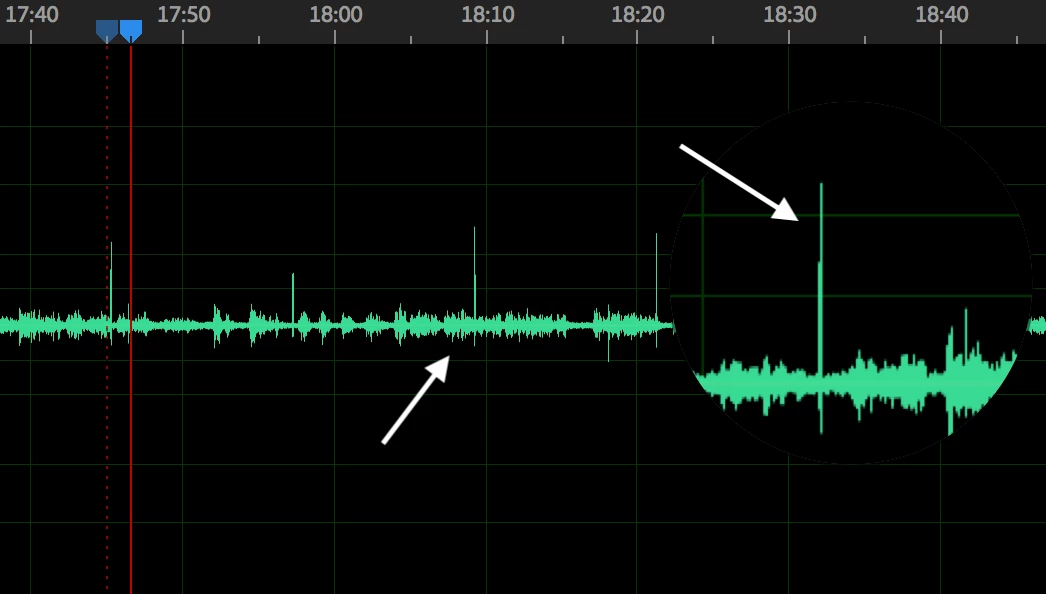
Thank you in advance for any help,

Kyle

This topic has been closed for replies.
Correct answer SteveG_AudioMasters_

Hello,

Similar to ryclark's reply, here is the link! Definitely, a very odd issue that I have never encountered before.

Link: Audio Glitch - Google Drive

Thanks,

Kyle


Having looked primarily at the larger click (but also the smaller one, to a lesser degree) I can tell you unequivocally that something audible in the room caused those clicks and was picked up by your microphone. How do I know? Well, if you expand out the largest one it looks just like an impulse file you'd get if you fired a starting pistol or used a clapperboard in the space. The impulse is basically the response of the room you were in - the sound reflecting from the walls and dying away. So something in the location clicked. No I have no idea what it might be, as it's quite a clean click, but the nature of it is very clear!

Your only hope of removing these clicks is to do it manually - no amount of filtering will help, as the bandwidth of it covers most of the audible frequency range (you can see this in the Spectral view).

1 reply

ryclark
Participating Frequently
June 13, 2018

I would be helpful if you could post a screen image of the Spectral Frequency Display for some of these 'bleeps' to help identify a possible cure. Even better a short clip in .wav format containing a few bleeps posted on somewhere like Dropbox or Google Drive for us to download and listen to might be even better. How did the original 'bleeps' get into the audio in the first place?

SteveG_AudioMasters_
Community Expert
Community Expert
June 13, 2018

ryclark  wrote

How did the original 'bleeps' get into the audio in the first place?

That's a good question, and one I think I'd want to know the answer to pretty soon, if I was going to do any more of this! It looks like an alarm going off somewhere, and because they aren't all the same height, this looks like an acoustic pick-up of some sort, rather than any form of internal interference. But a clip in the original format (i.e. not an MP3 file) would indeed be helpful.

Participant
June 22, 2018

Hello,

Similar to ryclark's reply, here is the link! Definitely, a very odd issue that I have never encountered before.

Link: Audio Glitch - Google Drive

Thanks,

Kyle