
jordanm1086772
Participant
August 19, 2019
Answered

Removal of Background Trash Noise

  • August 19, 2019
  • 1 reply
  • 1553 views

Hello,

I just recently installed Audition, trial version and I'm wanting to use it for my voice over work. I'm reaching out to see if someone could take a few minutes and please listen to this track where I have recorded a sample as well as leave some dead air so you can get a feel for what "trash noise" I'm dealing with. My hope is to see if I could be provided with some tutorials, specific filters/it's settings, etc... that I could apply to help eliminate some of this noise. Unfortunately I'm not able to make my room voice over soundproof at this time. It is much easier to hear the noise with headphones.

Dropbox - VO-TEST-BCKGRND.mp3 - Simplify your life

Thanks,

Jordan
    This topic has been closed for replies.
    Correct answer SteveG_AudioMasters_

    Actually, compared to some of the test sessions we get, this is actually reasonably quiet!

    Because it's a single voice talking, you can reduce that background noise quite considerably in a single pass, without any serious effect on the speech quality, by using what most would regard as quite excessive settings on the Noise Reduction process. Normally we'd suggest using NR in multiple passes and much smaller amounts of reduction at each one, simply to reduce artifacts, but when the noise is pretty quiet in the first place, there's less need for this. The other thing to note about doing this at all is that it's quite disconcerting to remove all the noise - people don't like the sound of that at all, and prefer what would be there naturally in a presentation.

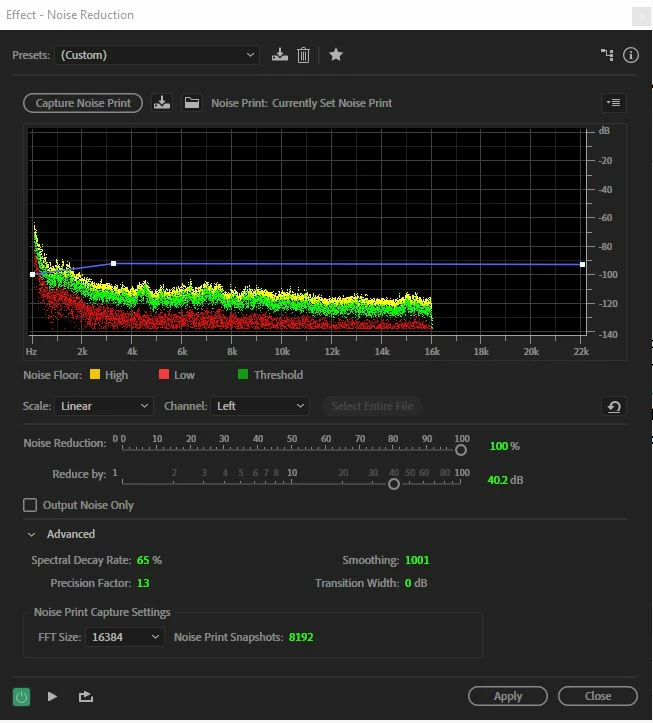
    Anyway, I got a pretty reasonable result by first setting the FFT size to its highest value (16384), then using the initial silent section as a noise print, and the following settings: (the order of operations is significant; if you don't set the FFT size first you'll have to start over!)

    This got rid of most of what was in the background. It's important to note that this approach only works on continuous sound. Fortunately that's what you've got...

    1 reply

    SteveG_AudioMasters_
    Community Expert
    SteveG_AudioMasters_Community ExpertCorrect answer
    Community Expert
    August 19, 2019

    Actually, compared to some of the test sessions we get, this is actually reasonably quiet!

    Because it's a single voice talking, you can reduce that background noise quite considerably in a single pass, without any serious effect on the speech quality, by using what most would regard as quite excessive settings on the Noise Reduction process. Normally we'd suggest using NR in multiple passes and much smaller amounts of reduction at each one, simply to reduce artifacts, but when the noise is pretty quiet in the first place, there's less need for this. The other thing to note about doing this at all is that it's quite disconcerting to remove all the noise - people don't like the sound of that at all, and prefer what would be there naturally in a presentation.

    Anyway, I got a pretty reasonable result by first setting the FFT size to its highest value (16384), then using the initial silent section as a noise print, and the following settings: (the order of operations is significant; if you don't set the FFT size first you'll have to start over!)

    This got rid of most of what was in the background. It's important to note that this approach only works on continuous sound. Fortunately that's what you've got...

    jordanm1086772
    Participant
    August 20, 2019

    Brilliant! I used a different voice track and it worked wonders; depleted all the background trash down considerably. Yes, I've heard that from other people on the internet when I've asked them to listen to a sample track and they do say for what I've got, it's actually pretty quiet already (good to hear--no pun intended) I appreciate your help, Steve. I do have one question, when you say "continuous sound", you mean like speaking loud then quieter or sort of all over the place?

    Thank you so much.

    SteveG_AudioMasters_
    Community Expert
    Community Expert
    August 20, 2019

    Continuous sound is something like a hum or a hiss, that doesn't alter. Anything like speech is the complete opposite of continuous sound, and that can't be removed with NR.