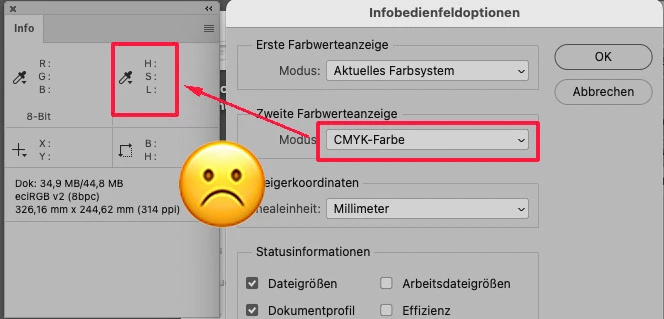
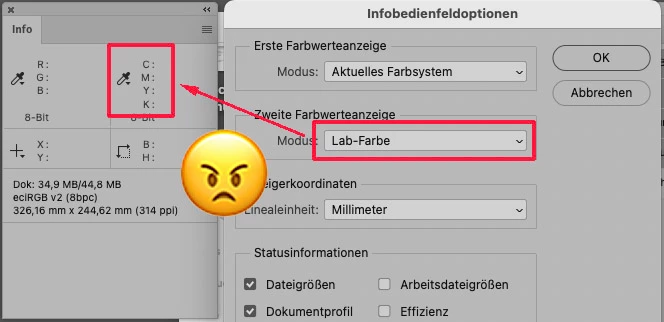
A versão mais recente do photoshop, está com bug no menu "info"
Está com as opções de cores trocadas, e quando se consegue descobrir qual é a troca e deixar da maneira como vc quer, ao reiniciar o photoshop as opções escolhidas são resetadas.
A solução é usar a versão anterior (26.30) enquanto a Adobe não corrige esse bug.
There seems to have been some change distributed. I've always done manual update installation. Somehow, CC got reset to auto-update. Sadly, Adobe has a long history of using their customers to trap code regressions. While performance has improved in recent years, there are still too many customer-found regressions. I've always taken the point of view to hold-off on any new release for at least a couple of weeks before deploying on my machines, hoping that the worst case regressions while have been found by that time. I turned OFF auto-update in CC and will check to make sure it stays that way.
I was experiencing the same problem. Open the info panel, intending to explore image with eye dropper. Using info panel fly-out menu panel options, I tried to set the second color to LAB color but the display showed CMYK. The workaround is to use the eyedropper pull down (in the info panel) and select LAB which is then the displayed color model. I'm using Ps 26.4.1 on a Mac Studio running macOS Sequoia 15.3.1. (I still have last year's Ps installed and it was not experiencing the same problem.)
The old version works. The newest 26.4.1 doesn't. Things like this are why I don't like upgrading. Always new and unpleasant suprprises with Adobe updates!

 AdChoices