
Medconsulting
Participant
January 17, 2025

nesting impossible in PP beta 25.2.0 build 87 and in PP 25.1

  • January 17, 2025
  • 38 replies
  • 6950 views

Nesting is impossible in PP beta 25.2.0 build 87 and in PP 25.1 (both German language) on Mac Mini 2018 with MacOS 15.1.1 (24B91) and external GPU AMD Radeon Pro 580.

The menu item Nest ("Verschachteln") is greyed out.
It does not even work with the official trial file from https://learndownload.adobe.com/pub/learn/premiere/premiere-pro-nesting-sequence-cc.zip
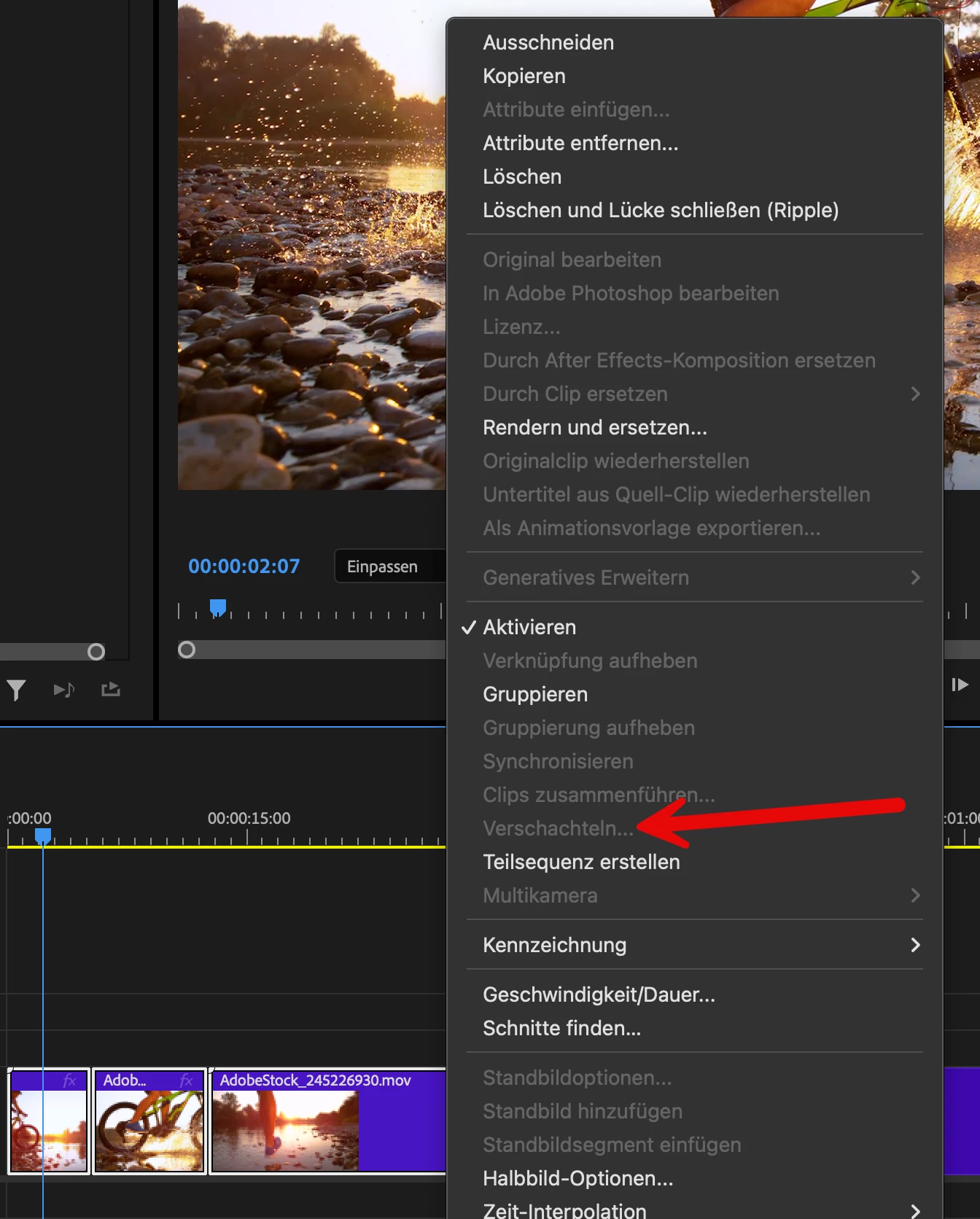
Have I missed a required setting? or is it a bug?

38 replies

Participant
January 22, 2025


"Nest" Option Grayed Out in the current build of premiere beta

Participant
January 22, 2025

"Nest" is greyed out any time I select one or more video clips. Opening the same project/sequence in the non-Beta version of Premiere works just fine. 

gened78432486
Known Participant
January 22, 2025

I have nested clips thousands of times so I know what I'm doing. Today, I did the same thing I always do, but Nest is grayed out when I try to nest two sequences (image attached). I have created another project and imported different clips, but the same thing is happening. I am using Premiere Beta Version 25.2.0 BETA Build 89. (I just updated this morning hoping it would help, but the same thing is happening.). When I do the exact same thing in Premiere 2025 (25.1.0 Build 73) everthing works fine as it should. I had used Premiere Pro Beta and nesting without issue up until today.


Is there a setting I'm missing somewhere that would prevent me from nesting when I should be able to?


UPDATE: Opened the Beta project in Premiere 2025 and everything works as it should so you can do this in the meantime if you are worried about losing work. (Downside is you get that annoying Color Management pop-up.) I do not use Color Management for this exact reason - in case I need to open a project up in 25. Using Lumetri Color gives me more flexibility anyway.

Participant
January 22, 2025

For some reason the nest feature has stopped working, I'm just doing what I always do but nest is just always greyed out. I've looked for advice online to see if it's something silly I'm doing and have tried all the things I've discovered. I think it must just be a bug.

Ann Bens
Community Expert
Community Expert
January 21, 2025

If you reverted to 25.1 beta that is the same as 25.1 official release.

As a workaround you can use Make sub-sequence.

matthewf38320796
Participant
January 21, 2025

Nesting is 100% broken.  I went back one beta version and it's working.

Ann Bens
Community Expert
Community Expert
January 21, 2025

This is a known issue in the beta 25.2

But 25.1 should work as expected on windows in English.


Participant
January 17, 2025

When I try to things together in the timeline the nest option is not possible, this is not because i have only selected audio but nothing works, it was fine before the new update.

Inspiring
January 18, 2025

25.2 Build 84


Nesting not working (the option is greyed out when selecting two clips and right-clicking)


Work-around was to open the project in Premiere Pro 25.1, nest, save, and re-open im 25.2 beta.