

Participating Frequently
July 25, 2023

P: Canon 24-240 lens profile v3

  • July 25, 2023
  • 56 replies
  • 16146 views

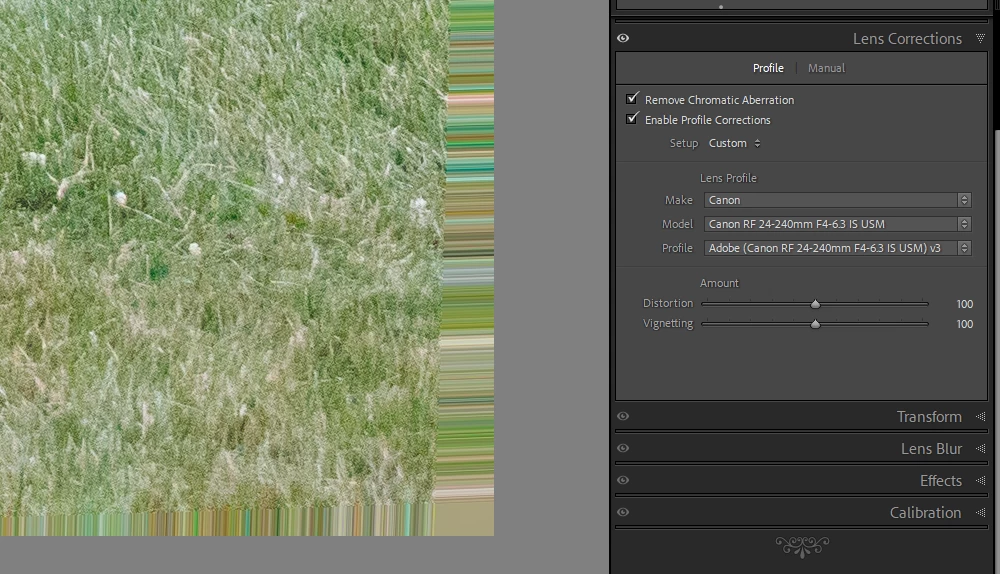
On the latest Lightroom Classic release version 13.5 there is a new lens profile (v3) for the Canon 24-240 lens. It has reintroduced the "bad borders" bug. Workaround is simply to select the older v2 profile.

This topic has been closed for replies.

56 replies

Community Manager
November 20, 2024

Hello @oda6317 


Thanks for confirming re-install helped while simply updating to the latest app did not help.


Our developers are discussing how the experience could be improved.

Participant
November 20, 2024

Hi all, only update to V10.0.2 in the iPad was in my case not sucessful. After uninstall and reinstall, everything is fine now. 🙂

Community Manager
November 19, 2024

@davidarosen , 

Thank you for letting me know.  This forced the app to fetch the latest profiles from the server.  

Participant
November 19, 2024

Charlie.  Thanks.  Uninstall and reinstall seems to have it fixed.  Thank you.  Back to good workflow.

Community Manager
November 19, 2024

Hello @davidarosen 

This should have been addressed for you with our October release.  Just now, I spot check a couple images that were used to debug the problem, and they are working OK on my own LR iPad app.


If you update to the latest LR iOS app v10.0.2 that was released today, do this still reproduce?  (if you don't already see the update, search for the LR iPad app and actually open the listing fully to see the update)

If that still doesn't help, does a reinstall of the app help?  

Participant
November 18, 2024

My problem with Canon 24-240mm was solved on LRC, but NOT on LR for iPad.  I use iPad to narrow selects and some LR editing.  Screws up workflow BIG TIME...  Adobe?

Participant
October 20, 2024

我也是遇到這個問題,不光是邊緣怪怪還整個變形都沒有調整回來


Inspiring
October 15, 2024

This takes a lot of time. I though that this entire Creative Cloud scheme was made with the intention of automated and on demand updates. Here people report this problem for months meanwhile, over and over. What's the holdout? Why not to update this profile as a minor update in a weeks notice?

GoldingD
Legend
October 15, 2024
"bernard_5482

When I import pictures into LrC, some of them have a distorted edge (see below). Displayed on my camera the same pictures are OK. As well as on my PC with Photos software. Where does it come from?

LrC 13.5.1. ; Windows 11 ; Canon R6 camera, Raw format"


Solution posted in a reply by Adobe in this very Bug posting is to upgrade to LrC v14. Did you not read that?
Participant
October 15, 2024
My problem seems to be solved ! Great!
Participant
October 15, 2024

When I import pictures into LrC, some of them have a distorted edge (see below). Displayed on my camera the same pictures are OK. As well as on my PC with Photos software. Where does it come from?

LrC 13.5.1. ; Windows 11 ; Canon R6 camera, Raw format