Hi there
This sounds like there is a fundamental misunderstanding of Objects and the Timeline.
Click Boxes and Buttons will normally pause the slide they are on until the user performs some action that causes the playhead to resume play. Consider the image of the Timeline below:
(You may need to click to see a larger view)
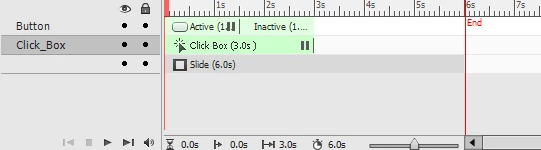
Note that the slide is timed for six seconds. The Click Box is timed for three seconds and will pause at the end as indicated by the pause icon. ( || ).
Note that the Button pauses at 1.5 seconds. So if the Button were clicked and the Pause released, assuming the action of the Button were to "Continue", the slide would pause again at the three second mark because that's where the Click Box is pausing.
So lets assume there are three Click Boxes and a button. Each Click Box is staged to pause the slide at different times.
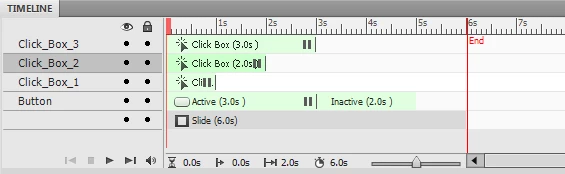
In the image above, Click Box 1 will pause at one second. If the user clicks and the slide continues play, it will then pause again at the two second mark because Click Box 2 pauses there. And the third click box pauses at the three second mark. But if you look closely, so does the Button. This means that if the third Click Box is clicked, the pause is released and the button is still viewable, but isn't pausing the slide as it was before.
If this is your setup, you likely need to stage the pause point of the button a bit farther down the timeline.
Cheers... Rick 


 AdChoices