Participating Frequently
September 29, 2017
Answered

3 quiz locations

  • September 29, 2017
  • 1 reply
  • 334 views

Hello all,

I am using Captivate 9.  I have created a course that has three segments.  After each segment I have a quiz.  The users are required to pass the quiz. If they do not pass, they have the option to retake the quiz.  My dilemma is that Captivate starts the users at the first quiz and then after that it does not take them immediately to the second quiz (that's what I need).  It takes them back through the beginning of the second segment.  Is there anything that I can do to allow the users to retake all questions without have to go back through the segments again?

many thanks for the assistance!

Lorenzo
    This topic has been closed for replies.
    Correct answer Lilybiri

    Go to the first slide of content2, just after the last question slide of content1.

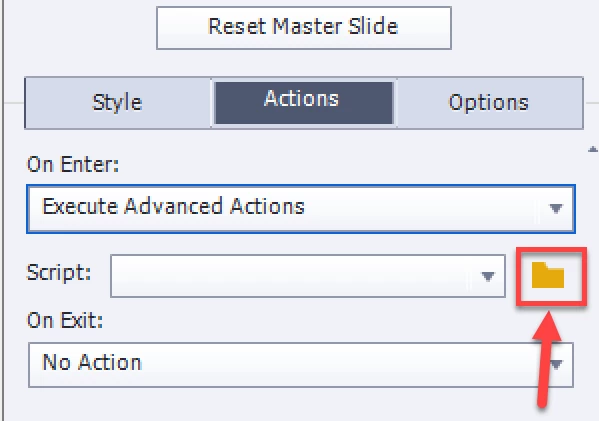
    In the Properties panel of the slide, go to the tab Actions. Open the dropdown list next to On Enter and choose Execute Advanced Action. Since you don't have one yet, there will be no list. Click on the Browser icon, it will open the Advanced Actions dialog box.

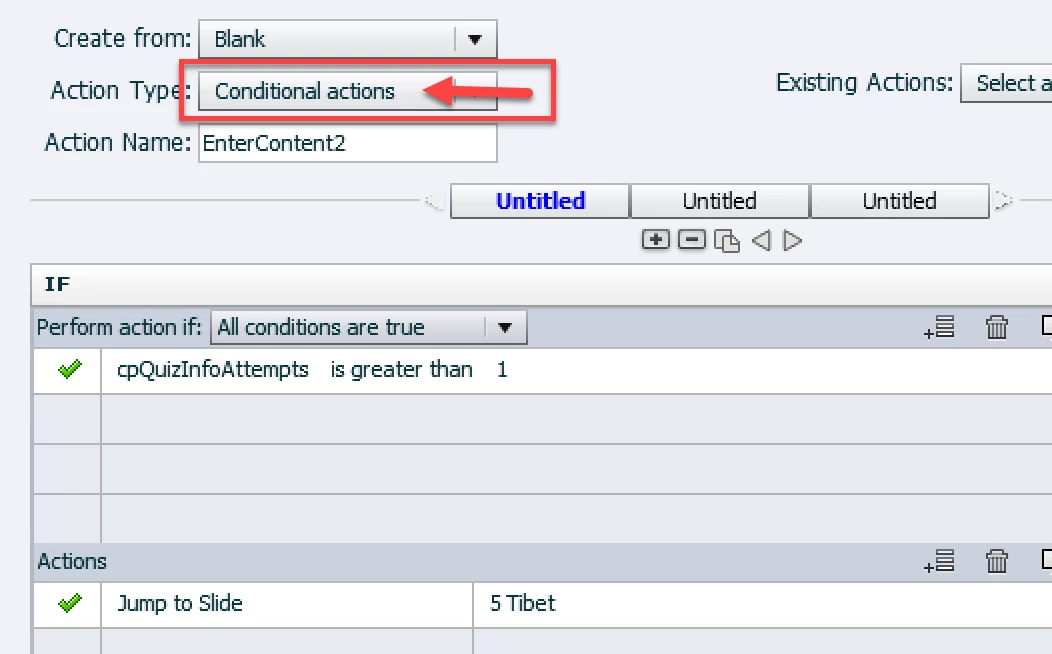
    Create this conditional action

    You have to replace the slide 'Tibet' by the first question slide of content 2

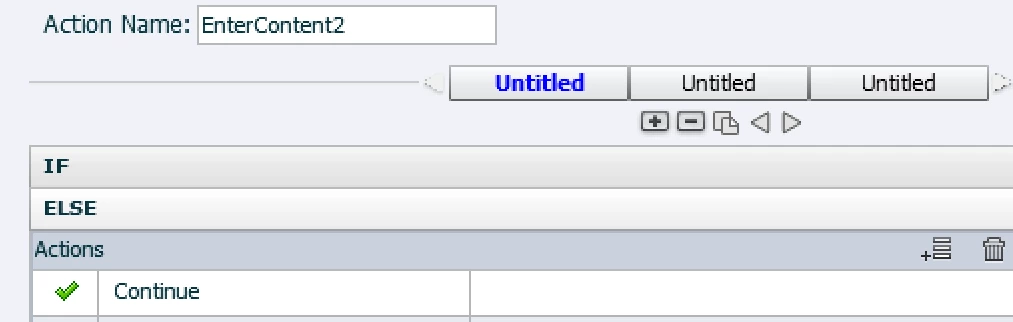
    Click on the Else button at the bottom and enter:

    Save that action (button at the bottom). Close the dialog box, the action will already be assigned to the On Enter event of the slide.

    Now navigate to the first slide of content3. Open the Advanced Actions dialog box from the Project menu. You'll create the action to be triggered by the On Enter event of this slide, first you'll need to create the action.

    You can duplicate the action (for content3) using the Duplicate button at the top:

    Edit this duplicate: name, and the slide to jump to (first  Save the action, close the dialog box.

    Use the Dropdown list next to On Enter to assign the second action

    1 reply

    Lilybiri
    Legend
    September 29, 2017

    You could use the system variable cpQuizInfoAttempts and a conditional action at the first slide of the second segment:

      IF cpQuizInfoAttempts is greater than 1

          Jump to slide....          where you indicate the first question slide of the second segment

    Same for the third segment.

    SammadAuthor
    Participating Frequently
    September 29, 2017

    Thank you so much for the information.  I'm glad there's a solution.
    As I am not super familiar with variables and actions ( I know where to find them ), Can you please elaborate on the process to do this?
    Even a little extra help would be greatly appreciated again.

    Once again, thank you for your support!

    Lilybiri
    LilybiriCorrect answer
    Legend
    September 29, 2017

    Go to the first slide of content2, just after the last question slide of content1.

    In the Properties panel of the slide, go to the tab Actions. Open the dropdown list next to On Enter and choose Execute Advanced Action. Since you don't have one yet, there will be no list. Click on the Browser icon, it will open the Advanced Actions dialog box.

    Create this conditional action

    You have to replace the slide 'Tibet' by the first question slide of content 2

    Click on the Else button at the bottom and enter:

    Save that action (button at the bottom). Close the dialog box, the action will already be assigned to the On Enter event of the slide.

    Now navigate to the first slide of content3. Open the Advanced Actions dialog box from the Project menu. You'll create the action to be triggered by the On Enter event of this slide, first you'll need to create the action.

    You can duplicate the action (for content3) using the Duplicate button at the top:

    Edit this duplicate: name, and the slide to jump to (first  Save the action, close the dialog box.

    Use the Dropdown list next to On Enter to assign the second action