
Participating Frequently
April 15, 2016
Question

a problem on fill-in-the-blank question slide

  • April 15, 2016
  • 1 reply
  • 173 views

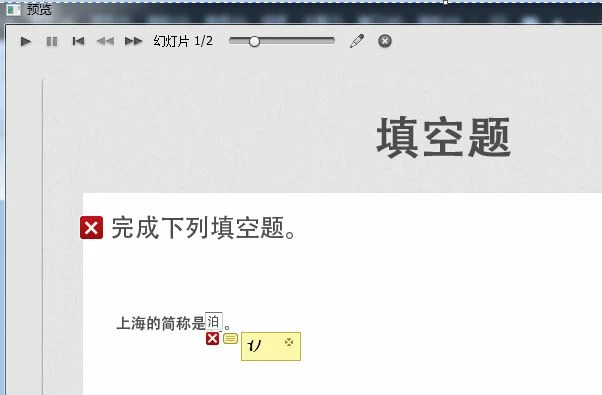
when i finished the quiz and review, if the answer in the fill-in-blank question slide is Chinese character, the answer can't show well.The screenshot is like below .(the correct answer character  沪 just show half ).How i can solve it?
    This topic has been closed for replies.

    1 reply

    Lilybiri
    Legend
    April 15, 2016

    I think it is an issue with the FIB field being to narrow. I don't know if you used a dropdown list with possible entries? If yes, make sure to have the widest entry on top, and even insert some blank spaces before the character to force the field to be wider.

    Alternative would be to create a custom question slide using the Scrolling Text interaction, but that is a lot more work.

    Participating Frequently
    April 18, 2016

    thanks.

    but the problem is the answer area is not enough high so that  the corect answer can't show well.but when the correct answer is a standart ASCII character, it will show well.(just like the below screenshot )

    so i think ,could i customize the answer area with the yellow backgroud and the answer's font size? (when the correct answer is Chinese ,the font size is too big and the answer area with the yellow backgroud is too small,the problem occurs.but when the correct answer is an English word,everything is ok.)

    Lilybiri
    Legend
    April 18, 2016

    Only the engineers could answer about this issue. I suggested to use the scrolling text interaction which you can make as big as you want. Drawback: if this is a scored question, you'll have to tweak everything to get the score reported.