


- Home
- Captivate
- Discussions
- Re: Adding multiple audio clips to a slide
- Re: Adding multiple audio clips to a slide
Adding multiple audio clips to a slide

Copy link to clipboard
Copied
I'm trying to build frames that include voice over audio and video. I want to begin with an audio clip, add a fade up and fade down video, and then finish the frame with another audio clip. If I import the second audio clip, Captivate 2017 indicates that I need to replace the first clip. How do I use multiple audio clips within a single frame?


 13
Replies
13
13
Replies
13


Copy link to clipboard
Copied
Sorry, I changed the subject, because you are talking about audio clips added to a slide, not to a frame. Each slide with a default duration of 3 seconds has 3x30 frames because the default speed when playing is set at 30 frames per second. I wanted to avoid confusion for other users.
You are talkinn about slide audio, and Captivate allows only one audio clip as slide audio (unless you tweak and use the extra System audio timeline). Slide audio is necessary if you want to use the CC feature of Captivate. In that case youo'll need to merge the two audio clips into one longer audio clip with any audio editing application. I do use Audition, but you can use Audactiy (free) as well.
If you don't need CC you could replace one or both audio clips by audio attached to an object. If you are in a normal, non-responsive project, that object can be invisible to the user. Example: a shape with Alpha and Stroke set to 0. That audio will play when the object appears, so you can time it on the timeline.
Where does the 'video' fit in? Is it event video or synchronized video?
Copy link to clipboard
Copied
The videos I'm adding are event videos. I think attaching audio to an object might be a solution for me.
I'm actually converting 25, 8-10 minute training videos into 5, hour long interactive programs by re-editing the longer videos into shorter clips which will be delivered to the audience over multiple slides (thanks for correcting my terminology), one 90-120 second set of interviews per slide. The videos themselves are interview-driven with about 15% narration. My thinking is that I can extract the edited interviews (encode at a low bitrate) and rebuild into a slide format by adding the narration within Captivate slides. I'm also planning to add some new hosting video, question slides and links to related online sites.
The end result should be compelling (I'm hoping) unless there are performance issues in dealing with that much video. I'm able to encode a 90 second video down to about 15 mb at reasonable quality which means each that each video could be converted into a module under 100 mb. I would then link modules together to create video-driven hour long trainings.
Am I missing something or do you think this will work?
Copy link to clipboard
Copied
Beware: event video plays totally independent of Captivate, you cannot control it with the timeline. Have a look at the interactive movie embedded in this blog post:
Timeline - Advanced Workflows - Captivate blog
If you want to use the timeline for timing audio clips and video, you need to use synchronized video.
Copy link to clipboard
Copied
I have never used synchronized video. I clicked on the link but didn't get much out of the presentation - lots of moving text that didn't make much sense to me, sorry. There was no narration or anything I could follow.
Is there somewhere I can learn about synchronous video and it's using in developing the kind of modules I want to create within Captivate? As I asked above, is what I want to do possible or am I wasting my time trying to use Captivate to convert the videos to interactive presentations?
Copy link to clipboard
Copied
You never talked about an 'interactive video' in your original question. I answered about having two audio clips on a slide. When I realized you wanted to time video, I wondered if it was inserted as synchronized video. I offered you that link because in that presentation I explained (did you listen to the audio) how the timeline can be paused, something which you will need absolutely for interactive video, and which items can be paused by the two possible work flows. Explanation about the different type of audio is also in that presentation. Now it looks like you are totally new to Captivate, and then I understand that the presentation is way over your head.
Video is by definition passive. The term 'interactive video' is used by different authors to indicate different ways of what they call 'interativity'. If you explained what you really want to do? Captivate is an eLearning authoring tool, which has many ways of adding interactivity. To engage the learner by adding some interactivity to an exisiting video is one of the possiblities, but not the first goal at all. Some examples for what I see as adding interactivity to an existing video:
- Adding keyponts, by splitting the video over different slides and creating a popup menu to navigate to those keypoints.
- Adding buttons that will pause the video and show some static information (to which you can also add object audio). I have another blog post showing such a workflow: Interactive Video Buttons - Captivate blog
Maybe you have other interactivity in mind, but please explain i that case.
Anyhow you will have to insert video as synchronized video, so that it can be controlled by Captivate's timeline. Event video is just like a link to a youtube video somewhere, without any other controlling possiblities than those in the control panel which is added to event video. Inserting a synchorinzed video is just clicking another radio button when inserting the video, and extending the duration of the slide to the length of the video. That is all:
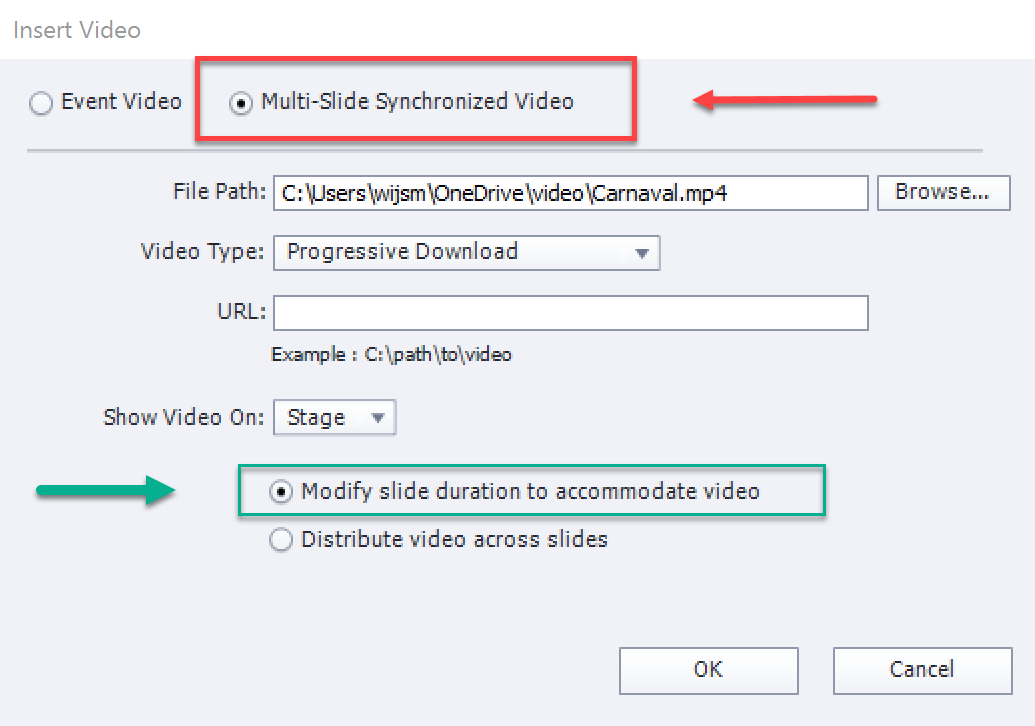
You can slso distribute the video across multiple slides, work flow which could help by defining keypoints.
Copy link to clipboard
Copied
First, thank you for your patient, detailed answers.
I didn't listen to the audio on the link because there was no audio playing on my system.
Actually, I've used Captivate intermittently over the past 5 years but, in many ways, I am a new user in that I've never needed to take advantage of advanced actions or other more complex Captivate features. I am familiar with the interface and have authored a couple of dozen Captivate modules using video in less ambitious ways.
I understand my misuse of terminology is making it difficult for you to envision what I want to do. I do not want to add interactivity within videos. I want to re-edit the existing videos into small segments that will be inserted into each slide. So each 8 minute video would be converted into 6-8 slide presentation with short re-edited video segments on each slide. My audio question was about whether I could add narration before and after the video inserts. I also would like to add a quiz and links to related online resources which I've done with other projects. As a video producer, I have unlimited ability to re-shape, re-encode and add new video to presentations. Instructional designers with whom I've worked on other projects have pushed me toward Articulate but I don't see why I can't figure out how to do what I want to do within Captivate.
My planned interactivity is limited to user control of the pace of the presentation as well as quiz and link options. I am interested in more creative uses of video in future presentations but, at present, have a sizable inventory of linear video that I need to make available online in an lms ready format.
Copy link to clipboard
Copied
Without the audio that presentation didnb't have any sense.
In that case, please insert the video as mutlislide synchronized video, distributed over multiple slides. Create those slides fbefore inserting the video. With the Vidoe management you'll be able to move the slide separator markers to the wanted tocation in the video.
It is then up to you to add more objects on the video slides (like a button to pause at the end, which I would put on the used master slide), to add quiz slides etc. I really do not recommend to use event video, unless you split that video up in a video application in the chunks you want.
Copy link to clipboard
Copied
Since I produce videos, I can easily create the chunks I need.
But I still face the original question of how to add narration before and after the chunks. Maybe I should bunch the pre-edited chunk videos into a single video file and then use the video management tool to point to each chunk as needed.
Would that allow me to add narration before and after the videos?
Copy link to clipboard
Copied
Synchronized video is compulsory if you want audio on same slide,
before/after the video. Then you can move timelines. That was the reason I
sent you the link.
Copy link to clipboard
Copied
Sorry, I am on the road. I would put an audio object timeline to end before
the video timeline, another one after the video timeline. I explained
before what I mean by audio object, have also blog posts about them.
Copy link to clipboard
Copied
Great - I think you've given me enough confidence to explore synchronized video as a base for my approach.
I appreciate your insight and understanding as I try to wrap my head around a different way of presenting my work to learners.
Copy link to clipboard
Copied
This article explains about audio objects:
Audio Objects: Control them! - Captivate blog
Beware: if you want to show the first frame of your video during the first audio clip, you'll need a static image, since you'll have the video timeline only appearing later.


Copy link to clipboard
Copied
You could also break this into 3 slides:
Slide 1 - First audio clip
Slide 2 - Video clip
Slide 3 - Second audio clip


Find more inspiration, events, and resources on the new Adobe Community
Explore Now
 AdChoices