
Inspiring
July 31, 2018
Question

Adobe captivate crossword ??

  • July 31, 2018
  • 6 replies
  • 1926 views

Hi, i was trying to create a crossword in captivate with Text entry boxes and a button that check all the values in the tebs.
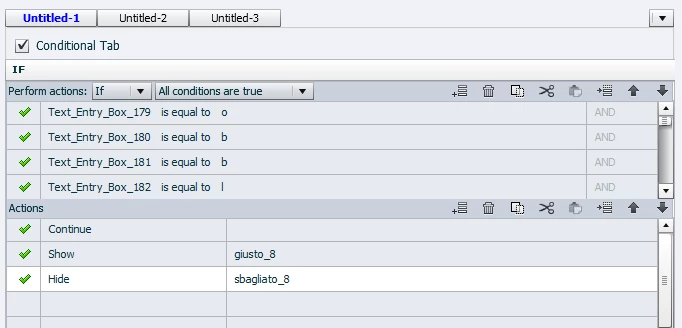
Now, sometimes it work and show me the correct message (giusto_8) and sometimes any if all the value are right is show me the wrong message. It seems a random thing. Any help?

    This topic has been closed for replies.

    6 replies

    Inspiring
    August 2, 2018

    I only want to do this simple crossword, the user complete it and click on button "Conferma", if it's right then appear the correct message and the project continue, else appear incorrect message and the user can redo the crossword. I watched the elb crossword but i don't understand too much, i tried the validation of the TEB's but i don't know to use it and i want only a button that check all TEB's and scho the correct or incorrect message. my problem is, as you can see, that some letters are not recorded and i can't explain why. I do some test and i notice that if you do the crossword clicking the boxes and without the use of "tab" button it record all letters.

    Lilybiri
    Legend
    August 2, 2018

    You may not realize it but you just confirmed my suspicion. This ' the user can redo the crossword.' !!! is a not so easy to realize workflow. That was the reason for my question. Resetting and clearing a TEB is not an easy workflow, I used it as an example in my presentations about the Timeline:

    http://www.lilybiri.com/published/TEBClear/index.html

    I have a meeting coming up, will try to figure out a workflow that is easy to use and understand but it will be later on. You can already watch that movie. Do not underestimate the power of advanced/shared actions, I have about 10 years experience with them for clients and complicated use cases. You'll find some games on my blog as well. Here is a recent one:

    Playing a dice game, using While loop - Captivate blog

    Or do you want to play?

    http://www.lilybiri.com/published/GameALS/index.html 

    Inspiring
    August 2, 2018

    thank you a lot, to clear the TEB's i used this script:

    VickieM
    Participating Frequently
    August 2, 2018

    Hi Daniel,

    Suggestion:

    You might consider checking out the Adobe Captivate Asset Library.  Under the Templates section look for Games.

    You'll find a Crossword  Puzzle template.  Depending on your version of Adobe Captivate (9 or 2017) it might offer some insight as to how this one works once downloaded.  That information could possibly assist you with yours.


    Thanks

    Inspiring
    August 1, 2018

    I used the "insert variables" command to see the value that are in the teb's and now i can see which variables aren't registred

    Lilybiri
    Legend
    August 2, 2018

    Is the only reason for checking the result to show the correct/incorrect message? In that case you could simplify a lot by using the validation feature of the TEB's. Before I try to explain, answer my question about the use of the result checking. It makes no sense to find a simple solution if later on you tell that you want to do more with it, as so often happens with quetions.

    You can check the games in eLB, but often I am not very impressed by their advanced actions, my bad. They are too convoluted to my taste.

    Inspiring
    August 1, 2018

    i test after publish in our lms in html5. the exercise it's a crossword.

    the settings of teb's are this:


    Inspiring
    August 1, 2018

    No one have a solution?

    Lilybiri
    Legend
    August 1, 2018

    Did you change the sequence and can you post the Preview of the full action? How do you test?  After publishing or in Preview? Which preview? Which output do you want?  Are those TEB's validated or not? What is their setup? You give too little details, which may explain why no one sees a solution.

    Lilybiri
    Legend
    July 31, 2018

    Not enough information, but I would never choose your sequence of commands: first Hide, then Show and as last Continue. Why do you release the playhead?

    It is a conditional action, what is in the ELSE part? Please use the Preview button to show the complete action. That is the first buttton in the top right control panel, looks like an arrow. More info in:

    Advanced Actions Dialog box in Captivate 2017 - Captivate blog

    Inspiring
    July 31, 2018

    In the else parte there is only show - sbagliato_8 (the image that appear if the crossword it's wrong). if the user make correct the crossword then it show gisuto_8 and continue the project