LALumley
Known Participant
April 8, 2016
Question

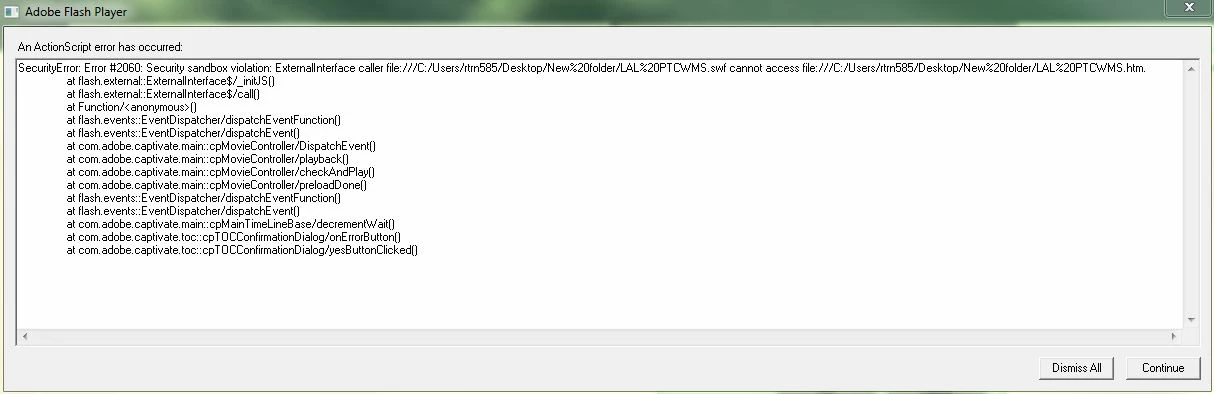
Adobe Flash Player Action Script error #2060 on publish

  • April 8, 2016
  • 3 replies
  • 373 views

Just published to my desktop and when attempting to view I keep getting this action script error.  Happens across multiple computers within the organization.  Any ideas?
    This topic has been closed for replies.

    3 replies

    BDuckWorks
    Inspiring
    April 11, 2016

    The best practice would be to share these files via a webserver or LMS hosted for your organization.

    Publishing the file locally to your desktop builds a zip package, or an unzipped folder, that lets you view the files locally. If you view them with "file:///C:/Users/rtrn585/..." in the path it triggers issues with flash global security that your users won't experience if the same files are loaded to a webserver or LMS.

    (Note that it is also possible, but unlikely, that you linked directly to a file on your desktop using a hardcoded url, rather than importing the file into the Captivate library and dragging it onto the Cp stage. In that case, the error is generated as the users can't see the file that you can, as your machine has access to your users folder.

    This doesn't appear to be the case, as you saw the error on your computer as well as others, but it is a possiblity.)

    HimanshuSatija
    Adobe Employee
    Adobe Employee
    April 8, 2016

    Hello,

    Welcome to Adobe Forums !

    You may try to add the flash file in trusted location using the link below .

    http://www.infosemantics.com.au/adobe-captivate-troubleshooting/how-to-set-up-flash-global-security

    Along with that Could you please confirm the version of Captivate and Flash player installed on your computer.

    Along with that please try to switch the browser and try to play the content in Chrome or any other browser.

    Regards

    Himanshu

    RodWard
    Community Expert
    Community Expert
    April 8, 2016

    Have you set up this folder as a trusted location in your Flash Global Security settings?

    LALumley
    LALumleyAuthor
    Known Participant
    April 8, 2016

    That I have not, Where exactly would I do that at?  This is just a folder I published to the desktop.