October 24, 2012
Frage

Advanced Action - Toggle on and off Audio

  • October 24, 2012
  • 1 Antwort
  • 1534 Ansichten

Hello,

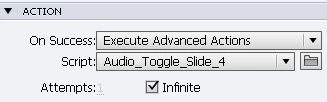
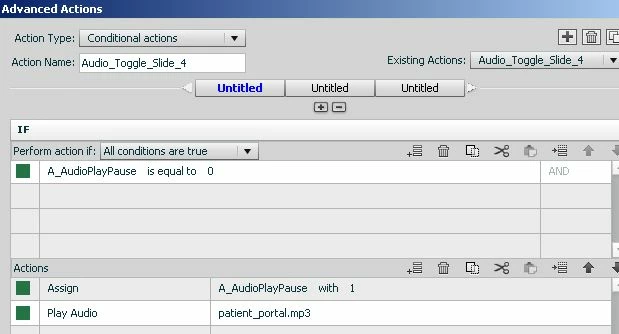
I have added smart shapes into my project on each slide with an advanced action that when clicked plays audio and when clicked again stops the audio.  If the learner clicks to listen to the audio but does not click to turn the audio OFF and progresses to the next slide they have to click the audio button twice on the next slide to start the audio.  I understand why this happens –this button uses a user variable, if you click on the audio button to listen and then click to the next slide without turning the audio off the variable essentially keeps the value of ‘1’ (thus meaning captivate still thinks the audio is playing).  So when you click on the audio button on the next slide it essentially turns off the audio (value of ‘0’)  and then you have to click to start the audio (back to a value of 1). 

Does anybody know if there is a way around this?  I have attached some images:
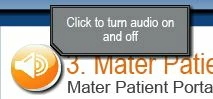
Any help with this would greatly be appreciated

ali

    Dieses Thema wurde für Antworten geschlossen.

    1 Antwort

    Lilybiri
    Legend
    October 24, 2012

    Why do you not assign an action 'Stop Triggered Audio' on entering each slide? If the audio is no longer playing, this will do nothing, but if it is still playing it will be stopped. The audio button itself can then be used.

    BTW: I blogged recently with some scenarios to toggle audio, not with the Play/Stop statements, but using the system variable cpCmndMute. Contrary to the Stop Triggered Audio this will stop all audio, not only the ones that have been started by using Play Audio, but it will pause audio and restart.

    http://lilybiri.posterous.com/toggle-shape-buttons

    Lilybiri

    October 24, 2012

    Hello Lilybiri,

    Thankyou very much for your help I greatly appreciate it, and the blog is very helpful. 

    As my audio is attached to the smart button and your suggesstion of stopping triggered audio on slide enter helped me realise that I should have put the Audio play pause with '0' on slide enter.  Simple and it has fixed the problem and I can't believe I did not think of it.

    Thanks again

    ali