



Copy link to clipboard
Copied
When exporting to AICC format, captivate doesnt seem to be giving me all the files I need. My LMS vendor tells me they need files in addition to what I am posting. Im only getting flash, one html and one javascript file. In SCORM I get all the required file (lmsmanifest etc) but not AICC.
I've run this by the Adobe team, but again they have failed to respond to my issue.
Can anyone assist?
Cheers


 1 Correct answer

Captivate 😉 Generally speaking, you are expected to create them yourself.
They are fairly simple ini-format files.
The good news is that, even though Captivate does not provid ethe files,
Adobe has seen fit to remedy that on theor developer center. Check out this
link
http://www.adobe.com/devnet/captivate/articles/output_aicc_print.html
There are smaple files and full instructions that should get you up and
running.
S...

 10
Replies
10
10
Replies
10

Copy link to clipboard
Copied
> When exporting to AICC format, captivate doesnt seem to be giving me all
> the
> files I need. My LMS vendor tells me they need files in addition to what I
> am
> posting. Im only getting flash, one html and one javascript file. In
> SCORM I
> get all the required file (lmsmanifest etc) but not AICC.
>
> I've run this by the Adobe team, but again they have failed to respond to
> my
> issue.
>
> Can anyone assist?
Are you talking about the ini files: CRS, CST ,DES, AU ?
Steve
--
Adobe Community Expert: eLearning, Mobile and Devices
My blog - http://stevehoward.blogspot.com/
Copy link to clipboard
Copied
Yes - they're the ones!
Thanks,
Dean
Copy link to clipboard
Copied
Captivate 😉 Generally speaking, you are expected to create them yourself.
They are fairly simple ini-format files.
The good news is that, even though Captivate does not provid ethe files,
Adobe has seen fit to remedy that on theor developer center. Check out this
link
http://www.adobe.com/devnet/captivate/articles/output_aicc_print.html
There are smaple files and full instructions that should get you up and
running.
Steve
--
Adobe Community Expert: eLearning, Mobile and Devices
My blog - http://stevehoward.blogspot.com/

Copy link to clipboard
Copied
Hello,
10 year later, we're experiencing the same issue:) I've tried the link above to get the files, but got an error page. Can you provide an updated link or the files?
Regards,
Maryam


Copy link to clipboard
Copied
If you are publishing a Captivate course from a recent version of Captivate (e.g. 2019) to AICC format those CRS, CST , DES and AU files should already be present in the final HTML5 output.
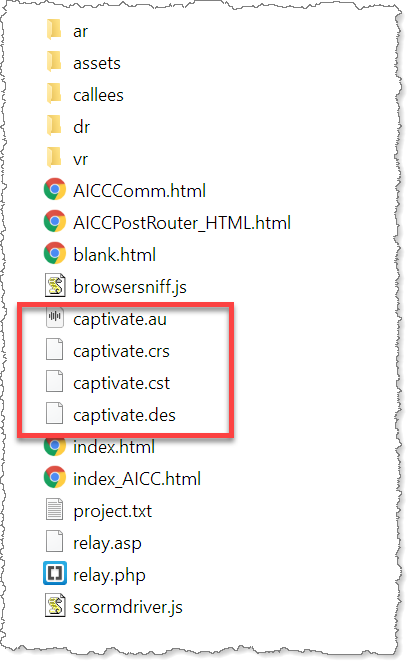
So, if you DO NOT see these files in the output, what version are you publishing with and what output format are you publishing to?

Copy link to clipboard
Copied
The above referenced files are in the output. I am using Captivate 2019 and publishing AICC.
Copy link to clipboard
Copied
Rod,
I appreciate your reply and support. As Michele mentioned, we get these files, but the LMS doesn't mark the completion and shows in progress. When I compare the Storyline output with Captivate, I see Articulate uses: var VERSION = "7.7.0"; and Captivate 2019 uses var VERSION="6.0.0". not sure if this is related or not since I don't have a coding background.
Maryam
Copy link to clipboard
Copied
If you need to debug this further, I think you need to contact your LMS vendor and ask that they provide you with some technical assistance. They should have log files from the session when your module is run. Those log files should indicate WHAT is failing and hopefully WHY it is failing.
As has been noted many times, if you upload Captivate's content (AICC or SCORM) to SCORM Cloud or another LMS of that quality, you don't usually find anything wrong with it.
99 times out of 100 these types of issues tend to be a problem with the LMS, NOT with the content.
Copy link to clipboard
Copied
Thanks, Rod. I appreciate your advice.
Copy link to clipboard
Copied
Thanks, Rod.


Get ready! An upgraded Adobe Community experience is coming in January.
Learn more
 AdChoices