Inspiring
January 23, 2017
Answered

Apply effect causes objects to disappear - CP9.02.437

  • January 23, 2017
  • 1 reply
  • 814 views

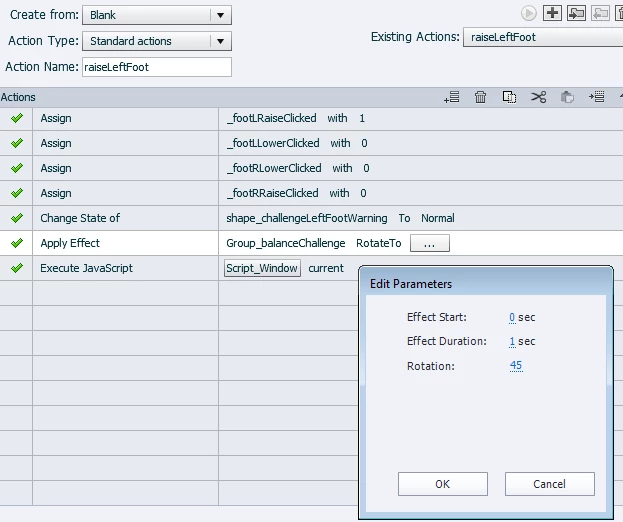
I am trying to rotate an object a certain amount by button click. I created a custom "rotate to" effect and applied it to the object as normal.  I then applied the effect through an advanced action triggered by the button. However, when I try to view in HTML5, the object does not show on the slide. When I remove the effect, the object is again visible. I tried applying other effects on a variety of objects on this slide as a test - anytime I apply any effect to any object on this slide the object disappears.

On other slides I can apply effects to objects and they behave normally.

This slide has quite a bit of javascript on enter and js functions are called through advanced actions as well. The js all behaves normally with and without the effect applied. The problem occurs no matter what order the effect is called vis a vis the javascript call.

The object appears normally when viewed as swf in browser, but I have users with tablets on which flash is not supported.

Any suggestions?

(BTW, the orange box under the balance is normally not visible - it forms a group with the balance to force the balance to rotate around its center foot)
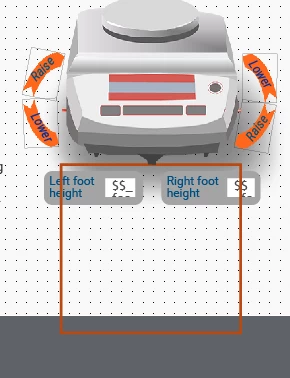
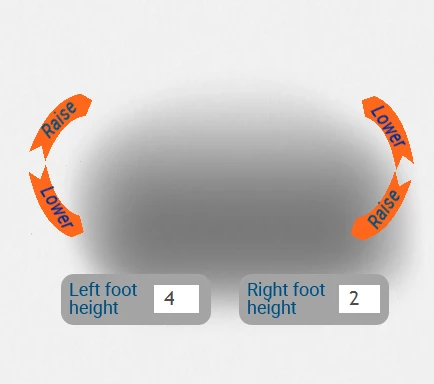
This is what appears (or doesn't appear) on slide entry with the effect applied to the balance object. The numbers in the foot height boxes indicate that the js is running normally. No buttons have been clicked at this point. Clicking the button with the above AA does trigger the js to change the foot height calculation normally.

This topic has been closed for replies.
Correct answer Lilybiri

Interesting idea about different interactions with JS in a slide window as opposed to a separate file. All the JS is in slide-based Execute JS fields. The long function definitions are in On Entry and the short function call is in AA. I tried moving the function definitions to On Entry of a blank slide at the beginning of the course but had the same (bad) results. I'll have to try separating it out into a file.

It would be great if a JS expert could discuss the advantages/disadvantages of using slide JS fields vis a vis separate files - also how to directly access the .show(), .hide() and other functions!


Have a look at TLCMediaDesign's blog. I think he would agree with what I posted here, it is one of his recommendations.

2016 - TLC Media Design, LLC

I don't use JS to show/hide objects, find it much easier to use advanced/shared actions (which will be converted to JS on runtime when published to HTML5). Bit lazy, I know. I only switch to JS when the feature is lacking in Captivate: random numbers, formatting of numbers, arrays...

1 reply

Lilybiri
Legend
January 23, 2017

In the AA I see that you apply the effect to a group, not to an object. Which objects are part of the group?

What is being done with the JS immediately after the Apply effect? Can the effect being done, since it has a duration? I often find it better to use time-based effects and using micro-navigation with the advanced action if the duration is important.

dan561Author
Inspiring
January 24, 2017

Thanks for your questions.

This page is a simulation for adjusting feet on the device to set it to level. The feet can be rotated in either direction at any time to raise or lower a foot. I wanted to have the effect act as fast as possible and with 1 degree rotation per click - that did not work either, so I tried with default settings, then took the screenshot. The grouping is so that the image will appear to rotate around its center foot (the center of the group). Applying the effect to the single ungrouped image also caused it to disappear.

The JS calls the following function:

Which is

and, of course, calls further functions to determine which state of the level indicator image to show based on heights of the adjustable feet and slope/tilt of the table surface. The page also runs a JS timer to calculate elapsed time (game style) and best time.

I attempted to apply other effects (motion path, scale) to other objects on the page and they all disappear from view in HTML. On removing the effect the objects reappear.  I gave up and created lots of states for the balance in various degrees of tilt and now determine which state to show through conditional AA. So much for an elegant "click the button to rotate x degrees" solution.

Other pages in this project have no problem with effects. I tried copying all of the elements to a new page, but got the same bad results. I don't know what is causing the interference on this one and I don't want to rebuild it from scratch.

Lilybiri
Legend
January 24, 2017

I'm not a JS expert at all, but did you post that function in a Captivate JS script window? I suspect that leads to issues (special characters like the // for adding comment as an example). If it is in an external JS file, or even in the index.htm file you can call the function from a JS CP script window when necessary.

If it was done with advanced or shared actions maybe I could help, but you'll have to wait for a real JS expert, I am only doing very simple things with it.