Known Participant
August 23, 2012
Question

Backgrounds with the same name creates a problem

  • August 23, 2012
  • 2 replies
  • 1803 views

Hi there.

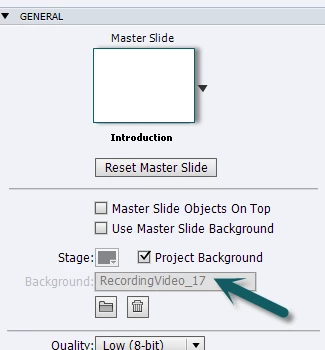
Any idea how you can change the background name shown below?  Its not in the library - is it somehow embedded in the project?  I have two recording slides with the same name so when one plays it merges with the other one.  I looked at their background names and they both have the same, so Im thinking it has something to do with that.  Id rather not have to redo either of them.

All help is much appreciated.

This topic has been closed for replies.

2 replies

Lilybiri
Legend
August 23, 2012

Codys  Girl, as you can see from my question to Priyank, cannot help you because I have been looking for a way as well.

You are right, those videos are not in the Library, they are the result of recording a Video demo in a regular CPTX-file. But I am puzzled that you have two slides with the same name, because normally a second Video demo slide will get another number in the name. Did you perhaps copy/paste from another file?

Lilybiri

Priyank Shrivastava.
Community Manager
Community Manager
August 23, 2012

Hi There,

You cannot change it from here, however you can check this image in Library and just rename it there. It will accept those changes here.

Hope this helps.

Thanks

Priyank

Thanks, Priyank Shrivastava
Known Participant
August 23, 2012

Hi

Thanks for the response.  How can I do that?  Its not showing in the Library for me to change it

Known Participant
August 30, 2012

Priyank, how can those issues being solved, how can we change the generic name. Those video demo slides seem to be the only objects where you cannot edit the name, do not know for which reason.

Lieve


Sorry folks for the radio silence, have been out for a few.  So yes back to the same issue.  I have two slides that play together because I suspect that its because they are both named the same (Recording Video_17).  Neither of these are in the Library, and there is no way to rename the things.  Twiddling around with backgrounds settings doesnt seem to do anything.  Did you manage to figure it out Lieve?  (And in answer to your question I did copy and paste one from another project, but the other one was a new slide, so why it named itself 17 again, dont know ).

Hoping for a magic solution!