
Participant
November 12, 2019
Question

Buttons won't display
  • November 12, 2019
  • 2 replies
  • 3080 views

Not sure the title of this post accurately describes the challenge I am experiencing with a Captivate 2019 project.
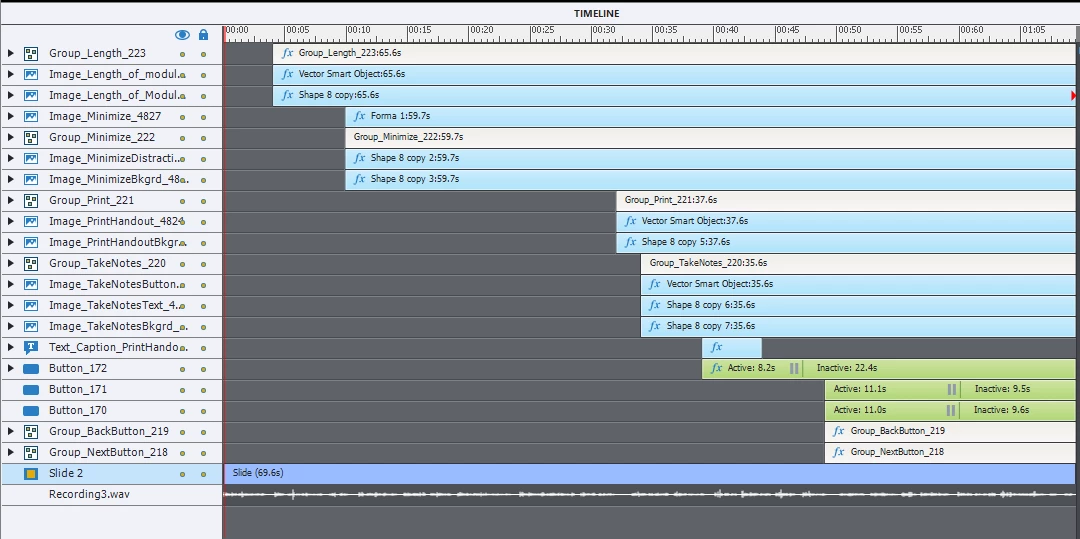
The slide is formatted to display various text in sync with audio narration.  At the conclusion of the audio the Next and Back buttons are displayed however they are not functional i n spite of my trying many things.
Not sure what is interfering with the timeline.  

This topic has been closed for replies.

2 replies

Participant
November 13, 2019

I have read the blog recommended and have read the (entertaining) banter amongst repliers  however . . . 
I still don't know how to fix the Captivate problem with my project.
Can anyone tell me specifically what to do . . . what steps to resolve this.

Maybe I need to change something with button_172 or maybe I am suppose to go the route of javascript.
I am still confused and frustrated.

Stagprime2687219
Legend
November 13, 2019

Pardon - the side exchange.

As Lieve pointed out - your Button_172 has a pause symbol on it that appears prior to the appearance of the two back and next button groups.

That means that someone will need to click on whatever Button_172 is on the stage before that portion of the timeline will continue.

At least that is what one can suggest from the screenshot.

Perhaps you could expand the back and next button groups for us to see that as well or verify the name of those buttons for us?

Participant
November 13, 2019

Lilybiri
Legend
November 12, 2019

If the Next and Back button are Button_171 and Bt_170 they can only appear if the playhead which is paused by button Button_172 is released by that button. Another Timeline issue.  Getting frustrated, when will trainers and books explain the Pausing of the Timeline in a proper way? Not even the certificate training has it embedded.

 Have a look at:

http://blog.lilybiri.com/pausing-captivates-timeline

Stagprime2687219
Legend
November 12, 2019

Would you believe me if I said that I rarely make use of the timeline at all in any of my projects?

Here is a screenshot of a portion of one of my project timelines.

They pretty much all look like this.


Stagprime2687219
Legend
November 13, 2019

Sure, continue the way you like. Lot of developers with Captivate are more visually oriented and in that case pure programming is tough. As I wrote, it is interesting to see multiple solutions for the same goal.  You choose for the first way a while ago, and that makes you missing new features. Not at all to be considered as criticism. 


BTW was already scripting when maybe you were not yet born. Maybe Lectora would have been an eLearning authoring tool which was more suited for your 'mindset'. Thanks to HTML5 output however, JS has replaced AS and that is  great!


I built some stuff with Flash back in the day and had bought some books on ActionScript to try tapping into that program a bit deeper. I would love to someday explore CC Animate and see what can be done with it.


I have heard of the Lectora Suite but never used it.
Only started scripting heavily with Captivate within the last couple years. I'm 46 now so that means I am proof that old dogs really can learn new tricks!