


- Home
- Captivate
- Discussions
- Re: Can I replace all font on a project?
- Re: Can I replace all font on a project?
Can I replace all font on a project?

Copy link to clipboard
Copied
The font is always set to Trebuchet and I have been manually replacing to the font of my choice. It's really tedious.


 5
Replies
5
5
Replies
5


Copy link to clipboard
Copied
Choose, edit, object style manager when you start a project in the future.
If a style is not overridden, you can apply the style by clicking the dropdown symbol next to the text caption name in the properties panel.
Copy link to clipboard
Copied
I just gave that a try, then hit apply after choosing a different font. When I returned to the project the text was still Trebuchet.
Does this mean the style is overridden? I'm working on a responsive project.
Thank you!

Copy link to clipboard
Copied
It will not be a 'unique action' work flow. As David points out: which theme did you use, how are the text styles set up in the Object Style manager, which styles did you use, and which did you override (marked by a + sign in the style field)?
How did you manually 'apply the change'? I hope not on each individual slide? Each theme consists of all used object styles, the master slides and the skin. It is indeed good practice to set up that theme before starting a project, not trying to repair afterwards. You can save a theme as a custom theme.
Copy link to clipboard
Copied
What is a unique action flow? I see a + sign, when I click on it it reads " New State."
Thank you in advance. If you have a recommendation where I can read about all the features, I'd love to hear it.
Copy link to clipboard
Copied
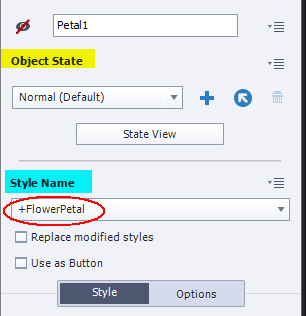
I was not talking about the + button, which adds a state in Captivate 9 to an object, I was talking about a style name that is preceded by a +, which means the default style of that object is overridden.
In this screenshot you see the upper part of the Properties panel of an object. On top is the Object State with that + button you are pointing at. Under that part you see the Style Name field. The default style for this object (Petal1) was FlowerPetal but in this case it is preceded by a +, which means the default style has been overridden, it has been changed for this particular object.
For a responsive project it is even more complicated, because you'll need to define the style for each breakpoint view. I don't know where you can read about that, even most training are just ignoring what I find to be the proper way to set up a project by starting to check the theme and the theme color palette. Each theme has a set of Object styles for all objects, and for each object a default style is set up. For buttons and shapes (that can be used as buttons), that means you have to set up the style for all states, for responsive projects also the styles for each breakpoint used. After setting up the object styles (in the Object Style Manager) you set up the master slides you want to use, which also means for responsive projects to take into account all breakpoints. The last part is setting up the Skin, and then you can save the theme and start the project.


Get ready! An upgraded Adobe Community experience is coming in January.
Learn more
 AdChoices