


- Home
- Captivate
- Discussions
- Re: Can't record in Training Mode, only Demo Mode....
- Re: Can't record in Training Mode, only Demo Mode....
Can't record in Training Mode, only Demo Mode. Please Help!

Copy link to clipboard
Copied
I need to record in Training mode but Captivate is recording in Demo mode. I changed the mode in Preferences to Training and also changed the mode to Training on the box that pops up when I select "Record new Software Simulation". When I play back the recording it's in Demo mode. When I go back to look at the Preferences, the mode has defaulted back to Demo mode. I am using Adobe Captivate 6. Please help. Thank you!


 6
Replies
6
6
Replies
6


Copy link to clipboard
Copied
Common misunderstanding since many versions. Mode in Preferences is only to set up the three modes, not to choose a default mode. That is chosen when
you start recording, I will always recommend to record immediately in the three default modes.

Copy link to clipboard
Copied
Lilybiri, thank you for replying. I have tried your suggestion and selected all 3 check boxes and I get 3 tabs after recording (demo, assessment, and training). When playing back the training, it runs through as if it is a demo......does not give me a chance to type anything in. Could it be something with my settings? Another weird thing that is happening is the text is just popping in the fields and not showing each character being typed in (this is happening in both Demo and Training).
Image 1: Here are the options I chose after going to File>>>Record New Software Simulation

Image 2: I chose the "Settings" box in the picture above and got to the screen below. I choose "Training Simulation" as the Mode and click "Okay". If I immediately go back to "Settings", the mode has changed back to "Demonstration".

Image 3: Here is Captivate after recording in all 3 modes. When I play back the "training", it plays through as if it is a demonstration. It does not give me an opportunity to type any text in myself.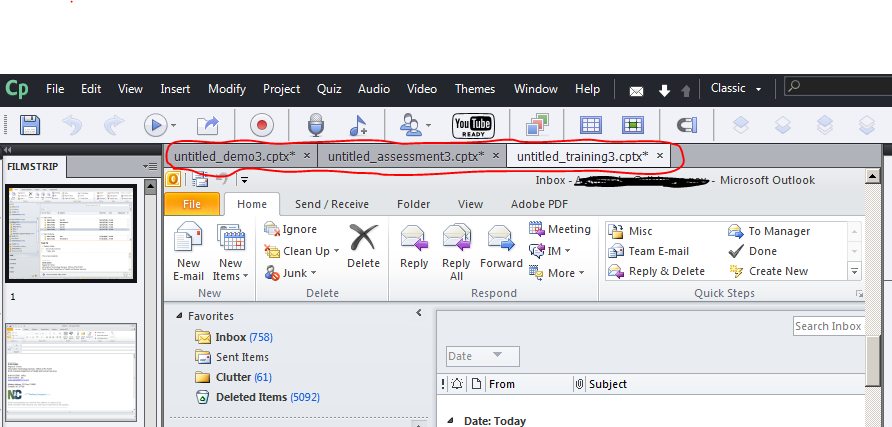
Copy link to clipboard
Copied
You changed the default settings for Training. They should be like this (you can use the button Restore Defaults):
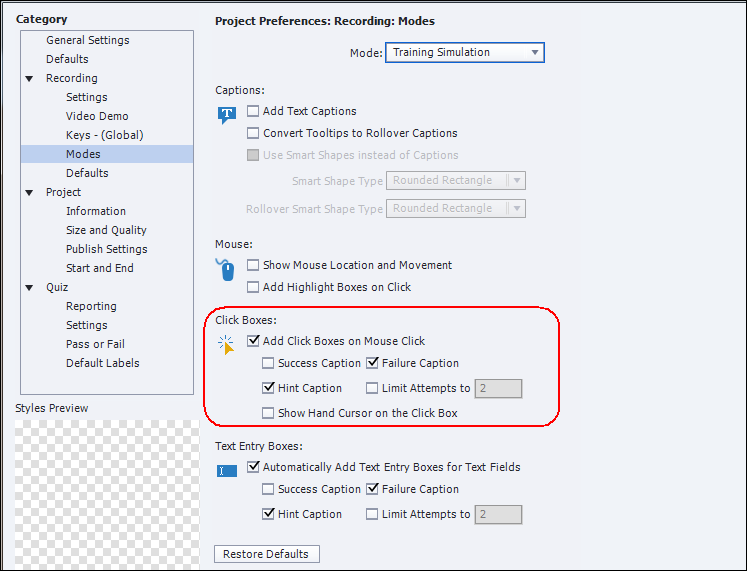
Since you unchecked adding click boxes, there is nothing that pauses each slide, it is normal that everything just runs on. Normally you should get Text Entry Boxes for text typed in, but I heard that there are issues in some versions. Which version are you using?
Indeed, you have three files, one for each mode. That allows you to copy/paste to a new file or to insert some slides in one of the three files.
Copy link to clipboard
Copied
Okay, I fixed the settings back to what you have above. Now it is no longer just running through as a demo when I select the training file. I am using version 6.0. I'm not getting the text entry box to type the text in. The text is just popping in when I click into the field. I'll continue to research and mess around with the settings to try to correct this. If you have any more suggestions, please let me know. Thank you for your help so far!
Copy link to clipboard
Copied
It could be CP6 where those issues existed, not sure. What do you have: a Typing object?

Copy link to clipboard
Copied
Hi there
Just a note about the dialog. Earlier you showed this dialog:
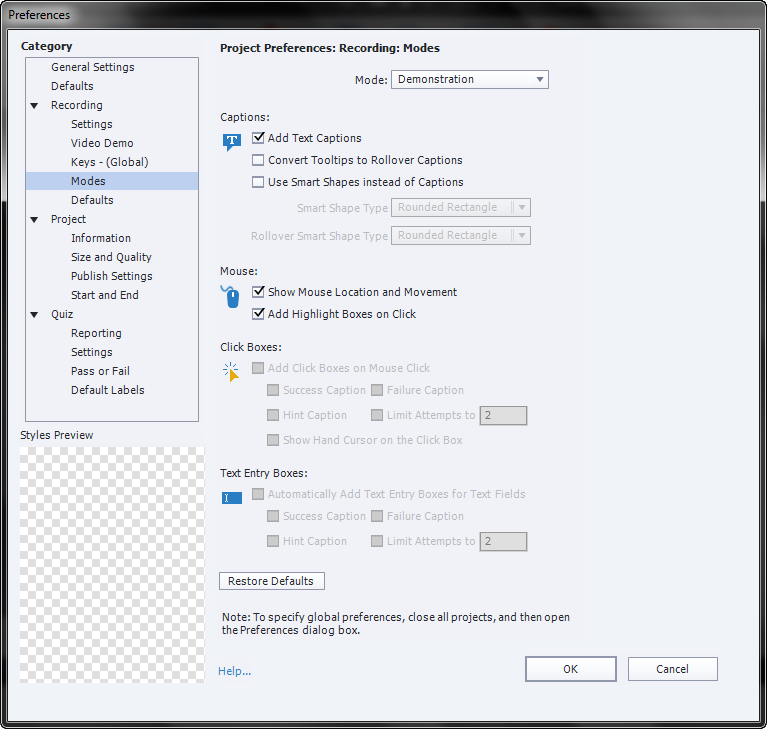
What you said was that even though you changed it from Demonstration to Training Simulation, when you closed it and went back to it, it was "stuck" at Demonstration.
The thing to note is that what you see here is simply what objects are added if you choose that mode in the recording settings:
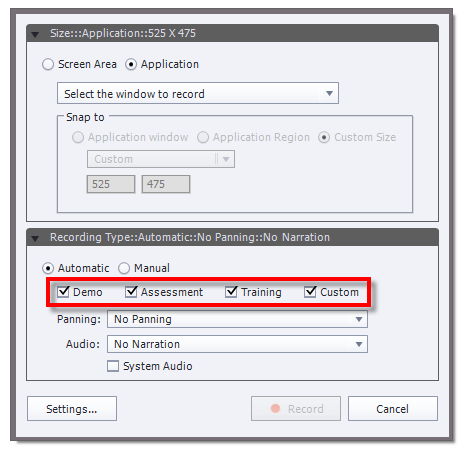
So if you were to choose only Assessment, you would get Click Boxes (with an associated Failure caption) and Text Entry Boxes (with an associated Failure caption).
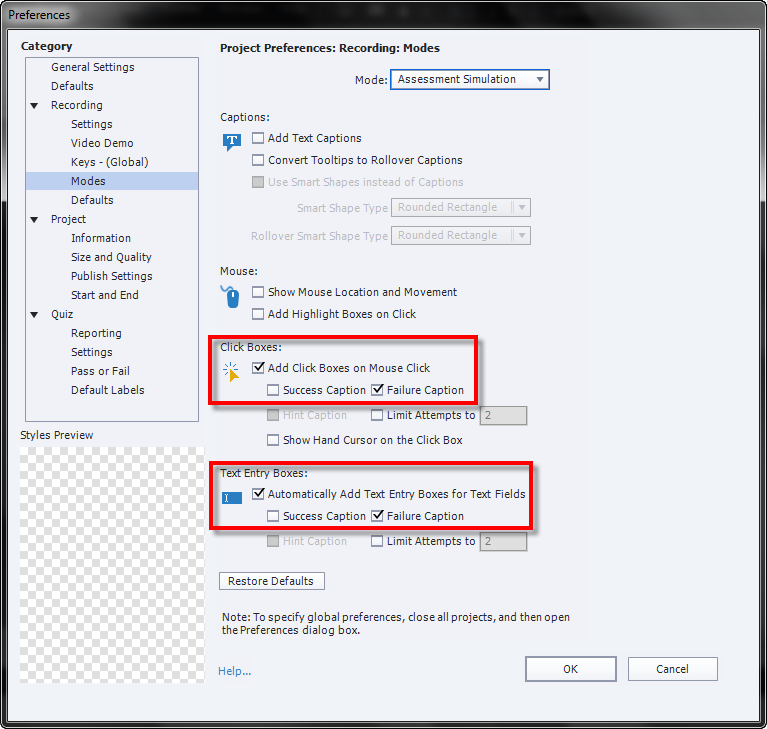
Each time you close the dialog and open it again, it will indeed revert to showing you Demonstration because you don't choose the mode of recording there. All you choose are the settings used if that particular mode of recording has been enabled.
Cheers... Rick 


Get ready! An upgraded Adobe Community experience is coming in January.
Learn more
 AdChoices