
ffami
Known Participant
June 13, 2019
Question

Captivate 11.5.0.476 replaces missing fonts (which are not missing) with Tahoma

  • June 13, 2019
  • 15 replies
  • 10761 views

Hey!

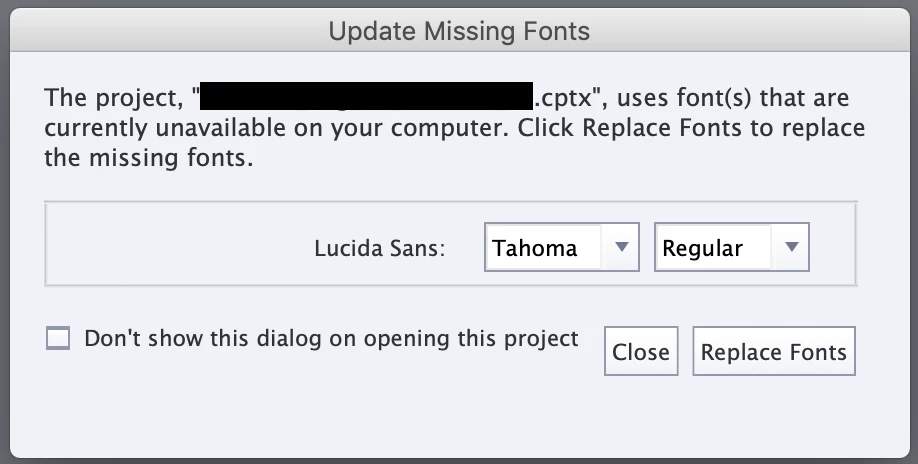
Since the latest update, Captivate is akting me to replace "missing fonts" after opening a project.

The fonts aren't missing, I can see them working fine on the first slide.

It always misses Lucida Sans, which I don't use in my projects.

No matter which font I choose of even if I cancel, every font in my projects will be replaced by Tahoma.

I've tried opening projects with customers corporate fonts and projects which only use Arial, all of them get this message. Unit Pro for example.

The only option I have right now, is to let Captivate replace all of my fonts and put them back to what I used before manually.

After that it won't ask me to replace, but that can't be the way to go? This takes forever

I'm on macOS Mojave 10.14.4.
This topic has been closed for replies.

15 replies

Paul Wilson CTDP
Community Expert
Community Expert
June 21, 2019

I personally would like to see two additional buttons added to this dialog. The first would be a button to take you to Adobe Fonts where you could reconcile the missing font before opening the project. The second would be to close the project without adjusting the font choices. It's important to understand what the two buttons do in this case. Close will apply the default font, while Replace will replace fonts with whatever you selected from the dropdown. Those are not the only two choices that I want.

Paul Wilson, CTDP
Inspiring
June 21, 2019

But what about the Windows/system fonts? I'm missing a fairly large number.

Lilybiri
Legend
June 21, 2019

Before the feature of using Adobe fonts, each Captivate course, in order to be viewed the same way by all learners, could use only the very limited set of Websafe fonts.

For other fonts, if you hare in a non-responsive project with no dynamic text (which is text embedding variables) it didn't matter, because text was converted to images to overcome the limitation to websafe fonts. However that is not the case for fluid boxes projects, nor for dynamic text.

nikkiw92098145
Inspiring
June 19, 2019

I'm having the same issue! Adobe needs to fix the "smart font replacement" feature. I'm receiving the "Update Missing Fonts" dialog for all of my Adobe fonts. I've ensured that I'm signed into my Creative Cloud application and nothing I'm trying works. I think I'm going to go back to the previous version of Captivate.

ShivaniParihar
Adobe Employee
Adobe Employee
June 20, 2019

Hey,

Please make sure that you have enabled all font faces (bold, regular, italic etc.) for the Adobe Fonts used in the project. Please get back to us , if you still see the issue.

Regards,

Shivani

nikkiw92098145
Inspiring
June 20, 2019

Can you please tell me where the option is to enable all font faces?

Inspiring
June 19, 2019

This missing font thing is causing way too many issues. One of my projects says I am missing the Lobster font. So I install the Lobster font, and it overrides my Times New Roman font and then messes with my button rollover states by putting a lock on them and changing the size of the button. Because of the missing font issue, I have rolled back to vers 11.0.1 and most likely won't update to the 11.5 version.

ShivaniParihar
Adobe Employee
Adobe Employee
June 20, 2019

Hey,

We would like to have a call with you, to see the issue and help you with it. Please share your email id and time that would suit you for the call,in messages.

-SHivani

ShivaniParihar
Adobe Employee
Adobe Employee
June 13, 2019

Hey,

When missing fonts are listed, we check for the fonts in Styles in Object Style Manager, Master Slides and  objects. The missing fonts that you are seeing in your project, may not be used for objects, but may be somewhere in styles or Master slides .  In case of “Cancel” , the font fallback will replace the missing font with Tahoma. But if you specifically  choose a font and then click replace fonts. Objects/Styles using Lucida Sans now would have the newly selected font. Please confirm that this is the behavior you are seeing

You can check the “don’t show Again checkbox” and the dialog wouldn’t show for the project again.

Also, If you still have an issue, please share a project with us to look into it.

ffami
ffamiAuthor
Known Participant
June 13, 2019

As I described, every font gets replaced with Tahoma, no matter which one I choose in the window.

And ALL fonts get replaced, not only Lucida Sans, which I do not (knowingly) use anywhere.

I may be able to create a dummy file on the weekend, now I'm busy rolling back to an older version to continue working.

ShivaniParihar
Adobe Employee
Adobe Employee
June 13, 2019

Ok, please share the project with us, as per your convenience.

Lilybiri
Legend
June 13, 2019

Maybe log a bug. I am still trying to explore this feature more in-depth, cannot give you a helpful answer right away.

ffami
ffamiAuthor
Known Participant
June 13, 2019

Thanks, I just did that.

I didn't even know "update missing fonts" was a feature, I never saw it until this update.

RodWard
Community Expert
Community Expert
June 21, 2019

Don't ask me why Adobe did this.  I don't have any part in such decisions.  I'm just a user like yourself.  This is just one of many instances where the Captivate developers were not aware of the way most end users would be affected by implementing a feature that probably looked quite innocent on paper.

Thankfully I always use only web-safe fonts for any of my courses so I got away with minimal disruption this time.


The thing I find really funny about all this is the way this feature is described in the marketing blurb:

There would be quite a few people on this forum who would beg to differ that the feature has "boosted their productivity".