
Captivate 2017/10 Rollover Area limitations on one slide?
Hi,
I am running into strange behavior with CP 2017 that I do not have in CP 9.
I have a 'complex' project with 19 slides, each slide has links to other slides or content in the published folder. Here I am mainly talking about buttons and hyperlinks.
My problem starts with one slide that I link to that has a lot of items on the timeline , 20 Click Boxes beneath 20 Rollover Captions, and another 42 hyperlinks on text and a couple of buttons. All in all the scene has the timeline has 47 items on it:
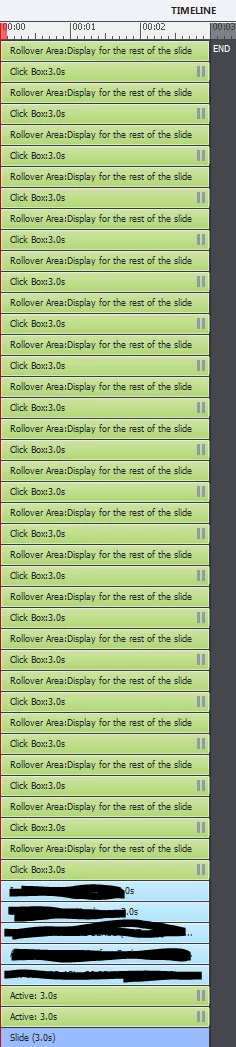
When I publish the project and click on one of the links that lead me to this 'complex' slide there is no response - The slide does not open.
With CP 9 this was not an issue.
I started to troubleshoot this behavior and found that if I reduce the number of items
1) delete the all Click Boxes, publish and click on the link to this 'complex' slide - The slide does not open 
2) delete the all Rollover Areas, publish and click on the link to this 'complex' slide - The slide opens 
3) delete Rollover areas one by one, to then publish for each time and test the link to the 'complex' slide - when there were 8 Rollover Areas left over the slide opens
I now conclude that there is a limitation in the number of Rollover Areas on one slide since Captivate 2017.
Is this correct? and if so Why?
Is there any way that I can proceed with my 20 Rollover Areas on one slide that I link to?
I really appreciate your input.
Looking forward to your ideas and help.
Thanks
Stephanie


 AdChoices