Participant
October 16, 2023
Question

Captivate 2019 Version Won't Let Me Retake Quiz

  • October 16, 2023
  • 1 reply
  • 2036 views

I am using the latest version of Captivate (2019) and am using KnowBe4 as my LMS. I've created a training module with a 5 question quiz at the end. When I did a test run in KnowBe4, everything was working great until I did a test run on the quiz and purposely failed to see how it would direct me. My issue is that when I fail the quiz, it does not allow me to retake it. Even if I don't review the answers and just close out, it does not let me retake it. Is there something I'm doing wrong?


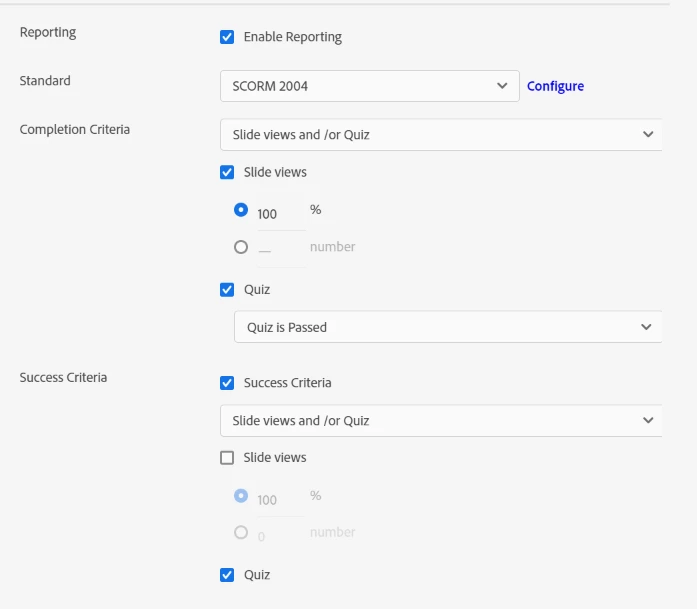
I have my quiz preferences set as follows:
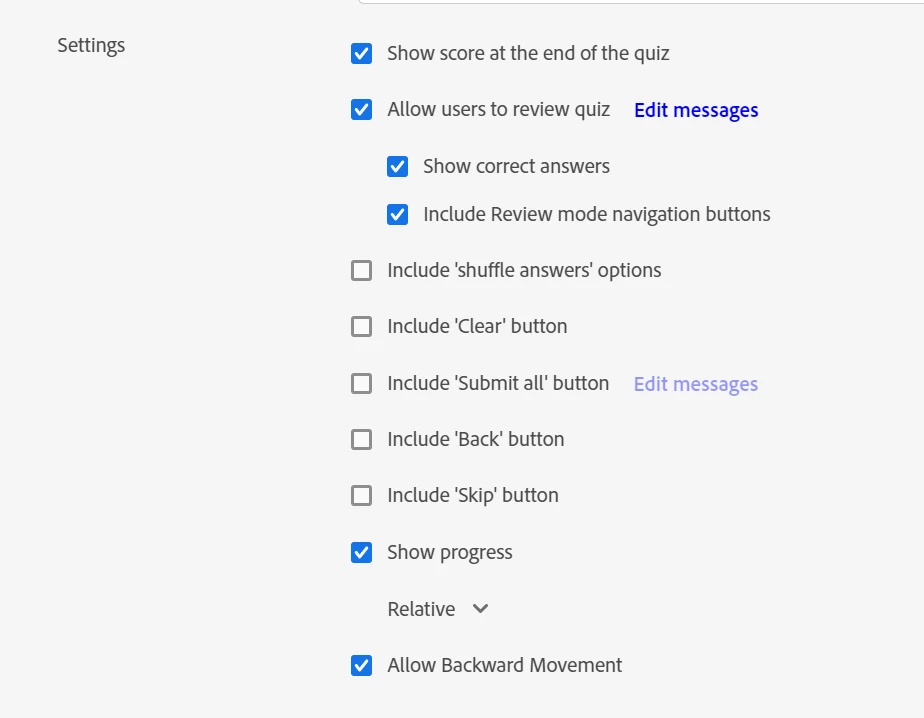


I would like users to be able to retake the quiz as many times as it takes for them to pass it. Currently, when I fail the quiz in KnowBe4, it doesn't show the module as completed. Instead, it has a "resume" button, but when I click it, it just takes me back to the quiz results page with no option to start the quiz or module over.


    This topic has been closed for replies.

    1 reply

    RodWard
    Community Expert
    Community Expert
    October 17, 2023

    It appears your LMS is currently set up so that it will only mark the module completed when it does see a passing score. If you want users to be able to retake the quiz indefinitely until they pass I would suggest you change the settings inside the Captivate module to allow that to happen.  


    In Captivate, go to Quiz > Settings > Pass or Fail and check the box option for Infinite Attempts.  Then select the Show Retake Button option that appears.  This will give you a Retake Quiz button on the Quiz Results slide.  With Infinite Attempts allowed now your learner will be able to do the quiz as many times as required until they achieve a passing score. 


    Their module will be bookmarked (as before) but when they resume the module and return to the Quiz Results page it will allow them to click the retake button for another attempt.  Once they achieve a passing score the Retake Quiz button no longer appears and they should then find their module is marked completed in the LMS.


    However, to ensure they do not click the Continue button OR the Review Quiz buttons on the Quiz Results slide, I usually place the Retake Quiz button over the top of the other two buttons.

    Participant
    May 1, 2024

    "Hi RodWard, We are using EasyLlama for our LMS training, and I am facing an issue with a quiz that I created. One of the users did not pass the quiz, so they selected the option to review the answers before retaking it. However, after reviewing the answers, the "Retake" option disappeared. What do I need to do so the employees can retake the quiz? I checked, and I have selected "Infinite attempts." Thanks!

    Participant
    July 29, 2024

    As usual, Lilybiri is quite correct.  Just wanted to confirm what she said.


    Greetings,  I have two questions:

    1)  I am using Classic Captivate and Moodle LMS (v 3.9.3) and would like to know how to require learners to re-take Quizzes when they score below 80%.  I've attached a screenshot of my quiz settings. 

    2)  How do I activate/turn on closed captioning for my projects without typing the content from each slide?  I tried copying the audio via audio>edit>closed caption>placing pin head at start of the audio and copying>click "+" then paste but it doesn't allow me to copy.

    Thank you very much for your help!