May 20, 2013
Answered

Captivate 6 error at end of install

  • May 20, 2013
  • 2 replies
  • 1425 views

I’ve just gotten the following error after running Captivate_6_x64_LS12.exe. Not sure what it means or how I should proceed. Will paste in the contents of the error summary below. Any suggestions?
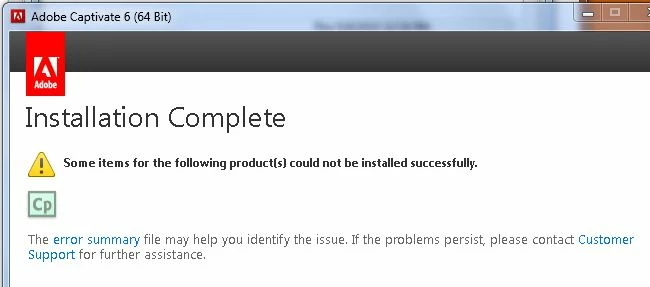
Exit Code: 6

Please see specific errors and warnings below for troubleshooting. For example,  ERROR: DW050 ... WARNING: DF012, DS013 ...

-------------------------------------- Summary --------------------------------------

- 0 fatal error(s), 2 error(s), 4 warning(s)

WARNING: DS013: Payload {7EABC54B-02C3-4DA1-9EB4-974CE7414066} AdobeHelp 3.4.0.0 is already installed and the session payload {D38116C8-C472-4BB0-AD6F-0C1DD1320D1D} AdobeHelp 4.0.0.0 has no upgrade/conflict relationship with it.

WARNING: DS013: Payload {1A1E5FF9-D0FD-42A3-8E18-E5E7E95E1AB4} DynamiclinkSupport 5.5.0.0 is already installed and the session payload {DE88AA40-6766-43D3-A755-8FC374B3D2C3} DynamiclinkSupport 6.0.0.0 has no upgrade/conflict relationship with it.

WARNING: DS013: Checking payloads upgrade/conflict relationships : Failed with code 1

----------- Payload: {9AB0EFC0-AC6B-11E0-9E61-00215AEA26C9} Microsoft Visual C++ 2005 Redistributable Package (x86) 6.0.2900.2180 -----------

ERROR: Failed to install Microsoft Visual C++ 2005 Redistributable Package (x86). Please try installing it by double clicking on the executable at "C:\Users\sucohen\Desktop\Adobe Captivate 6 (64 Bit)\Adobe Captivate 6\payloads\Microsoft VC 2005 Redist (x86)\vcredist_x86.exe", or download and install the latest Microsoft Visual C++ 2005 Redistributable Package (x86) from Microsoft website - www.microsoft.com

----------- Payload: {797DA56D-AF0F-11E1-A68F-84A45F58D2FE} Adobe Captivate 6 (64 Bit) 6.0.0.0 -----------

WARNING: DF012: File/Folder does not exist at C:\Users\sucohen\Desktop\Adobe Captivate 6 (64 Bit)\Adobe Captivate 6\payloads\AdobeCaptivate6_x64-mul\OEM(Seq 6195)

ERROR: DW050: The following payload errors were found during install:

ERROR: DW050:  - Microsoft Visual C++ 2005 Redistributable Package (x86): Install failed

-------------------------------------------------------------------------------------
    This topic has been closed for replies.
    Correct answer Shekhar_Dhiman

    Hi there,

    Welcome to Adobe Community.

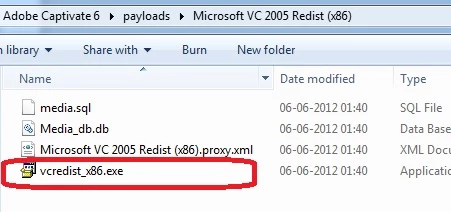
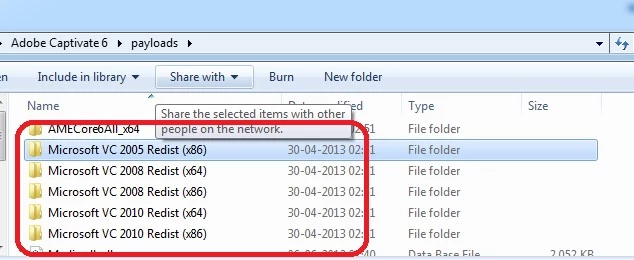
    When you run the Captivate_6_x64_LS12.exe it actually extracts the installation files and put them on your desktop by default. There should be a folder on your desktop named Adobe Captivate 6. Inside that folder you should have a folder named payloads. Go inside the payloads folder and you should see certain Microsoft VC folders. You need to go inside every Microsoft VC folder and run the .exe file. Once you are done with installing all the Microsoft VC files then launch the setup.exe inside the Adobe Captivate 6 folder on your desktop.

    See the screenshots below:

    Hope this helps!

    Thanks!

    2 replies

    Shekhar_Dhiman
    Adobe Employee
    Shekhar_DhimanCorrect answer
    Adobe Employee
    May 21, 2013

    Hi there,

    Welcome to Adobe Community.

    When you run the Captivate_6_x64_LS12.exe it actually extracts the installation files and put them on your desktop by default. There should be a folder on your desktop named Adobe Captivate 6. Inside that folder you should have a folder named payloads. Go inside the payloads folder and you should see certain Microsoft VC folders. You need to go inside every Microsoft VC folder and run the .exe file. Once you are done with installing all the Microsoft VC files then launch the setup.exe inside the Adobe Captivate 6 folder on your desktop.

    See the screenshots below:

    Hope this helps!

    Thanks!

    May 28, 2013

    Thank you so much for the reply! I'm not seeing the Adobe Captivate 6 folder on my desktop at the moment so I think I'm going to uninstall the whole deal and start over to see if I can locate the payload files.

    I don't know that it makes any difference but I'm running a .exe from files downloaded from our company's software vendor. There are a bunch of files, though the girl already using this software told me to only run "Captivate_6_x64_LS12.exe". Would appreciate any suggestions on that if any of those files look familiar to you.

    May 29, 2013

    Update: Just uninstalled completely and reinstalled using the instructions from Shekhar_Dhiman and all appears to be normal. Many thanks!!

    Jeffrey_A_Wright
    Community Manager
    Community Manager
    May 20, 2013

    Moving this discussion to the Captivate forum.