
matthewm86786765
Inspiring
September 2, 2016
Answered

Captivate 7 Quiz Slides

  • September 2, 2016
  • 2 replies
  • 850 views

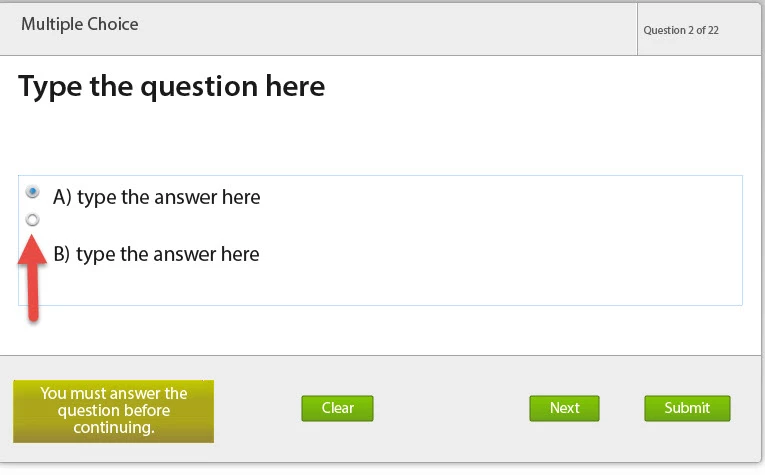
Has anyone else experienced issues with the radio buttons not aligning to the answer choice text? Anytime I create a new question slide this happens. I have to create 3 or more radio buttons to delete choice B. I create projects at 800x600. Any solutions to this issue?

m
This topic has been closed for replies.
Correct answer Lilybiri

I like to keep all projects with same font type, object placement for the most part, and also have other important info added in that is used, such as legal info and other.


Most can be done with themes. Even info could be put on a master slide.

2 replies

BDuckWorks
Inspiring
September 9, 2016

Did you happen to cut and paste the text from Word?

You're likely to add hidden characters any where in Captivate, my advice has been to avoid copy and paste directly from word.

I'm now in the habit of pasting a file of text into a simple text editor, and copy and paste from that.

matthewm86786765
Inspiring
September 9, 2016

The radio button alignment issue happens before text is added, happens right when the slide is created. I created a new project with the same theme and created new master slides too. The issue is resolved. Thanks.

Paul Wilson CTDP
Community Expert
Community Expert
September 3, 2016

I have encountered something like this before, but I don't know for sure if this is what you are experiencing. I believe it's happened when I've resized the answer caption box. I usually resize my answers if I have more than one line of text. When this happens I change the alignment from middle aligned to top aligned and that seems to solve my problem.

Paul Wilson, CTDP
matthewm86786765
Inspiring
September 6, 2016

This problem happens right after I add the slide, so the answer caption box size in not changed.

Lilybiri
Legend
September 6, 2016

Which version of 7 are you using? I just fired up 7.0.1.237, remember vaguely seeing issues like that but it is a couple of year ago. Which theme do you use, it looks to be the White? Is it a custom theme, and if yes, was it created in CP7?