
Inspiring
July 16, 2014
Answered

Captivate 8: Edge Inspect not finding devices

  • July 16, 2014
  • 1 reply
  • 1328 views

Using Windows desktop computer running Windows 7 Ultimate and Captivate 8 and trying to preview in Edge Inspect. I have a MacBook Pro laptop booted to the Mac OS, and an iPhone, that are connected to my network. I know they are connected to my network because I'm able to browse and receive email on those devices.

The Edge Inspect plug in is installed in Chrome, but when I click the Edge Inspect icon in Chrome, I get a "Waiting for a connection..." message that never goes away, and the MacBook Pro and iPhone devices never appear.
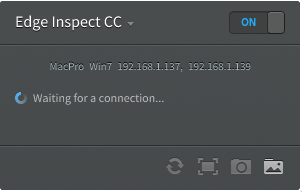
There must be a place to specify which devices I want to preview. What do I need to do to preview at least my iPhone in Edge Inspect? (Once I know how to do that, I also want to preview the project on my iPad.)

    This topic has been closed for replies.
    Correct answer jay fresno

    I found a setting to turn off syncing, so that is no longer a problem.

    However, even when I connect my iPhone directly to my computer, I get the same "Waiting for a connection" message when trying to preview in Edge Inspect. The message never goes away and the iPhone is not recognized.

    I hope someone can help me.


    I watched the Dr. Pooja video where she explains how to use Edge Inspect. Her instructions were at such a high level and lacking important details it made me wonder if she has ever used Edge Inspect with Captivate herself.

    I finally found this

    Adobe® Edge Inspect Installation Guide

    which explains in detail what needs to be done.

    After following the instructions in the Edge Inspect Installation Guide, I was finally able to view my Captivate project on my iPhone.

    1 reply

    Lilybiri
    Legend
    July 16, 2014

    I cannot really help because I'm on Windows, but always have to connect manually. However I don't know the way on Mac. Manual connecting works fine for me: tried on a Android HTC One phone, on a Nexus tablet and on a mini iPad.

    Inspiring
    July 16, 2014

    Thanks for your input, Lilybiri.

    I prefer not to connect manually because I have a lot of music on my iPhone which is not synced to my desktop computer, and don't want to sync it.

    I hope someone has another solution to offer.

    Lilybiri
    Legend
    July 16, 2014

    Why should a connection to Edge Inspect do anything with your music? I don't understand, have a lot of files myself on devices that are not synced. Edge Inspect connect is only used to display your responsive project in CP on devices without having to publish them. Maybe I miss something but I don't understand your last answer at all.