


Captivate 9 custom progress bar

Copy link to clipboard
Copied
Hi. Is there a tutorial for creating a visual progress bar for the entire course using CP9? Or can you tell me how to create one? I only want a visual, no navigation scrubber. I do NOT want to use the native playbar because it's not 100% 508 compliant.


 20
Replies
20
20
Replies
20


Copy link to clipboard
Copied
Did you try using states of one object? How does it have to look?
Copy link to clipboard
Copied
H!, Lilybiri.
I don't know what that means. LOL. I need it to look like the native progress bar, but I do not want it to scrub. I created a very simple one for each slide. It's an image behind a mask that animates on a motion path as the slide plays. But instead I need one for the whole course of 72 slides.

Copy link to clipboard
Copied
Alternatively, if I could disable scrubbing and the TOC button on the captivate playbar that would do nicely. I recently tried this. But it didn't work.
Controlling Captivate - Disable Scrubber - TLC Media Design, LLC
Copy link to clipboard
Copied
Sorry, Sherry, but I'm in a different timezone.
To disable the scrubbing of the progress bar, personally I would use the CpExtra widget by InfoSemantics, but it is not free. You can download a trial version, it has so many features that it is really worth its price. Google for it.
It is pretty easy to create a progress indicator for the whole course, but not with an moving bar as you showed in the bar for a slide. You cannot have a motion path effect for the total course. With states you can have a static object added On Enter for each slide, making the bar see longer but it will not be moving while the playhead is moving. I'm sure it is possible with a HTML animation displayed for the rest of the project, but ignore if that is in your skills set?

Copy link to clipboard
Copied
That is an older post for CP7. It still works for SWF but for HTML5 there is a different method. You can add the following script to the head section of the index.html just below the first <script> tag
window.addEventListener( 'moduleReadyEvent', function ( e )
{
interfaceObj = e.Data;
eventEmitterObj = interfaceObj.getEventEmitter();
//hide the playbar slider thmb and disable clicking on the playbar
document.getElementById( 'playbarSliderThumb' ).style.visibility = 'hidden';
var cvs = document.getElementById( 'playbarSlider' );
cvs.style.pointerEvents = 'none';//chrome fix
var ctx = cvs.getContext( '2d' ).canvas.disabled = true;//IE fix
}

Copy link to clipboard
Copied
Personally, I have always been a big fan of starting with a complete blank slate and building my own navigation within Captivate and removing the native controls. I do this by going into the Skin Editor and disabling the playback controls. (The screenshot below is from Captivate 8)
I have then made other visual progress indicators as previously mentioned by creating the "meter" in multiple states and displaying the appropriate one at the right slide.

Hopefully that was helpful.
Copy link to clipboard
Copied
Do you have a custom moving bar as the OP wants in your customized setup? I never use the default playbar personally, always choose for custom navigation but the question was about the progress bar, correct?
Want to add: if you uncheck the playbar, don't forget also to uncheck the borders (or at least reduce the default size of the bottom border) in the second tab of the Skin editor dialog box.
Copy link to clipboard
Copied
True about the bottom border. 
No, I do not have any sort of animated progress indicator. I just thought it may help to eliminate the ability to scrub by not showing those controls.
As it relates to 508 compliance - Does the progress indicator have to move in real time to meet this requirement as opposed to static images? If not, the multi-state solution is a very flexible way to go since you can create it to look like many things.
Examples could be pieces of a pizza, a fuel gauge, or for the military screenshot we saw, perhaps the number of rounds in a magazine or something else that fits the theme.
Copy link to clipboard
Copied
My client wants an animated progress bar like the native one. The TOC button on that bar is what isn't 508 compliant. I hate using that bar. Having said that, I was able to disable the scrubber and delete the TOC button. It will work for now. BUT I still need an easily repeatable solution that works without admin access to the Captivate folder. The state idea is confusing. I'd still like to see a sample and know how to make that work.
I am using custom navigation for all other functions.
Copy link to clipboard
Copied
Screenshot with a quickly assembled static progress bar:
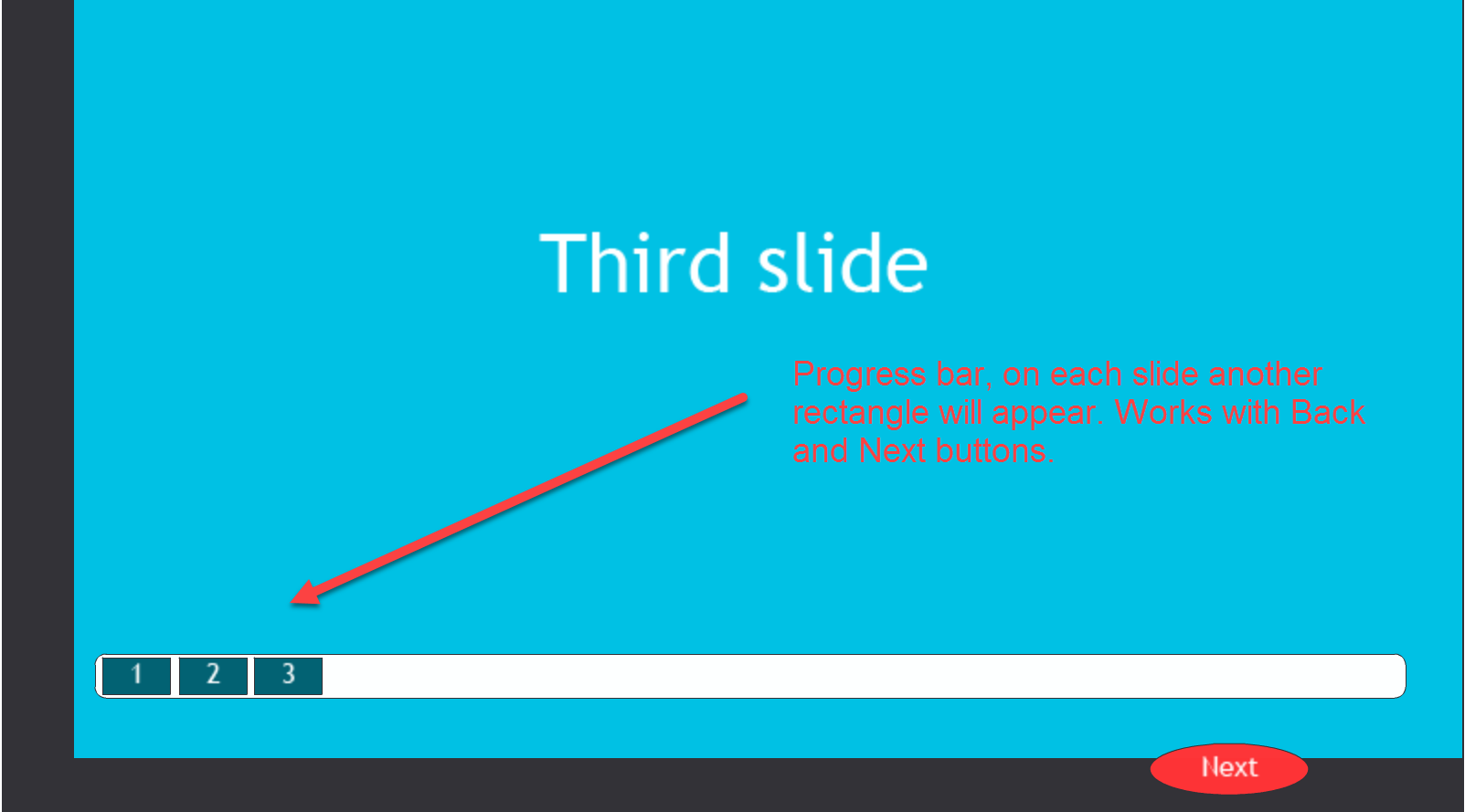
Effects cannot be used on states, that is the problem to make this animated.
Copy link to clipboard
Copied
Thanks! Do you have a link to a tutorial? Can it be made to look somewhat animated?
Copy link to clipboard
Copied
No animation. When applying an effect it will always apply to the first state. If I find a workaround without JS, will first post it on my blog.
No tutorial at this moment (bit fed up with my ideas often being stolen on the forums).
Copy link to clipboard
Copied
This video - if it shows - is a quick example of a homemade progress indicator that changes.
Does it appear animated enough for your purposes? Granted they are 20% jumps for the sake of brevity.
Copy link to clipboard
Copied
I'm sorry people are not giving you credit. I'll keep hunting.
Copy link to clipboard
Copied
Don't worry, I like to help users and spend many hours doing so. In Europe copyright is protected, seems not to be the case everywhere.
Copy link to clipboard
Copied
While trying to mark an answer helpful, I marked it correct. I can't unmark it either. This is not yet answered. But, you're all being very helpful. Thank you!
Copy link to clipboard
Copied
There is no correct answer marked, just checked if I had to unmark it (am moderator).
The approach in the video is similar to mine, but not sure it is done with states, and if it will work when using a Back button.
Copy link to clipboard
Copied
Seems to be a common request and easily achievable in Articulate. Hopefully will be an option out soon in an update that allows "disable progress bar" but keeps it visible. Articulate call it "Read only"


Copy link to clipboard
Copied
If you are publishing to HTML5 from Captivate, disabling user interaction with the progress bar can easily be achieved using the CpExtra HTML5 widget from Infosemantics:

Copy link to clipboard
Copied
Feel free to move to more appropriate thread. See image below. Just under USMC sits a progress bar, visible through image. As
the user navigates from slide to slide, the progress is visible through the letters. What I need is to create this bar, literally just a colored rectangle, that I can get to change in response to user progress. They're not concerned with actions like if user hits Back key...just a rough approximation of how much work remains. These no. of slides is not overwhelming but can get upwards of 40-50 at times. The progress bar will need to be a fixed size as the image overlaying it is fixed. I see your idea of a multi-state approach but I'd have to have upwards of 50 states, correct? I suppose we could set up in blocks of say 10% progress, where user jumps state from 10% image to 20% image when the calculation says user has visited the # of slides corresponding to 20% for that module. Am I barking up the right tree here? I've seen a few such examples in this and other blogs...could cobble it together if you all think it's the way to go. Would love it if anyone has tackled this progress bar in similar fashion....Thanks!


Get ready! An upgraded Adobe Community experience is coming in January.
Learn more
 AdChoices