
Exit
  • Global community
    • Language:
      • Deutsch
      • English
      • Español
      • Français
      • Português
  • 日本語コミュニティ
  • 한국 커뮤니티
0

Captivate 9 - How to enable automatic slide advancement?

Community Beginner ,
Jan 14, 2016 Jan 14, 2016

Hi,

In Captivate 9 I see that the slide advancement happens only when you click Forward in the playbar. I want some slides to advance automatically. Any clue how that can be done?


TOPICS
Getting started
5.6K
Translate
Report
Community guidelines
Be kind and respectful, give credit to the original source of content, and search for duplicates before posting. Learn more
community guidelines
Community Expert ,
Jan 14, 2016 Jan 14, 2016

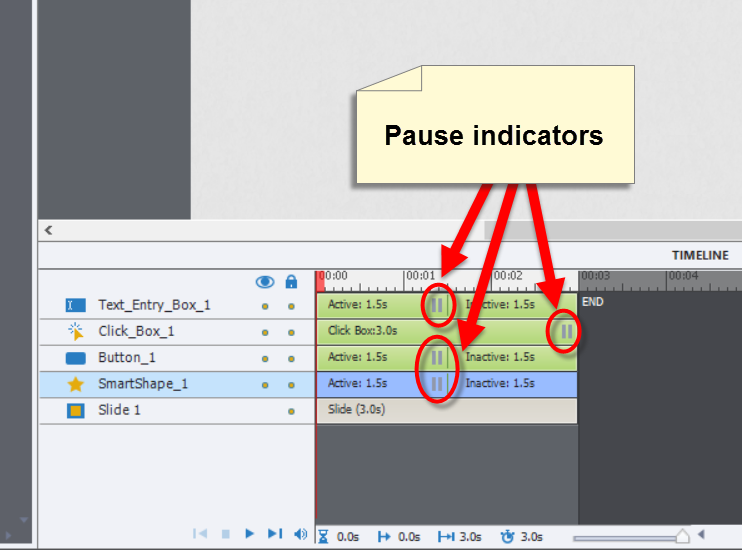
Slides in Captivate will always automatically move forward unless something pauses the timeline.

So if you WANT slides to progress automatically, just make sure nothing is there pausing the timeline.

Translate
Report
Community guidelines
Be kind and respectful, give credit to the original source of content, and search for duplicates before posting. Learn more
community guidelines
LEGEND ,
Jan 14, 2016 Jan 14, 2016

To expound on what Rod said, look for the existence of Click Box, Button, Text Entry Box or Smart Shape objects on your timeline. Normally, something pausing the slide will have a pause indication and look as shown below:
tmp1.png

Cheers... Rick

Translate
Report
Community guidelines
Be kind and respectful, give credit to the original source of content, and search for duplicates before posting. Learn more
community guidelines
Community Beginner ,
Jan 26, 2016 Jan 26, 2016

Thanks for the response. The clickbox was in the master view. I didnt find it in the timeline so posted the query.

Translate
Report
Community guidelines
Be kind and respectful, give credit to the original source of content, and search for duplicates before posting. Learn more
community guidelines
LEGEND ,
Jan 27, 2016 Jan 27, 2016

It is not possible to have a click box on a master slide. The only interactive object that can be used on a master slide is the shape button. Can you explain, please?

Do you mean that you found the solution to your problem?

Translate
Report
Community guidelines
Be kind and respectful, give credit to the original source of content, and search for duplicates before posting. Learn more
community guidelines
Community Beginner ,
Jan 27, 2016 Jan 27, 2016

Yes, it is a shape button not a click box. My bad!

Translate
Report
Community guidelines
Be kind and respectful, give credit to the original source of content, and search for duplicates before posting. Learn more
community guidelines
Community Beginner ,
Mar 25, 2021 Mar 25, 2021

How do you get rid of the pause indicators if they are there?

Translate
Report
Community guidelines
Be kind and respectful, give credit to the original source of content, and search for duplicates before posting. Learn more
community guidelines
LEGEND ,
Mar 25, 2021 Mar 25, 2021

What do you mean?  Have a look at:

http://blog.lilybiri.com/pausing-captivates-timeline


Translate
Report
Community guidelines
Be kind and respectful, give credit to the original source of content, and search for duplicates before posting. Learn more
community guidelines
Community Beginner ,
Mar 25, 2021 Mar 25, 2021
LATEST

Yes - that is what I needed. Thank you!

Translate
Report
Community guidelines
Be kind and respectful, give credit to the original source of content, and search for duplicates before posting. Learn more
community guidelines
Resources
Help resources