
Participating Frequently
February 3, 2017
Question

Captivate 9: quiz passing threshold not "completing" a user

  • February 3, 2017
  • 3 replies
  • 644 views

Hello,

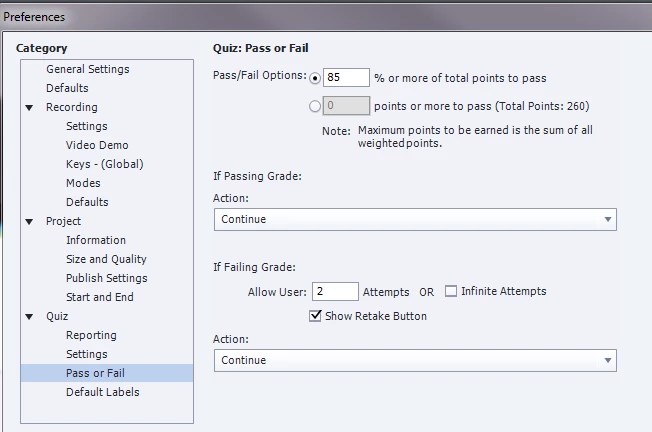
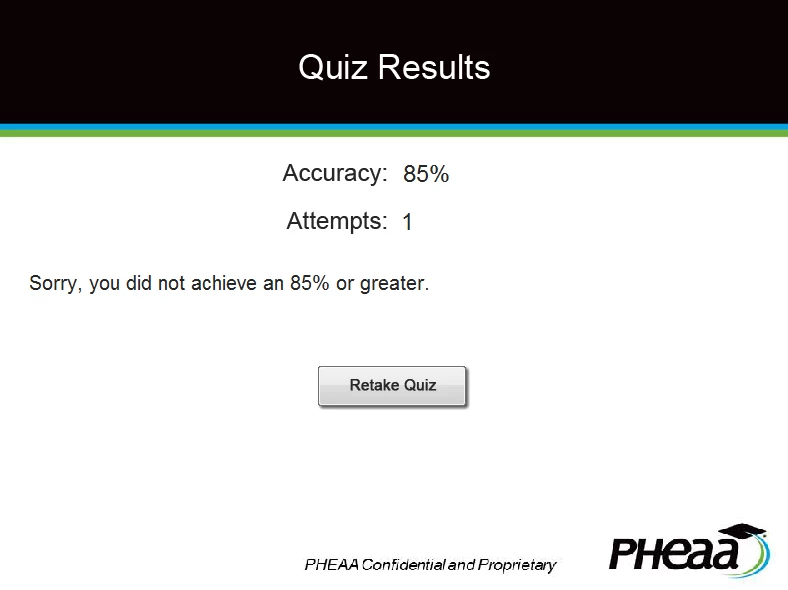
I have a course with 26 assessment questions. The passing percentage in Captivate is set at 85%, so the user is allowed to get 3 wrong.  I tested my course in our LMS and got four answers wrong, then my quiz results slide displayed my custom failure message "Sorry, you did not pass this training assessment with a 85% or higher", however, in the accuracy field it displayed my score as 85%.  I believe Captivate is rounding up because with 22 of 26 correct, the actual score is 84.61%.

Any idea what I should do so this doesn't confuse the learner? Should I set the passing percentage in captivate to 84% as a work-around?
Thanks for your help! If I can get a reply by Monday, this is our deployment date for this course.

-Laura

This topic has been closed for replies.

3 replies

lauraq7Author
Participating Frequently
February 7, 2017

I ended up inserting a variable that say "You got X of 26 questions correct" and in the instructions, I advised they can only get three questions wrong. This seems to work for the time being.

lauraq7Author
Participating Frequently
February 6, 2017

Hi Lilybiri,

Thank you for the quick response, however, it's not working the way I need it to. And, unfortunately, I'm unfamiliar with writing JavaScript so your first recommendation won't work.  Here's what I did:

Total amount of possible points = 260.  The options I tried still do not achieve what I need.  If I change the passing percentage in the quiz settings to 84%, will this not get my desired outcome?  This course needs to be published today, so any quick response would be GREATLY appreciated!


Thanks, Laura

Lilybiri
Legend
February 6, 2017

I would also try to get total score lower, why keep the default score of 10 points per question? Did you try to show the score in points instead of in percentage?

Lilybiri
Legend
February 3, 2017

Yes, CP is rounding  the value in cpInfoPercentage. That variable is displayed in the Feedback message on the score slide.

You could calculate the percentage with an advanced action, and format it using JS (CP has no functionality to indicate the wanted number of decimals). For calculation you can use the system variables cpQuizInfoPointsscored and cpQuizInfoTotalProjectPoints.

Or  you could show them the obtained score instead of the percentage? No actions required, you'll have to delete the default  feedback and create custom feedback messages, including the system variable cpQuizInfoPointsscored. The proper message can be shown using a conditional action On Enter for the score slide, which checks the other Quizzing variable cpQuizInfoPassFail.