
Inspiring
June 2, 2016
Answered

Captivate 9: TOC opening from bottom to top?

  • June 2, 2016
  • 2 replies
  • 1051 views

The standard options to open a TOC offer it sliding from the left or sliding from the right. My customer wants the TOC sliding from the bottom! Because that´s where the button is placed which opens/closes the TOC. I tried with a custom button and "no playbar" settings - which works fine except the sliding effect Maybe there´s an opportunity to solve it with advanced actions or javascript? We´re going to publish a HTML5 only.
This topic has been closed for replies.
Correct answer TLCMediaDesign

I´m not quite sute what you mean with "put in an alert to make sure the TOC is found" ... The TOC ist set to overlay and shows perfectly when I use the small button in the upper left corner (this one comes automatically). An additional button using a single action "Show TOC" works fine as well. But not the button with the Javascript ...

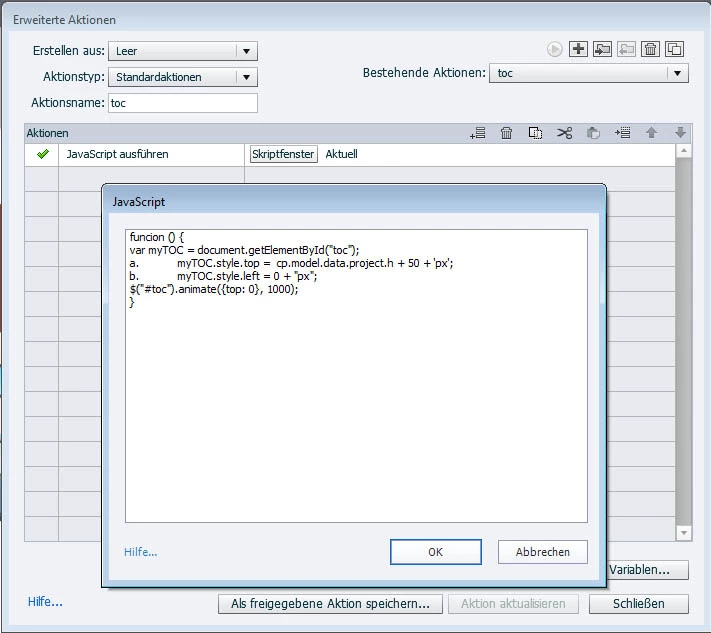
I even tried to make a function form the script. But please take a look here at my settings for the advanced action:

Maybe the place where this should happen is wrong? I can select between "new/parent/this/top" - here it´s set to "this" ("Aktuell")


I just noticed that this forum changed some of the script to bullets! Use this for the open:

var myTOC = document.getElementById("toc");

myTOC.style.top =  cp.model.data.project.h + 50 + 'px';

myTOC.style.left = 0 + "px";                                                       

$("#toc").animate({top: 0}, 1000);

2 replies

Inspiring
June 6, 2016

Sorry for answering late ... but thanks for your hint to the parameters! That´s just what I needed and what I meant with "any further information for me about any things I can change/adjust in this script" :-)

TLCMediaDesign
Inspiring
June 2, 2016

You can do it with a little JavaScript.

You would need to use a custom TOC button. To show the TOC execute this JavaScript:

var myTOC = document.getElementById("toc");

  1. myTOC.style.top =  cp.model.data.project.h + 50 + 'px';
  2. myTOC.style.left = 0 + "px";                                                       

$("#toc").animate({top: 0}, 1000);

to Hide execute JavaScript::

var myTOC = document.getElementById("toc");                                                              

$("#toc").animate({top: cp.model.data.project.h  + 50 }, 1000);

Inspiring
June 3, 2016

Thanks, TLC! I would have never encountered this ... to be honest I´m less than a newbie at JavaScript

But what a pity, this one does not work. Did I do something wrong?? At first I´ve created a custom button, applied the advanced action "Show TOC" and everything works fine - the TOC showing from the left as I checked in the TOC settings. Then I tried to use the advanced action "Execute Javascript" instead of "Show TOC" as you suggested, inserting your code into the script window, but nothing´s happening at all! I´m sure I missed something ...

Can I use the standard TOC or do I have to design an group of custom object which is named ""toc"?

Could you please give me another hint? Thanks!

TLCMediaDesign
TLCMediaDesignCorrect answer
Inspiring
June 3, 2016

I´m not quite sute what you mean with "put in an alert to make sure the TOC is found" ... The TOC ist set to overlay and shows perfectly when I use the small button in the upper left corner (this one comes automatically). An additional button using a single action "Show TOC" works fine as well. But not the button with the Javascript ...

I even tried to make a function form the script. But please take a look here at my settings for the advanced action:

Maybe the place where this should happen is wrong? I can select between "new/parent/this/top" - here it´s set to "this" ("Aktuell")


I just noticed that this forum changed some of the script to bullets! Use this for the open:

var myTOC = document.getElementById("toc");

myTOC.style.top =  cp.model.data.project.h + 50 + 'px';

myTOC.style.left = 0 + "px";                                                       

$("#toc").animate({top: 0}, 1000);