
Inspiring
June 2, 2016
Answered

Captivate 9: TOC opening from bottom to top?

  • June 2, 2016
  • 2 replies
  • 1059 views

The standard options to open a TOC offer it sliding from the left or sliding from the right. My customer wants the TOC sliding from the bottom! Because that´s where the button is placed which opens/closes the TOC. I tried with a custom button and "no playbar" settings - which works fine except the sliding effect Maybe there´s an opportunity to solve it with advanced actions or javascript? We´re going to publish a HTML5 only.
This topic has been closed for replies.
Correct answer TLCMediaDesign

I´m not quite sute what you mean with "put in an alert to make sure the TOC is found" ... The TOC ist set to overlay and shows perfectly when I use the small button in the upper left corner (this one comes automatically). An additional button using a single action "Show TOC" works fine as well. But not the button with the Javascript ...

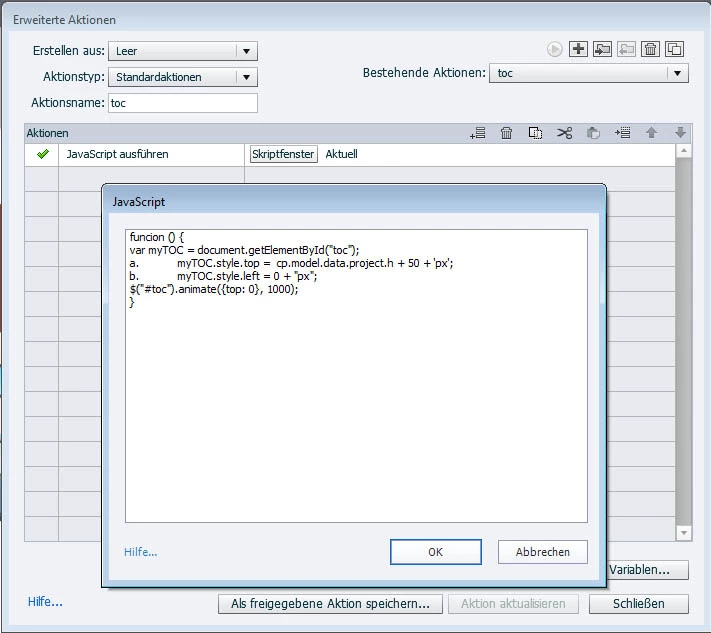
I even tried to make a function form the script. But please take a look here at my settings for the advanced action:

Maybe the place where this should happen is wrong? I can select between "new/parent/this/top" - here it´s set to "this" ("Aktuell")


I just noticed that this forum changed some of the script to bullets! Use this for the open:

var myTOC = document.getElementById("toc");

myTOC.style.top =  cp.model.data.project.h + 50 + 'px';

myTOC.style.left = 0 + "px";                                                       

$("#toc").animate({top: 0}, 1000);

2 replies

Inspiring
June 6, 2016

Sorry for answering late ... but thanks for your hint to the parameters! That´s just what I needed and what I meant with "any further information for me about any things I can change/adjust in this script" :-)

TLCMediaDesign
Inspiring
June 2, 2016

You can do it with a little JavaScript.

You would need to use a custom TOC button. To show the TOC execute this JavaScript:

var myTOC = document.getElementById("toc");

  1. myTOC.style.top =  cp.model.data.project.h + 50 + 'px';
  2. myTOC.style.left = 0 + "px";                                                       

$("#toc").animate({top: 0}, 1000);

to Hide execute JavaScript::

var myTOC = document.getElementById("toc");                                                              

$("#toc").animate({top: cp.model.data.project.h  + 50 }, 1000);

Inspiring
June 3, 2016

Thanks, TLC! I would have never encountered this ... to be honest I´m less than a newbie at JavaScript

But what a pity, this one does not work. Did I do something wrong?? At first I´ve created a custom button, applied the advanced action "Show TOC" and everything works fine - the TOC showing from the left as I checked in the TOC settings. Then I tried to use the advanced action "Execute Javascript" instead of "Show TOC" as you suggested, inserting your code into the script window, but nothing´s happening at all! I´m sure I missed something ...

Can I use the standard TOC or do I have to design an group of custom object which is named ""toc"?

Could you please give me another hint? Thanks!

TLCMediaDesign
Inspiring
June 20, 2016

Hi!

For opening I use the same as for closing: "Execute JavaScript" ... applied to two seperate buttons!

When opening I inserted your script:

var myTOC = document.getElementById("toc");

myTOC.style.top =  cp.model.data.project.h + 50 + 'px';

myTOC.style.left = 0 + "px";                                                       

$("#toc").animate({top: 0}, 1000);

For closing I tried the same with different parameters, e.g.:

var myTOC = document.getElementById("toc");

myTOC.style.top =  cp.model.data.project.h + 50 + 'px';

myTOC.style.left = 0 + "px";                                                       

$("#toc").animate({bottom: 0}, 1000);

I changed a lot of other parameters which I thought may have the wanted effect, but I did not find out which part really starts the upward movement and which parts I have to change in which way so get a downward movement. So it would be very helpful - not only for me, but for all followers as well - to know which tiny litte screws one has to draw to get a downward movement, so that this script could be used not only for opening TOCs from bottom to top and close from top to bottom, but also to open from top to bottom and close from bottom to top :-)


Bottom is not a parameter. You need to use top.

var myTOC = document.getElementById("toc");                                                               

$("#toc").animate({top: cp.model.data.project.h  + 50 }, 1000);