
10afterElearning
Participating Frequently
December 2, 2015
Question

Captivate 9 Unused Library items incorrectly marked??

  • December 2, 2015
  • 1 reply
  • 359 views

I updated a Cp8 file in Cp9. Everything works fine. Except some images are marked as 'unused' when they are actually being used.

So when I delete unused items, critical images are unintentionally deleted.

The images that are incorrectly marked as unused are images used in the 'Rollover' state of buttons.

Why is Cap9 doing this? Why Rollover images? Is there a way to fix this?
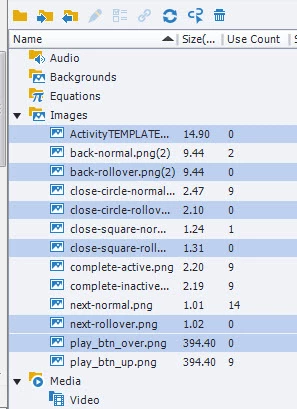
thanks!

    This topic has been closed for replies.

    1 reply

    Lilybiri
    Legend
    December 2, 2015

    States of buttons are now different, can you check the state view of the buttons?

    10afterElearning
    Participating Frequently
    December 2, 2015

    Hello! yes. both these views show that the correct rollover image is being used. However, I'm wondering why Cp9 doesn't recognize my rollover images are being used? So annoying not to be be able to trust Cp9's ability to correctly identify used or unused items.

    RodWard
    Community Expert
    Community Expert
    December 3, 2015

    This could be a bug in the upgrade process where Captivate 9 doesn't see the fact that rollover objects upgraded from Cp8 are actually using these images.

    Can you create a small blank test project in CP9, and then add images to rollover objects in that?  Then check in the Library to see if Cp9 correctly marks those images as being used.  If it does, I suggest you need to report a bug to Adobe about this.