Participating Frequently
September 6, 2022
Answered

Captivate ver 11.5.5.53 -when saving action "go to next state" in Advanced Actions, it gets replaced

  • September 6, 2022
  • 1 reply
  • 1074 views

I'd like some help with this issue, it seems to be very simple but I can't get around it.


1. In an Interactive Project (first slide) I create a multi state object (for example, from a shape). Give a name to every state.

2. In the same slide, I create a button with custom name.

3. Go to Project > Advanced Actions, and set the action "go to next state", select the object's name and click "save actions".

4. Strangely, after I close the info box (which informs me that the process of saving /updating was succesful)  the  "go to next state" action gets replaced and I see the action "Continue" instead.

5. I tried with actions "go to previous state" and "change state of" and there is no problem with them. It only seems to happen with "go to next state" action.


SCREEN CAPTURES

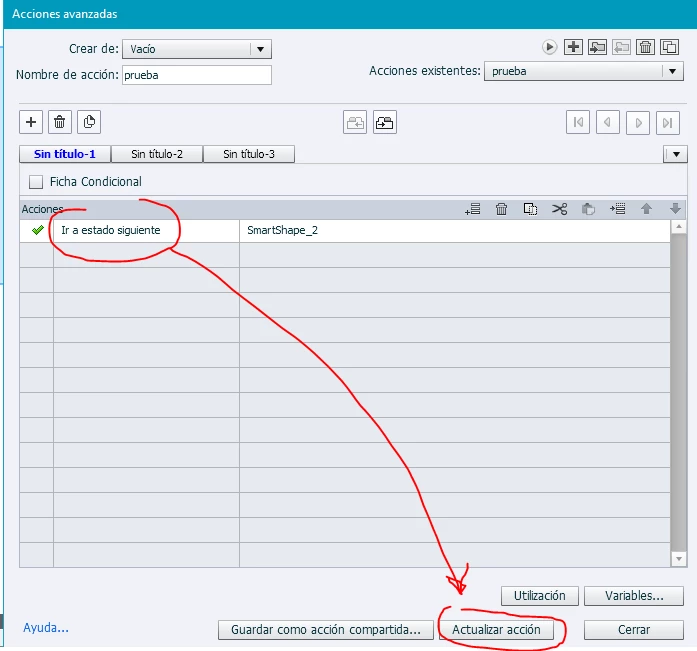
1.Go to Project > Advanced Actions, and set the action "go to next state", select the object's name and click "save actions" ("update action" has the same effect).
 

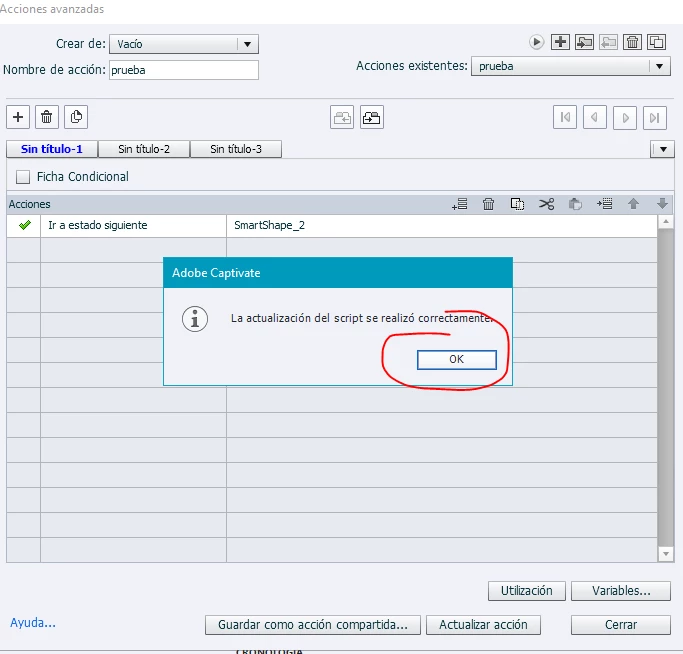
2. Click "OK" in the info box.
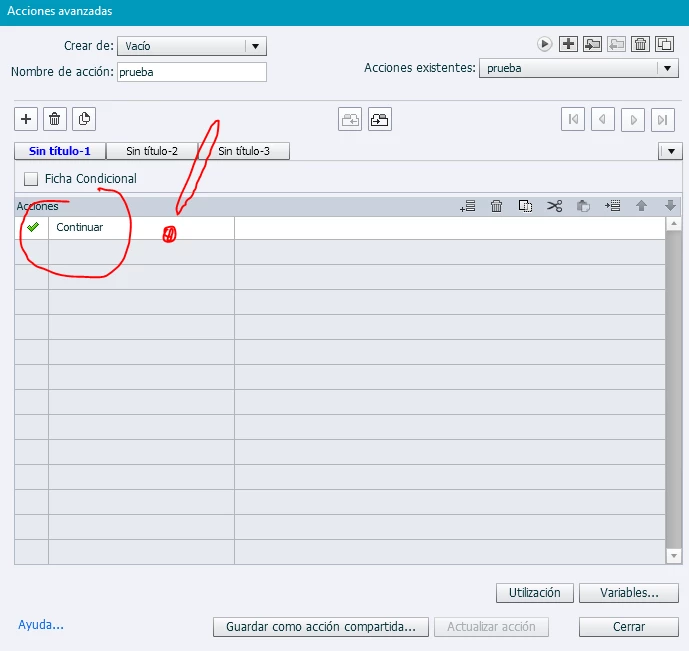
3. The action "go to next state" gets replaced automatically and for no visible reason, with "Continue"
 

Could you help me? thanks

    This topic has been closed for replies.
    Correct answer Lilybiri

    Thanks Lily! I forgot to mention that only my laptop is running Win11. My desktop computer runs Win10 (Windows 10 Pro version 21H1) and the problem was exactly the same.  This was intentional: I wanted to see if the error is related to the SO version.


    "You are creating a responsive project, but I didn't see the fluid boxes."

    For testing purpouses, I created a new interactive project with no fluid boxes, just the multistate object and the button. No other actions, nor variables, as you can see in the video.


    I'm still hoping that may be I'm doing something wrong, or forgetting something very simple.


    For the Win10 system with 11.5.5.553, the only difference we didn't discuss yet is the language of Captivate. I use the English version. I never imagined that the language could be responsible of this type of bug, but on my blog a Brazilian had an issue with one of my worklows (shared and advanced actions) not performing as expected. He had a 'portuguese' version (which is not Adobe original IMO). He did install an English version and everything worked as expected. Seems weird. You may have a look:

    https://blog.lilybiri.com/custom-review-text-for-random-questions


    I rarely do propose this, try to avoid debugging files for free, but contact me using a private message. If you accept, you could send me a project with the bug, and I will try to open it in my version to see if the bug exists for me as well. In that case, this is really a bug to be solved by Adobe. 

    1 reply

    Lilybiri
    Legend
    September 6, 2022

    The only reason why this happen AFAIK is that you have used the same name for two items. Each name in Captivate needs to be unique. The best known exception are state names, because their uniqueness is defined both by the state and the multistate object name. You can use the same state name as long as you have unique names for the objects. It is not the Smartshape_2 name because that is a generic name. But is the action name 'prueba' (test) unique? I cannot see what the other decisions do, it would be better to post a full Preview screen of this advanced action.You find that preview windows using the first button (arrow) in the top right control panel?

    This is about editing an advanced action, hence my request for a full preview. Whenever there is a bug in an advanced action the command will be replaced by Continue (Continuar), the default command.

    Participating Frequently
    September 6, 2022

    Lilybiri, thanks for your help!

    I knew "Continue" can be a kind of "This is not a valid sentence" in Advanced Actions pane. However, I can't seem to locate the error. It only happens when using the action "go to next state". 

    • Name of the object: SmartShape_1
    • Name of the button: Button_1
    • Name of the action: _my_test_action

    There are no saved actions, no other buttons, nor objetcs. It is a brand new project.


    When I try again, re open Advanced Actions (Acciones avanzadas), set the "go to next state" ("ir a estado siguiente") action and hit "Preview" I get this (screen capture below). But as soon as I click "Update action" ("Actualizar acción") it is replaced again with "Continue"


    Thank you!

    Lilybiri
    Legend
    September 6, 2022

    Lilybiri, thanks for you feedback!

    As you can see in the following screen captures, the object is a very simple SmartShape (hence the default name), "Use as a button" ("Usar como botón") is unchecked. The button with "Click me!" in it, is named "Button_1".


    ...it has three states. I left the default naming too (bout I tried with custom names too).


    This is weird.  I am using multistate objects all the time, never had this type of problem. And my nickname in the CP community has been 'Queen of advanced actions' since a decade. 

    The only other possibility I see is that your project has been corrupted for some reason. If you are sure you don't have any duplicate use of names (except for states, where that is not important), try to reproduce this situation in a new project, using the same theme. 

    There is something still bothering me: the shape is using the default style for shapes. Which theme are you using? When you add states to the shape, and edit its colors, the style should show to be overridden (+sign) but that is not the case. Theme could corrupt as well...