


- Home
- Captivate
- Discussions
- Re: Challenges with Animation Triggers
- Re: Challenges with Animation Triggers

Copy link to clipboard
Copied
Hello - I have spent quite some time trying to figure out how to make the click boxes
I have on one slide (6) result in text animation appearing. I have the click boxes, and then I created the 6 t
ext animation object. Then "on success" for each click box have it set to "apply effect" and then
the object name is the text caption. Still, when I preview my slide, all the text animations appear depending on how the timing is set up for each of
those objects, ignoring the trigger relationship. On the timeline, under effects tab there is a drop-down menu "animation trigger"
and it is defaulting to "(Self) Time-based animation". When I change it to select the appropriate click-box, once I move away from th
e text animation object, it goes back to the "(Self) Time-based animation"
animation trigger. Anyone know what I'm doing wrong? Thanks!


 1 Correct answer

Hello,
Rod gave you the most easy way, if we understand your question all right: you created objects of the type 'Text Animation' and want them to appear when the user clicks a button or click box?
But I'm puzzled about your phrasing because you are also referring to Effects? Perhaps you did not insert Text Animations with their timing on the timeline of the slide but you tried to apply effects to a text caption? This could be because you do not find the wanted animation provided with the default
...
 12
Replies
12
12
Replies
12


Copy link to clipboard
Copied
If all you want to happen is that the text animation objects suddenly appear after their relevant clickboxes are clicked then you don't need to worry about using effects.
Set each Text Animation to not be visible by unticking it's Visible box in Properties and give it a meaningful Item Name so that it will be easier to find in the Object list in the next step.
Then set the On Success Advanced Actions for each clickbox to Show the particular Text Animation it should make appear. Once you select the Advanced Action as Show, you can select the relevant Text Animation object from the drop-down menu provided.
Does this accomplish what you wanted to happen?
Copy link to clipboard
Copied
Thank you Rod - yes very helpful. I was thinking this could be accomplished without going to advanced actions but it would not seem so. I really appreciate your help!

Copy link to clipboard
Copied
Hi. I'm using 5.5 and when the user clicks a clickbox, I want the tint of the button to be change. It is not working for some reason. What other information do you need to help me?
Copy link to clipboard
Copied
double posting, look at my answer in the other thread please
Copy link to clipboard
Copied
Hello,
Rod gave you the most easy way, if we understand your question all right: you created objects of the type 'Text Animation' and want them to appear when the user clicks a button or click box?
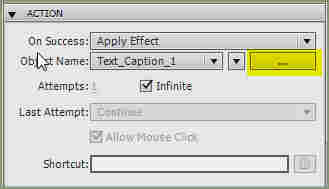
But I'm puzzled about your phrasing because you are also referring to Effects? Perhaps you did not insert Text Animations with their timing on the timeline of the slide but you tried to apply effects to a text caption? This could be because you do not find the wanted animation provided with the default Text Animations out of the box. Could you please clarify this? In that second situation it is also possible to trigger the effect (I'll use that word to avoid confusion) by clicking on a button or click box. Effects can be Time-based (default), triggered by an interactive object like a button or click box (eventually Text Entry Box) or by an advanced action. If you want to trigger the effect by a button, you create that button and in its Properties go to the Action accordion, choose Apply Effect and then choose the Text Caption (or other object) you want to apply the effect to. Then click in this accordion on the ellipsis button (highlighted) and both the Effects panel and the Text Caption Properties will appear with the TC selected so that you can create the effect.
Copy link to clipboard
Copied
Thanks very much Lilybiri - I am using text boxes and applying event animation (effect). I thought I tried as you mentioned but I obviously still did something wrong so I will give it another whirl. Thanks so much for your time!
Copy link to clipboard
Copied
Hi Sandy,
If you have more questions, or want me to have a look at the file, please fire away,
Lilybiri
Copy link to clipboard
Copied
Hello Captivate Community - well it has been a month or so since my original post, and I am still struggling badly with
simple click and action scenarios. I have two buttons where I want a swf files to play (4 sec)
when you click each button (different swf for each button). Anyway, I have tried what feels like a million different settings and they still won't play when you click the button. I have the swf files set to invisible, everything is on no transition, and nothing at all happens when I preview. Timing on the swf animation I have tried rest of slide, as well as for duration of animation. I've also tried advanced actions where one animation is showing, while the other one is hidden. Nothing is working. Help! and Thanks!
Copy link to clipboard
Copied
Where did you get these SWF animations? Did you create them yourself, or are they from the Captivate collection?
If you created them yourself in Flash, did you ensure all of the animation is on the main timeline level, or do you have the animation inside a symbol? If the animation is inside a symbol, what might be happening is that Captivate is playing the animation when it loads the SWF into memory at the beginning of the project's runtime. Then when you get to the slide where you WANT it to play, the animation has stopped. So it looks like it won't animate, when in fact it already has completed the animation long before it got to the slide.
Copy link to clipboard
Copied
Hi Rod - thanks much for that info. I do think it has to do with the swf file running already. I am playing with a test file which is only one slide, but I can see where if I click the button more quickly part of the animation appears. Within flash, their is a top level "scene" and then under that are the layers with the various parts that are animated. I created this exactly using the steps from a demo in Lynda.com. In fact, when I use one of their creations, I have the same problem. I don't know how to get the animation up to the scene level, is that what I need to figure out?
Copy link to clipboard
Copied
I think I figured out how to get everything to main level. I haven't figured out how to scale it back down, but that is
OK I can make it smaller in captivate. I can't thank you enough Rod, I don't think I would ever have figured this out on my own!
Copy link to clipboard
Copied
There is actually a way to get the animation inside a symbol to play for a SWF imported into Captivate, but it requires that you get into a little bit of ActionScript.
I provided some details at the bottom of this thread: http://forums.adobe.com/message/3606274#3606274


Get ready! An upgraded Adobe Community experience is coming in January.
Learn more
 AdChoices