


Click box advances

Copy link to clipboard
Copied
When I publish a file, one or more click boxes advance automatically, even though I've selected Pause project until user clicks. I've made sure the click box is visible in the timeline, created a new click box, copied a click box that works correctly, and uninstalled and reinstalled Captivate 6. Any ideas?


 8
Replies
8
8
Replies
8


Copy link to clipboard
Copied
The click box itself will not advance, where is it pausing? Perhaps post a screenshot of the timeline?
Copy link to clipboard
Copied
In the published file the slide advances automatically even though I did not click the click box and I selected Pause project until user clicks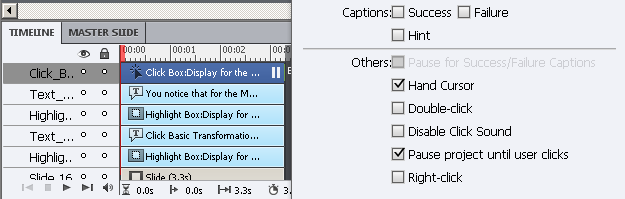
Copy link to clipboard
Copied
Is perhaps its visibility turned off in the properties panel?
Copy link to clipboard
Copied
No, I checked that, thanks.
Copy link to clipboard
Copied
A co-worker just tested and the click box worked as expected for her (paused until user clicked). We have the same Publish settings.


Copy link to clipboard
Copied
If the screemshot you showed is indicating the duration of the entire slide is 3.3 seconds, then the pause point of your click box is actually sitting right on the end of the slide. Unlike button objects which show the pause point somewhere in the middle of their timeline object, click boxes always have their pause point at the end of their timeline object. If the click box pause point is too close to the end of the slide it might not work.
Try moving the end point of the click box back to the left a second or so and see if that helps.
Copy link to clipboard
Copied
Thanks very much. I had figured out by trial and error that changing the slide duration fixed the problem, but your explanation makes much more sense. Can you explain why the click box would work on my co-worker’s machine but not mine if she did not alter the file?
Copy link to clipboard
Copied
Could be she had a slightly different setup, different browser, different Flash Player version, different brand of coffee, whatever. There are many variables and I've never been able to isolate all of the reasons why one Captivate user will have no troubles with something others do.
In your case I knew from experience that placing the pause point of a clickbox right near the last frame of a slide is a bad idea.


Get ready! An upgraded Adobe Community experience is coming in January.
Learn more
 AdChoices