
Click Box option in settings is greyed out
Hi
I tried to capture a system simulator using Adobe Captivate 5, this is something i have done many times and never had this problem. When i was capturing a part of the system which had tabs or items you could select to add in to a box on the same screen, Captivate would not capture this (it usually would). I was pretty sure I had set it up correctly so i tried again ... Software Simulation - Training (Also not working on Assessment as i have tried this option too). Again it didn't work. So I tried again, this time i went in to settings to check it was set up correctly, but it was on Demonstration and not Training (or Assessment when I tried this) and the Click Box option was grayed out. I changed it in the drop down box to Training (& tried the same with assessment) and clicked OK to save it and tried to capture the system again, and had the same issue again. Please see the pic below: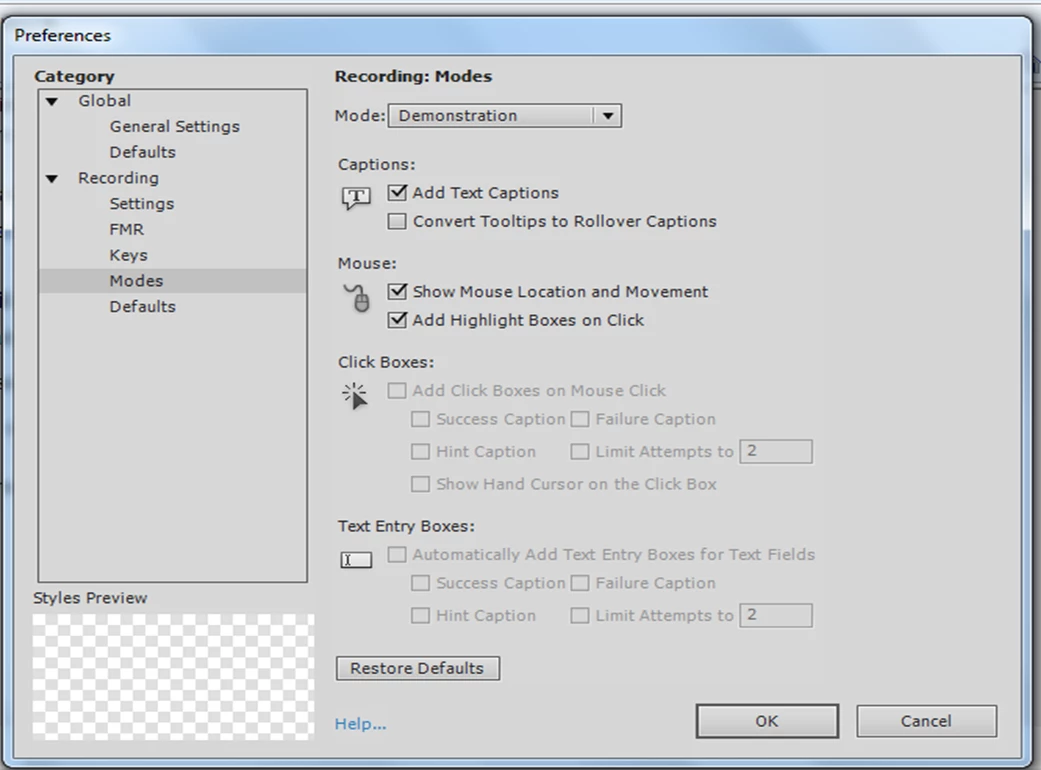
I tried it again, this time I checked the settings, changed it to training (also tried it with assessment), clicked Ok to save it, then went back into settings to see if it had saved, but it had gone back to Demonstration and the Click Box option was grayed out again. I have tried clicking on restore defaults and this hasn't done anything. Does anyone have any idea's on what the issue is and how to fix this?
Thanks
 AdChoices