
Participant
October 1, 2009
Answered

Closed Captions - Text TOO SMALL

  • October 1, 2009
  • 1 reply
  • 926 views

I have searched high and low for a way to increase the font size for the closed-captions that display in my training. Currently, they appear to display at  8pt. My target audience is requesting larger captions that they can read without a magnifying glass.  I am trying to avoid creating text captions with a larger font size, because that will bypass all of the built-in timing functionality of the closed-captions interface.  Any thoughts are appreciated.

Jerry
    This topic has been closed for replies.
    Correct answer Captiv8r

    Hi there

    You need to edit your skin.

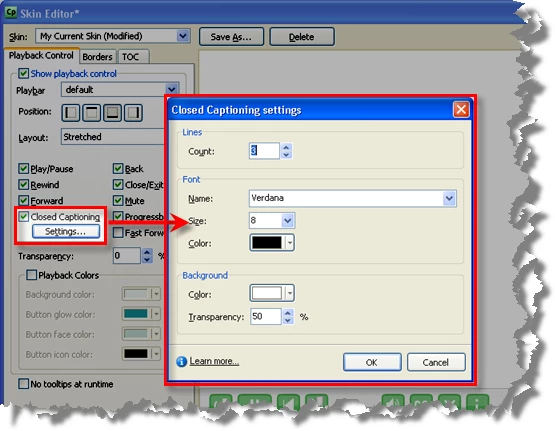
    Click Project > Skin Editor...

    Click the Settings... button below the Closed Captions check box.

    Cheers... Rick

    Helpful and Handy Links

    Captivate Wish Form/Bug Reporting Form

    Adobe Certified Captivate Training

    SorcerStone Blog

    Captivate eBooks

    1 reply

    Captiv8r
    Captiv8rCorrect answer
    Legend
    October 1, 2009

    Hi there

    You need to edit your skin.

    Click Project > Skin Editor...

    Click the Settings... button below the Closed Captions check box.

    Cheers... Rick

    Helpful and Handy Links

    Captivate Wish Form/Bug Reporting Form

    Adobe Certified Captivate Training

    SorcerStone Blog

    Captivate eBooks

    Participant
    October 1, 2009

    Yay!! Thanks Rick! That is exactly what I needed.  Appreciate the quick response!

    Jerry