
Known Participant
March 27, 2017
Answered

Company History Timeline - Pics out of sync?

  • March 27, 2017
  • 1 reply
  • 413 views

Hello,

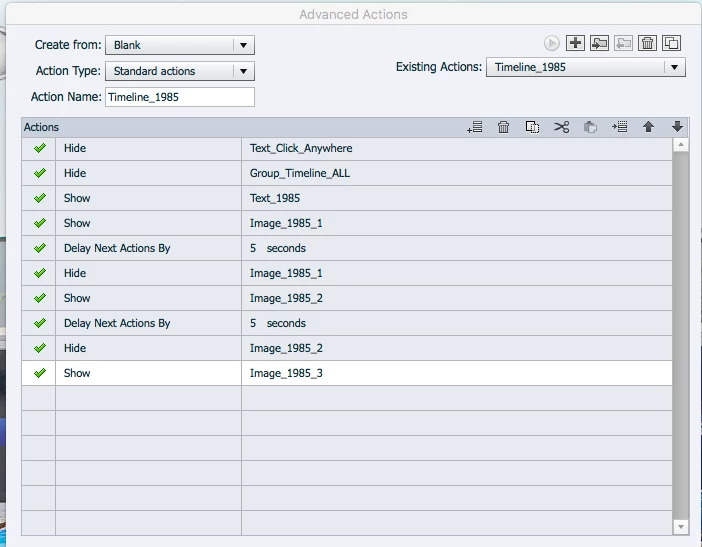
I'm creating a company history timeline in Captivate 9. I have one button for each year, and each year has text along with 3 different photos. I have set up advanced actions for each button, and to delay each picture from showing up, I've added delayed action of 5 secs between each picture.

It works perfectly if I go through each pic for a particular year. However, if I go to 1985 for example, only see 2 pictures, and then jump to 2010, it will show the first correct picture, followed by the third picture I didn't finish watching. I wonder if there'a a way to reset every time you click on a different year.

Attached is a screen shot of the advanced action.

Any ideas of what I could be doing wrong?
Thank you,

Lucy

    This topic has been closed for replies.
    Correct answer RodWard

    Hi RodWard,

    I tried, but it didn't work.

    What's the best way to set up a group of pics to be seen after pushing a button, if there are several buttons in the same slide as in the case of a history timeline?

    Thank you,

    Lucy


    The way you appear to have it set up should work.  You've grouped the entire set of objects that need to be hidden or shown, and that group should all be hidden at the start of the slide timeline.  Then each Advanced Action that you execute should also start with a statement that hides the entire group (as a sort of Reset in case you've previously shown some objects via another Action) and then just show the ones you want to be visible.

    You've so far only shown ONE of these Advanced Actions.  If you duplicated these actions and then edited them to get the full set of actions, you may have some errors in your Advanced Actions somewhere.  I suggest you check them all through to make sure the bug is not in one of the Standard Actions.

    1 reply

    RodWard
    Community Expert
    Community Expert
    March 27, 2017

    It sounds like your timeline might be advancing while all this is happening.

    Did you turn off the option to Continue Playing Timeline for each of these buttons?

    Known Participant
    March 27, 2017

    Hi RodWard.

    I looked for that option under properties and could not find it. Please see attached pic. I see it when I select Show or Hide, but not under Execute Advanced Action.

    Lucy

    RodWard
    Community Expert
    RodWardCommunity ExpertCorrect answer
    Community Expert
    March 27, 2017

    Hi RodWard,

    I tried, but it didn't work.

    What's the best way to set up a group of pics to be seen after pushing a button, if there are several buttons in the same slide as in the case of a history timeline?

    Thank you,

    Lucy


    The way you appear to have it set up should work.  You've grouped the entire set of objects that need to be hidden or shown, and that group should all be hidden at the start of the slide timeline.  Then each Advanced Action that you execute should also start with a statement that hides the entire group (as a sort of Reset in case you've previously shown some objects via another Action) and then just show the ones you want to be visible.

    You've so far only shown ONE of these Advanced Actions.  If you duplicated these actions and then edited them to get the full set of actions, you may have some errors in your Advanced Actions somewhere.  I suggest you check them all through to make sure the bug is not in one of the Standard Actions.