Known Participant
February 2, 2020
Question

Continue action does not work in the Overlay Slide of an Interactive Video

  • February 2, 2020
  • 1 reply
  • 486 views

Hi,


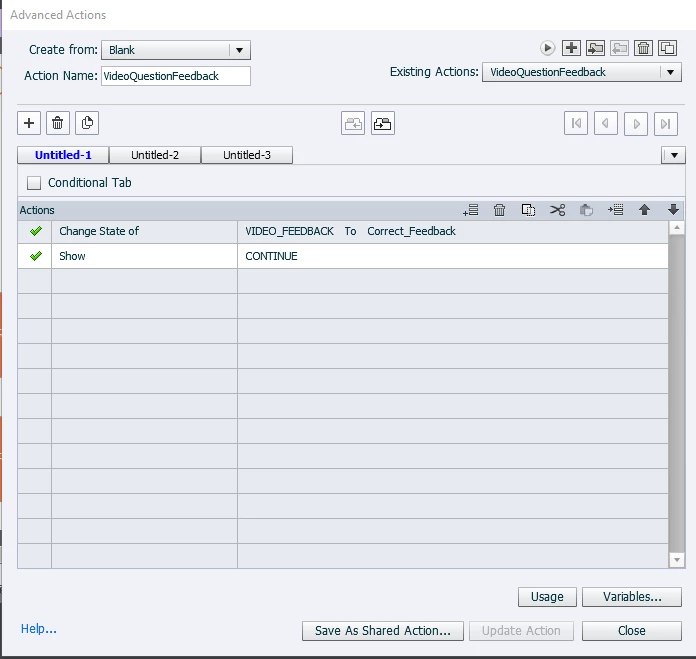
I have an interactive video, with an overlay slide. In the overlay slide, user clicks on some button. I display a feedback by changing a state of the feedback and showing a continue button with Continue action for On Success event. The continue button is normally hidden.  I use some advanced action to show it with some feedback. But it is not going back to the video slide.  By the way, other buttons work without any problem. I should be able go back to the video slide.


This topic has been closed for replies.

1 reply

Lilybiri
Legend
February 2, 2020

I also use a button with Continue as command to close an overlay slide, pondering what is going awry for you. Personally I would never use the label CONTINUE,  because that is a commmand. Even though you did write it in capitals and names are context sensitive. That button is pausing at the last frame. As you can read in this blog, to close overlay slides I will use a shape button on the master slide for the overlay slide. Effect should be the same. I am puzzled.

http://blog.lilybiri.com/tips-for-interactive-video

Beware: those tips were written for 11.0. In 11.5 you can have a sequence of overlay slides, have not explored those in depth.

Known Participant
February 7, 2020

Thank you very much. I will try to create it from scratch