


Inspiring
January 30, 2014
Answered

cpCmndGotoFrameAndResume and HTML5

  • January 30, 2014
  • 2 replies
  • 1778 views

Has anyone got the frame to rewind using the system variable and HTML 5 output ???

For testing and demonstration purposes, I have a simple project with 2 slides, on slide 2 I have a button, which executes advanced action and assigns variable cpCmndGotoFrameAndResume with value 0. This goes back top beginning no problems in the flash version and does nothing in the html output version

Any ideas ?

Using Captivate 7

Thanks
This topic has been closed for replies.
Correct answer Metapod

I had used your micro navigation blog as a starting point for what I was doing.

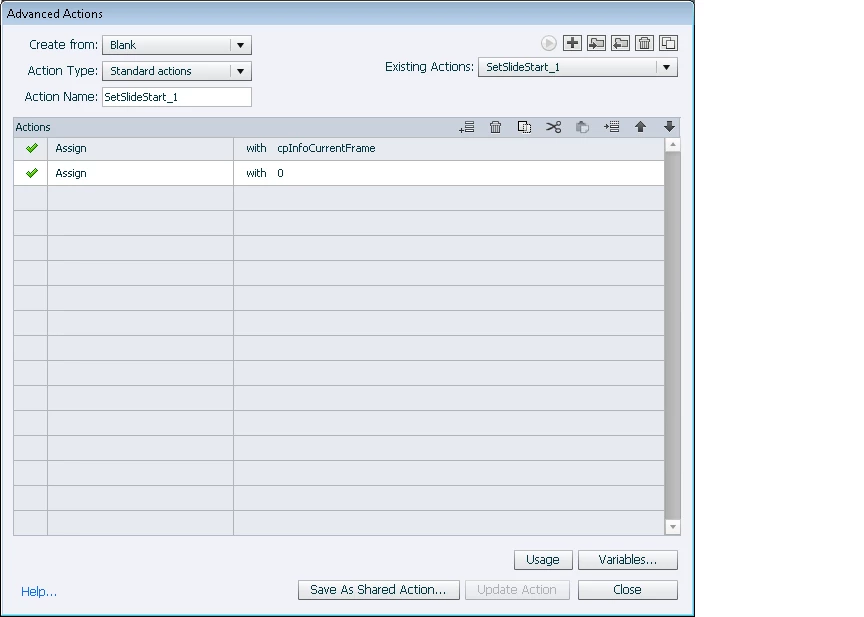
The issue ended up being a corruption in the variables. I think. See the screen shot below. The Advanced action has lost some assignment information. What's incredibly weird is that the swf output dosent haver an issue, but the html output does.

Thanks

2 replies

Lilybiri
Legend
January 30, 2014

I agree with Rod for this use case. If you want to keep with cpCmndGotoFrameAndResume, use the value 1 instead of 0. Checked it out (after all I started blogging about micro navigation ), is fine for me.

RodWard
Community Expert
Community Expert
January 30, 2014

I think Lieve may be misunderstanding me.  I'm questioning why you are bothering to try and jump to any particular frame in this case when all you need to do is jump to the beginning of the previous slide.

HTML5 and JavaScript doesn't really have a timeline and frames in the same way that Flash and SWF do.  It works on specifying delays and time durations in milliseconds. 

So it's actually a lot more predictable to just jump back to the beginning of an entire slide in HTML5 rather than trying to do things the same way as we were accustomed to in Flash or AS3.

MetapodAuthor
Inspiring
January 31, 2014

Hi Rod

I was trying to simplify the scenario. In reality I have a number of items that appear and disappear on the screen, orgabnised around timings. I wanted to allow the user to replay a section of the timeline, but only 3 times. Hence jumping to a slide wont do the job.

Thanks

RodWard
Community Expert
Community Expert
January 30, 2014

Why don't you just use Jump to Slide 1 instead?