iasmif91407090
Known Participant
October 3, 2016
Answered

Cpt 9: Closed Captioning Enabled by default?

  • October 3, 2016
  • 2 replies
  • 421 views

Dear all,

I am using Captivate 9 version 9.0.1.320 on my PC.

I would like the Closed Captioning to be enabled by default when opening a Cpt Project. In other words I don't want the user to have to click on the CC button to enable the Closed Captioning. Is that possible?


Thank you in advance for your help,
Iasmi

This topic has been closed for replies.
Correct answer Lilybiri

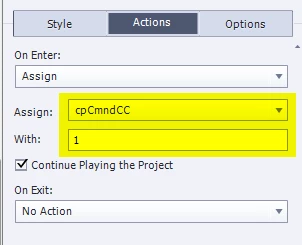
You could use this work flow:

  • Select the first slide and look for the Actions tab in its Properties panel
  • Select the action 'Assign' from the dropdown list
  • Choose the variable cpCmndCC
  • Type 1 next to 'With'.

It will look like this:

2 replies

iasmif91407090
Known Participant
October 3, 2016

Thank you Lilybiri! I think this post will be useful in the future.

Lilybiri
LilybiriCorrect answer
Legend
October 3, 2016

You could use this work flow:

  • Select the first slide and look for the Actions tab in its Properties panel
  • Select the action 'Assign' from the dropdown list
  • Choose the variable cpCmndCC
  • Type 1 next to 'With'.

It will look like this:

iasmif91407090
Known Participant
October 3, 2016

Lilybiri this exactly what I was looking for - It now works

I wanted to play around with the values of the cpCmndCC system variable but I couldn't find the way to do it.

Thank you once again,

Iasmi

Lilybiri
Legend
October 3, 2016

If you ever want to create a toggle button for CC, because you don't use the playbar, have a look at:

1 action = 5 Toggle Buttons - Captivate blog

cpCmndCC is a Boolean variable, has only values 0 and 1. Quite a lot of the command system variables are Boolean.