
Copy link to clipboard
Copied
Hi I'm very new to Captivate so I apologize if this is already a thread somewhere.
I work for the FAA and am trying to create airspace and air route exams. We currently have paper (hard copies) I'm trying to make them computer tests. Essentially I have a Chart with blanks and need those to be the "fill in the blank" that will correspond with the correct altitude. See attached pic below any help will be greatly appreciated.
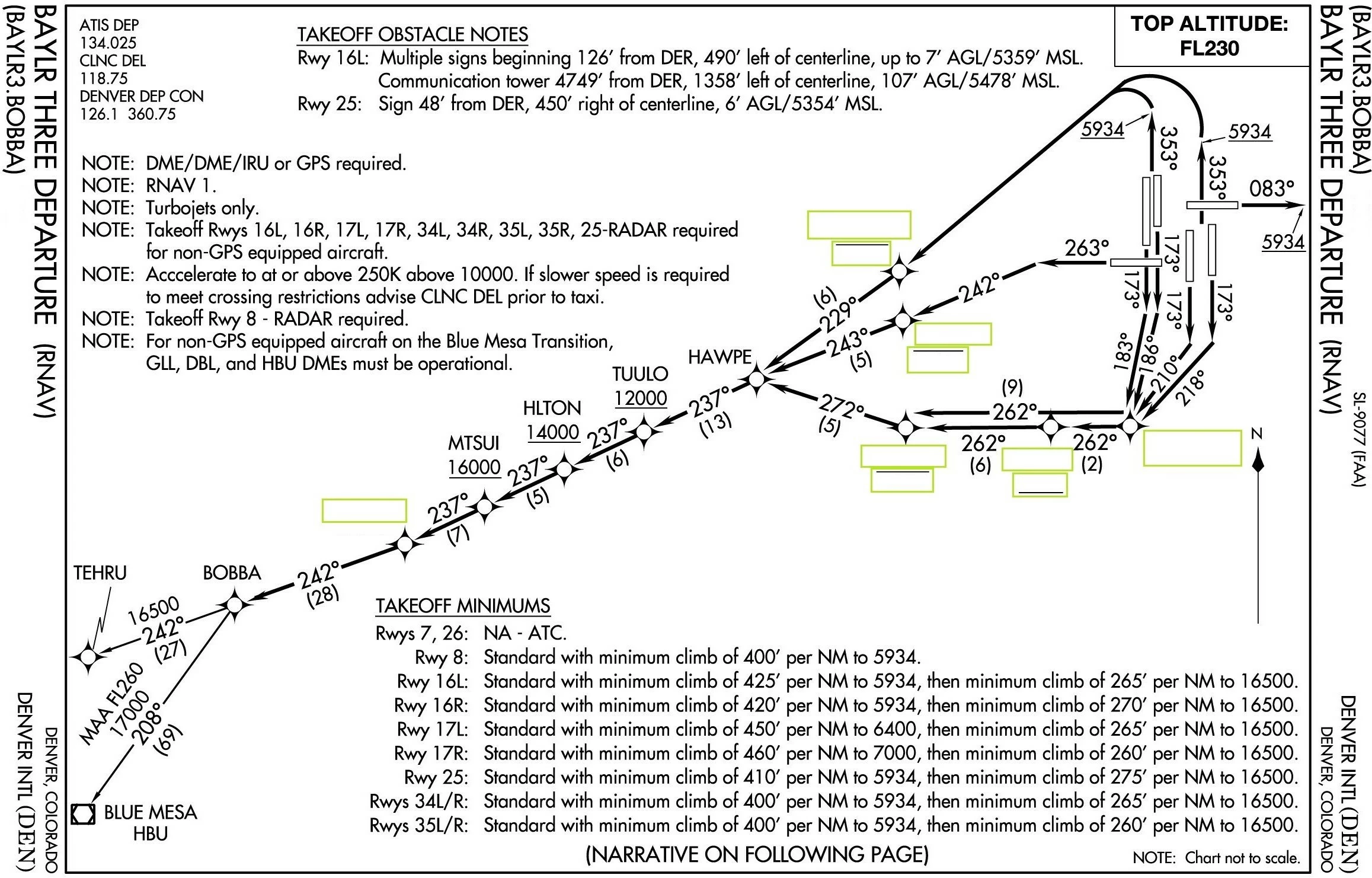
You can use Text Entry Boxes. They are interacitve, can be validated and can be scored.
Copy link to clipboard
Copied
You can use Text Entry Boxes. They are interacitve, can be validated and can be scored.
Copy link to clipboard
Copied
Thanks for the help!!!!!!
Copy link to clipboard
Copied
You're welcome!
Copy link to clipboard
Copied
So ive selected the validate box but am having trouble getting it to be apart of the quiz.. Ive selected Reporting, add to total and report answers also have entered correct answers for the corresponding texts boxes appreciate any help cheers
Copy link to clipboard
Copied
Can you check the Advanced Interaction panel (F9)? The total score you see there is the score that will be reported, included in the quizzing system variables. You can download a free table with those variables from this blog post:
Using Quizzing System Variables - Captivate blog
If you insert the score slide (Quiz, Preferences, Settings, the score from your TEB's will be included.
Copy link to clipboard
Copied
Lilybiri thanks for all the help
Basically im trying to make the map fill in the blank with one submit button am having trouble
what i can do: make TEB's ( validate them award them a point value and entering the correct answer )
need help : making one submit button for all the TEBs
thanks again youve been very very helpful sounds like you know this program in and out haha
Haydo
Copy link to clipboard
Copied
Someone just insulted me, saying that I'm only making noise on the forums mostly. Some machos really are disgusting.
To be validated a TEB has to be confirmed. It doens't have to be with a Submit buttonfor each TEB, it could be with a shortcut key as well. That shortcut key could be the last character that you expect.
Long time ago I wrote this article, maybe that approach could appeal to you. It is very old, but reactions like I just had do not inspire me to spend even more time to help other users, by creating noise.
One Submit button for Multiple Text Entry Boxes? - Captivate blog
Copy link to clipboard
Copied
ill read the arcticle thanks again !!!!
Find more inspiration, events, and resources on the new Adobe Community
Explore Now