
Participating Frequently
October 22, 2021
Answered

editing smartshape colour inside Master slide view is gone!??

  • October 22, 2021
  • 1 reply
  • 840 views

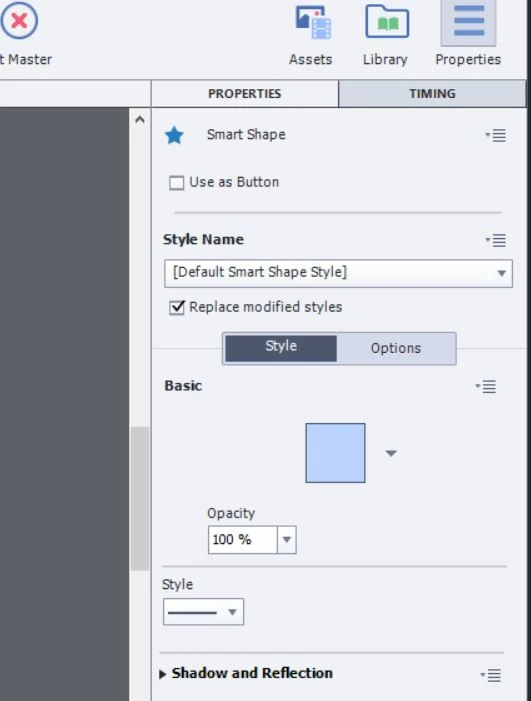
Two days ago, I selected "master slide view" went in and changed the colour of a rectangle from orange to blue and it updated my master slide. Today I went to do the same thing and the colour picker has vanished, as seen in the attached image, (and yes I have the object selected) Where did the colour picker go? 
    This topic has been closed for replies.
    Correct answer Lilybiri

    Did you try to restart Captivate? It may be a temporary glitch.

    Cleared the cache?

    If that is not helping, try to clean the Preferences. Find the subfolder 'utils' under the installation folder and run CleanPreferences... (the one appropriate for your OS) while Captivate is closed.


    1 reply

    Lilybiri
    LilybiriCorrect answer
    Legend
    October 22, 2021

    Did you try to restart Captivate? It may be a temporary glitch.

    Cleared the cache?

    If that is not helping, try to clean the Preferences. Find the subfolder 'utils' under the installation folder and run CleanPreferences... (the one appropriate for your OS) while Captivate is closed.


    Participating Frequently
    October 22, 2021

    restarting had no effect, but you remended me that I haven't cleared my project cache in preferences for a while. After doing so, the colour picker is available again. Thank you!
    If in the future cache doesn't work, I'll run the suggested Preferences utility.
    Cheers!