


- Home
- Captivate
- Discussions
- Re: Error - Failed to import Content Inventory
- Re: Error - Failed to import Content Inventory
Error - Failed to import Content Inventory

Copy link to clipboard
Copied
Hello all,
I'm having an issue uploading a SCORM elesson created to our LMS, and I'm hoping that one of the wise people out there may be able to help me out.
The project setting used, are the same as I've previously had success using.
There is no object outside of the stage.
The naming of the file project is ver simeple... 2 letters.
There is no Quiz.
Whilst trying to upload the zipped file to our LMS, I get this error:
The upload of this document failed. Error discribtion:
Error Encountered
(43073) Failed to import Content Inventory: IT - IT Work Processes Introduction
(43269) Invalid content. (*)ERROR: Failed to extract the manifest file from content package. Possible cause: The markup in XML document (manifest file) preceding the root element is not well-formed.'
Any ideas anybody?
Thanks ahead of time


 10
Replies
10
10
Replies
10


Copy link to clipboard
Copied
This error sometimes indicates that you haven't created the zipped SCORM archive correctly. Did you allow Captivate or the Multi-SCO packager to create the zip file for this SCORM, or did you zip it with Winzip or some other utility yourself?
Copy link to clipboard
Copied
Hi,
Thanks for the fast reply. I forgot to mention that it views on the PDF perfectly.
I allowed Captivate (5) to create the Zip file.
Thanks again
Copy link to clipboard
Copied
Are you saying that the output is a zipped PDF file and not a zipped package containing SWF/HTM and JS files?
Copy link to clipboard
Copied
No sorry. I only use the pdf version to send to people for reviews. When it comes to publishing it to the LMS (SABA), I zip it with Captivate (with no pdf). The zip file contains the HTML/SWF Files etc. included below is my normal package, unzipped.

and this is the one I'm having problems with:

Copy link to clipboard
Copied
OK. Then it looks like it might be complaining about something in the code within the imsmanifest.xml file being "malformed" and the LMS is rejecting the upload for this reason.
Can you take a screenshot of the settings in your Manifest dialog so that I can see your SCORM settings there?
Copy link to clipboard
Copied
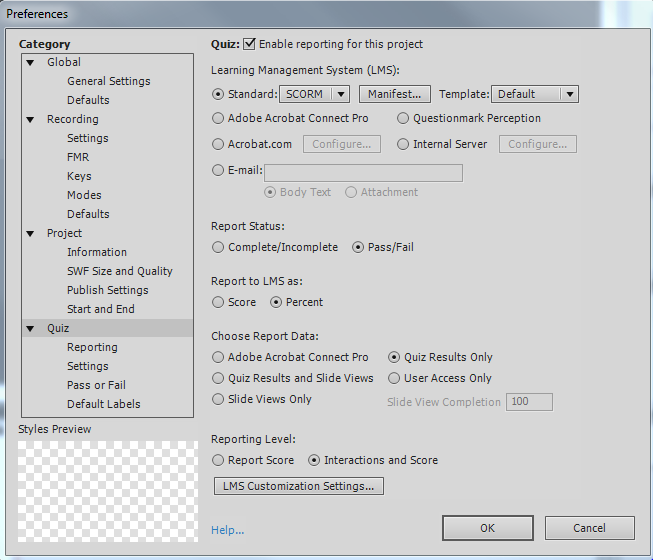
yep of course:
Copy link to clipboard
Copied
What I need to see is the one under the Manifest button.
Copy link to clipboard
Copied
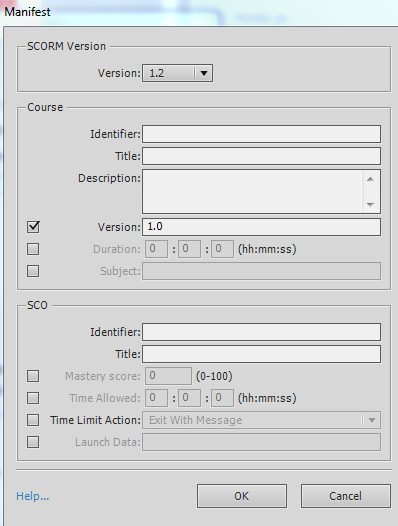
ops sorry
Copy link to clipboard
Copied
Well...thar's yer problem!
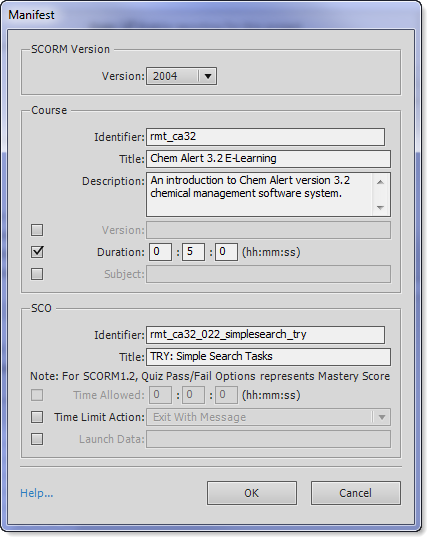
Make sure you specify valid information in these fields.
It should look something like this:
Copy link to clipboard
Copied
Groovy, thanks so much for the help


Get ready! An upgraded Adobe Community experience is coming in January.
Learn more
 AdChoices