
danielb51742821
Inspiring
August 6, 2018
Question

Event Video Skin Play and Pause only

  • August 6, 2018
  • 1 reply
  • 2660 views

Hello again,

Captivate 9, updated.

CPTX file, adding mp4 as an event video to an individual slide.

I'm confused about the skin on an event video. On the stage, after selecting "haloSkin1", the video on the stage displays play, pause and stop button. This is a perfect scenario for me, since we want to avoid learners scrubbing through the video. I also experienced users reporting that scrubbing to the end forced them to wait until the length of the video to expire before the slide auto advances. So when I found this skin with no slide bar, it seemed like a winner.

Anyways, on the stage, I see a skin that seems to fit my needs.
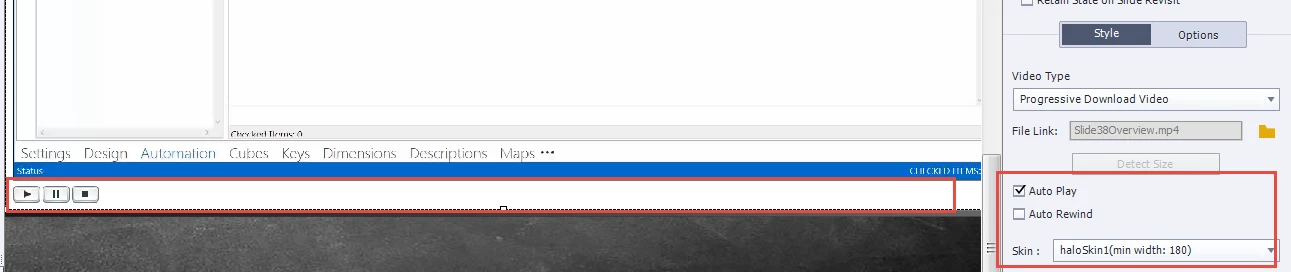
However, when I preview the html5, I do not get the skin that was on the stage. I get additional buttons and an unwanted video slider to scrub the video (no need for audio controls either). I only want play and pause (stop I can also deal with). The skin's playbar also only appears when moused over and appears as an overlay.

My questions:

Do we have control over what buttons appear in the skin?

Can we force the video skin's play bar to be pinned and not overlayed?

    This topic has been closed for replies.

    1 reply

    Lilybiri
    Legend
    August 6, 2018

    You are confusing the event video skin (which on HTML appears when you hover over the bottom of the video) and the Captivate playbar which you show on the second screenshot. That was not the case for SWF output, lot of good features are lost with HTML. Event video plays independently of Captivate's playbar, it has its dedicated control panel. You don't have to extend the slide duration to the length of the video as is the case for synchronized video.

    You can always hide the Captivate playbar using a command on the On Enter event of that slide.

    danielb51742821
    Inspiring
    August 6, 2018

    I can understand why you would think I was confusing the two, but I am not. I am currently hiding the captivate play bar. The captivate play bar is hidden (only on this slide) to force/require the learner to watch the auto-played video. The contents of screen shot 2 in my initial post was the overlayed skin's play bar appearing when I mouse over the video. Below is another view of the video's skin playbar in the html5 preview with the event video being moused over. As you can see in this new image, the captivate playbar is purposely hidden (only a border with curved corners surrounds the training).

    To prioritize what I need in addition to what I already have:

    1. The video's skin play bar to show only play/pause as it does on the stage.
    2. No play bar overlay
    3. The play bar appears at all times with no hover required.
    danielb51742821
    Inspiring
    August 7, 2018

    How did you test HTML output?  Contrary to SWF output where the Preview options are pretty accurate, that is not the case of HTML output. You'll only see it really after publishing and uploading to a webserver.

    You didn't need an advanced action On Enter. The simple action 'Hide Playbar) with the option 'Continue Playing ...4 checked would have been OK.


    I tested html output after pulishing to scorm 1.2/html5 and posting it to a moodle lms.

    I then tested html5 preview in browser and found the same unwanted behavior. Probably not a good practice when I'm ultimately publishing html5, but most of my previewing in captivate is done by F10 next 5 slides in swf preview.

    I just changed the on enter as you noted but still have same blank screen for this slide.