Inspiring
May 11, 2021
Answered

Executive Actions Freezing

  • May 11, 2021
  • 2 replies
  • 2440 views

I have an executive action that I am trying to execute.  It works perfectly until the correct combinations of variables is correct, then this does not work:


So I have 6 conditions where they must be all met.   
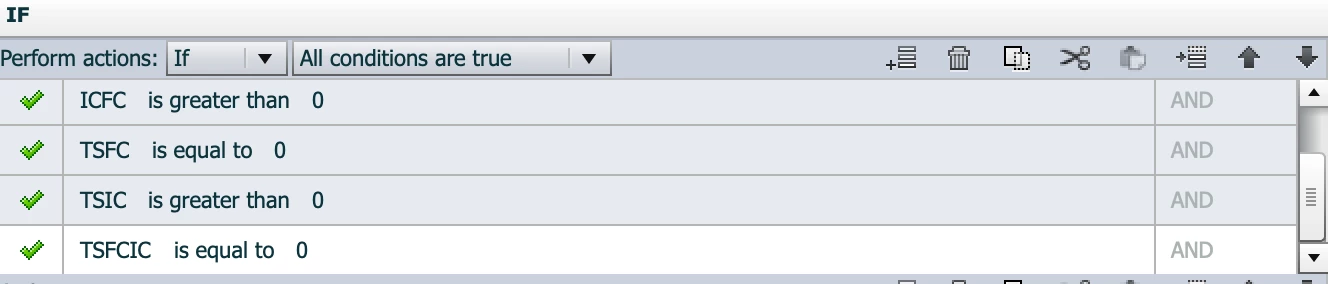
 

Once they are all met, they should do:

 

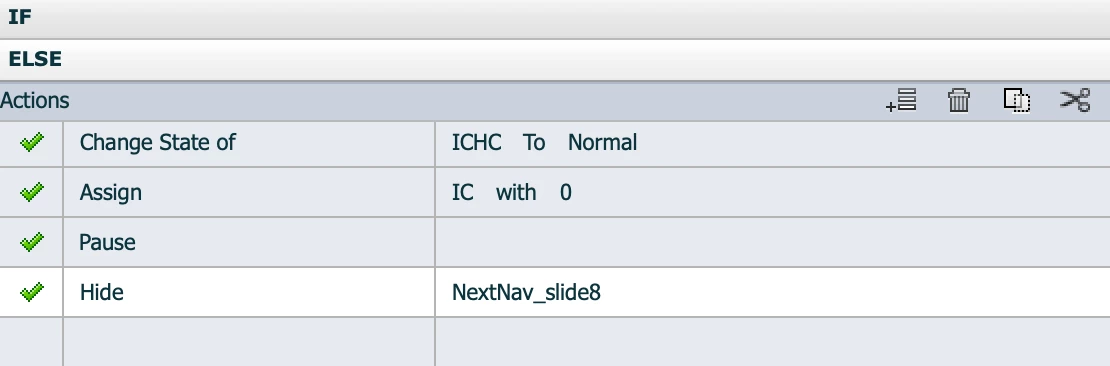
But when they are all met, it just does nothing.   It will not change the state of my box or show the next button.  If I click on a wrong box to highlight it, then it works again, but every time I have the correct combination clicked it just freezing up.


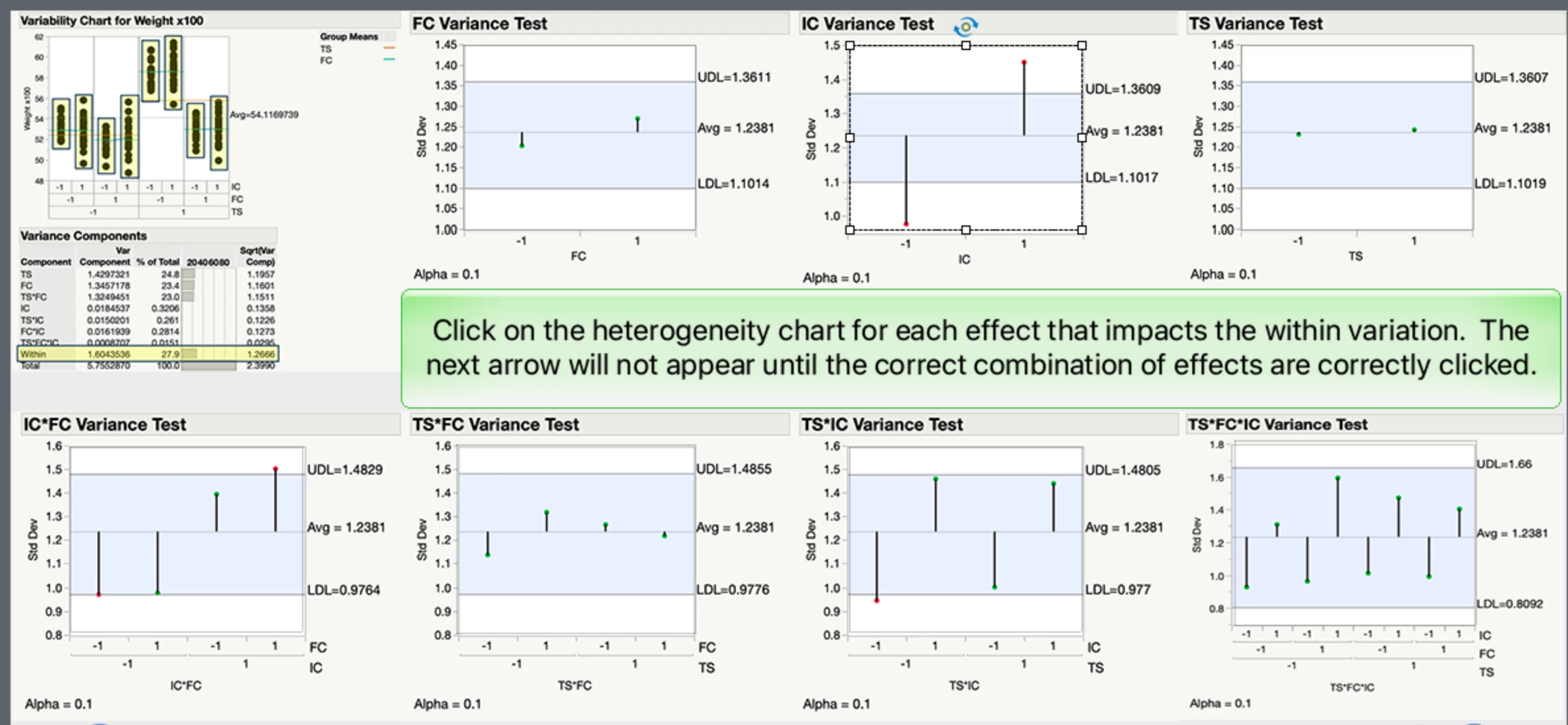
What I am trying to do, they have to click the correct graphs to answer the question, once they get the right sequence of graphs clicked the next button shows up.  I have a square over each graph with no color or outline that has a clicked state and it turns green when clicked and does not show if not clicked or clicked a second time.  If I have the wrong graphs clicked, the second box of If statements works fine and the green shading shows/disappears as they should.


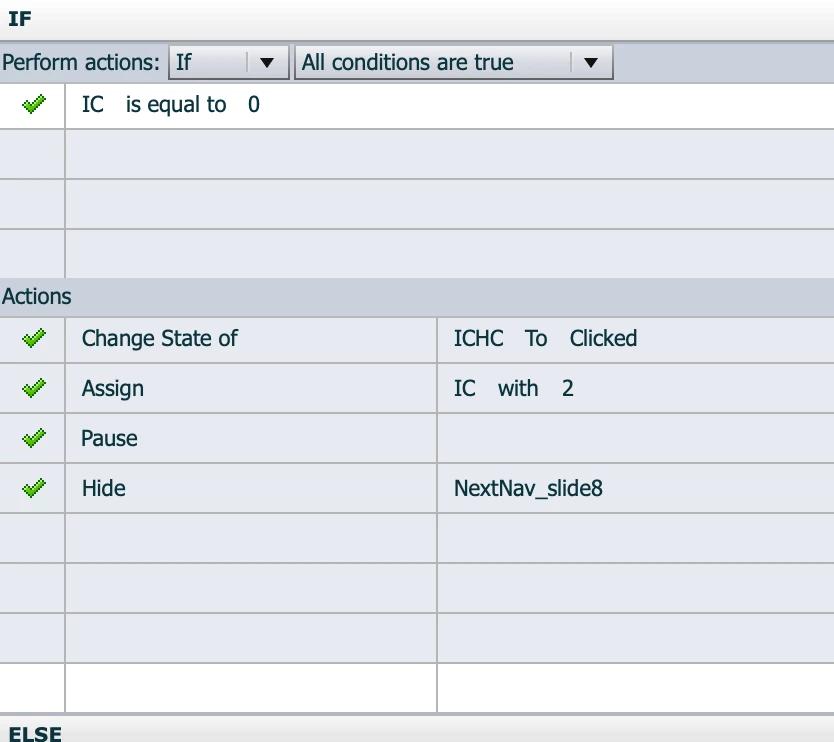
My untitled 2 which is the second round of conditional tab - I only have two.  This section works perfectly.


I have captivate 11.5.5.676.


What am I doing wrong?

    This topic has been closed for replies.
    Correct answer Lilybiri

    I thought if untitled 2 was true, it would not go to untitled 1?   I thought it only went there is Untitled 2 was false.  Is that not the case?  I understand why it is not working if it is not the case.  Is there a way to make it only go to Untitled 1 if untitled 2 is false?


    One of the first things to learn about advanced actions is that it ALWAYS will read and execute all commands, as I wrote before: from top to bottom and from left to right.  You need to rethink your advanced action setup and take that into account. It is really worthwhile to take some training or read some tutorials about advanced actions.  

    It is perfectly possible to make it work, but there is no way to only go to the second decision if the first one is false.

    For starters with advanced actions I always give  tips:

    • Try to make decisions in sequence mutually exclusive, so that a following decision cannot override a previous decision. In the majority of cases this is possible.
    • Do not use ELSE part, except eventually in the last decision, if that ELSE part will not override any of the previous decisions.
    • Do not use commands in a conditional action if they have to be done always, but put them in an standard decision (no condition). The place of that standard action, at the start or at the end, will be decisive for the condirional decisions.

    I would have given you a solution if I had a complete view of the actions and the difficult labels. But I recommend to take some training about advanced actions. Alternative would be to skip them and learn a full-blown programming language.

    Reflect on the possible situations you'll have and put each of them in a decision. Do this with pen and paper or a digital alternative, but not in Captivate. Is it necessary to combine 'equal to' and 'greater than' operators? I don't see why that is needed. 

    2 replies

    Lilybiri
    Legend
    May 11, 2021

    It is a pain to try to understand your advanced actions. Please use the Preview window, where we can see multiple and complete decisions in one view. You open that Preview window using the first button (arrow) in the top right control panel. Especially since I have not even any idea how many decisions you have used. See this screenshot:

    There are unnecessary commands in the shown actions. Bu default any advanced action will keep the slide paused if the button triggering that action has a pausing point. Please show the Timeline, so that it is possible to see the triggering buttons. Adding a Pause command makes no sense whatsoever. In one action you add Continue, which makes sense if you want to override the pause by the pausing point.

    If you want help, these details are needed:

    • Screenshot of the Timeline so that the pausing points of the hotspots can be checked.
    • Which event is linked to which action: I suppose the hotspots will trigger an action, but the first one you show is probably a second decision and belongs to the same action.
    • Screenshots of the Preview of the used advanced action. It is not necessary to post all actions if they are similar for each button.  You talk about '6 conditions', do you mean that you have 6 variables in the AND combination? How are those variables populated? Because I see only one variable which is assigned another value (IC) but that variable is not in the combined AND condition. Moreover that IC variable gets a value = =2 but you check the variables on a value == 0?


    lmaleyAuthor
    Inspiring
    May 11, 2021


    The next button is hidden initially.  I kept one pause point at the very end to keep it from going to the next slide prior to them answering correctly.


    What I am doing is creating 7 boxes that go over top the 7 graphs in this slide, the top left hand graph does not get one.


    When they click on a graph, the invisible box over top of it turns green to indicate that they have clicked on it.    Their variable gets assigned a 2.   If they click on it again, the green box turns back to invisible to indicate they have unselected it.   Their variable gets reassigned back to a 0.   So once the variables are all correct, the next arrow should come up.   (7 variables in all, but if they are clicking on the 7th one, I know what is going on with that one, so I only have to look at the other 6).  So I guess I can clean up the ones that I have 7 in there.


    FC - I have tried removing the pause and played around with things and cannot get it to work.  I have done something similar with less variables and I had to have the pause in there prior to showing the next button for it to work.. no idea why???


    IC


    TS


    ICFC

    TSFC


    TSIC

    TS*FC*IC


    Lilybiri
    Legend
    May 12, 2021

    Ok  Thanks.  I did get it to work within about 5 minutes by switching the untitled 1 and 2 around and changing one line, in each executive action.  Now it works.   Yeah, I may try Javascript next time.   That would probably be easier.  Thanks for the advice!


    That was my suggestion to switch the decisions back to the original sequence. I have no idea why you reordered them.

    Each method, advanced/shared action or JS programming language, has its advantages and disadvantages. Important is that you know the 'rules' and - for a programming language - that includes the syntax rules.  For this particular use case, it seems overkill for me although I have been programming since many decades. Much easier with a shared action, no need for syntax debugging. But Greg uses JS for almost everything, very logical that he will prefer JS.

    Stagprime2687219
    Legend
    May 11, 2021

    I noticed some of your conditions say if greater than 0 and some say equal to 0

    Not sure how you click boxes are setting those variables.

    Could that be part of the problem?

    lmaleyAuthor
    Inspiring
    May 11, 2021

    I don't think so, because it is working great except when all of them are at the correct setting.  I have done this before, just not with so many.

    Stagprime2687219
    Legend
    May 11, 2021

    A strategy I like to use is to place smartshapes on screen to display all my variable values so I can verify that they are changing WHEN I want them to and TO THE VALUE that I want them to.

    It is a good way to troubleshoot and can lead you in the right direction to solving the issue.

    Just a small smartShape with text  $$myVar$$  placed inside.

    Replace  myVar with  the name of your variable.


    Question - The correct setting is where you expect the changes to happen, right?  If it works great except when the settings are correct - does that mean nothing happens when the settings are incorrect? That would seem logical and would simply mean the settings are broken somewhere.

    How do you know that the variables match your setting criteria? That's what the above strategy will help figure out.