
anni_k76761249
Known Participant
February 22, 2019
Answered

FadedZoomOut Effect

  • February 22, 2019
  • 1 reply
  • 770 views

Hi again everybody
Please help me understand issue.

I apply on some png (it is map) 3 different effects
First-"EanseInLeft"

Second-"CustomLines"

Third-"FadedZoomOut"

when preview "from this slide" everithyng is work nice

but when as HTML (F11) on last effect "FadedZoomOut" this png  is disappear but after appear again some seconds.

Why?
after publish HTML also the same issue

My project blank (not responsive)

Captivate version 2019

Thanks !!!
    This topic has been closed for replies.
    Correct answer Lilybiri

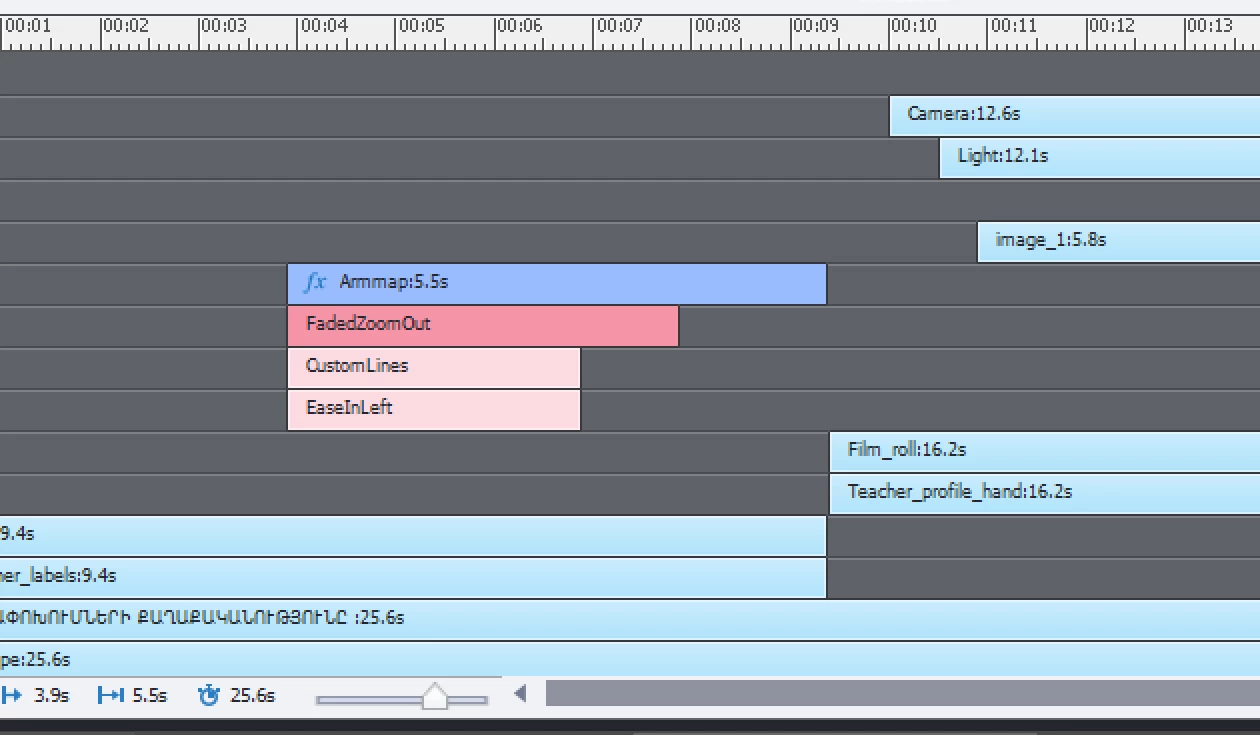
    Thank you I will read the blog and this is screen of my timeline with effects


    You had all the effects at the same time? That explains some of the problems. Both CustomLines and EaseInLeft have motion paths, how can Captivate detect which path to follow? It is like being at a bifurcation and asking that both paths have to be followed at the same time. FadedZoomOut is a canned Exit effect where Alpha and scale are combinated. Why do you have the timeline extend beyond that effect, that is totally illogical. If you want that effect to be applied, it should be at the end of the object timeline.

    1 reply

    Lilybiri
    Legend
    February 22, 2019

    For non-responsive projets only F11 will use a temprary HTML output, the other Preview methods are all SWF-based. If it is not working with F11, it may work after publishing, but is doubtful.

    Did you create a custo meffect?

    anni_k76761249
    Known Participant
    February 22, 2019

    no custom effect only these 3 effects which wrote before :

    First-"EanseInLeft"

    Second-"CustomLines"

    Third-"FadedZoomOut"

      and after publishing also have this issue

    Lilybiri
    Legend
    February 23, 2019

    how? I don't know what is mean expand ?
    sorry I am new in Captivate?


    Maybe you could have a look at:

    Challenges for Starters - Captivate blog

    Understanding the timeline should be your first priority. I published a lot of blogs aout it.

    Click the trinagular button to the left of the boject to which you applied the Effects, and the effect tiimelines will be visible.

    More detials in:

    Captivate's Timelines (master slide/normal slide cptx) demystified - Captivate blog