
Known Participant
July 27, 2021
Question

Fatal Error Captivate 2019 Release

  • July 27, 2021
  • 3 replies
  • 1003 views

Hi Everyone, 

I am hoping someone might be able to help.

I am working on a project and I have inserted a slide video on a blank slide.

I tried to copy and paste the 'Previous' and 'Next' buttons from the previous slide but I get the fatal error message (see image below).
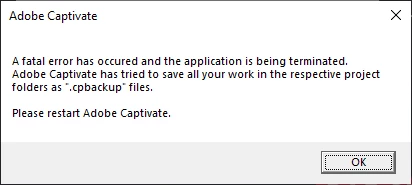
I was wondering if anyone is able to guide me and shed some light on why this may be happening? Or any other workarounds?

I am using Captivate 2019 Release v11.5.5.553


Thank you kindly 🙂


    This topic has been closed for replies.

    3 replies

    Lilybiri
    Legend
    July 27, 2021

    Did you clean the Preferences as well? Before reinstalling, would try that also, besides the suggestion of Rod which would figure out if Captivate or the project is corrupted.

    http://blog.lilybiri.com/tips-for-troubleshooting


    Known Participant
    July 28, 2021

    Hi @Lilybiri 

    Thanks for your assistance with this. 
    I haven't tried that option as yet and I am not exactly sure how to do it but I will look into it. 
    Thank you 😊 

    Lilybiri
    Legend
    July 28, 2021

    I explained 'how' in that blog: find the subfolder 'utils' in the installation folder of Captivate. Run CleanPreferencesWin.bat while CP is closed.

    RodWard
    Community Expert
    Community Expert
    July 27, 2021

    There may be something wrong with your Captivate installation and reinstalling would fix it.


    However, BEFORE you go to all that trouble, first try quickly creating a new Blank project, insert a video and then try to replicate the behaviour in that new project.  If you can replicate the behaviour in a new project then the issue is unlikely to be corruption in your main project.  It would point to something happening at the system level rather than at the project level.  So reinstalling would then be your next best option.


    If this problem turns out to require a reinstall of Captivate, the issue could be that something else has changed on your system (perhaps an update to Windows or installation of some other app) that is causing the issue.

    Known Participant
    July 28, 2021

    Hi @RodWard 

    Thanks so much for your reply and assistance with this.

    I did try your suggestion already and yes, I was able to replicate the same error - so it was comforting to know that the project wasn't corrupted.

    We did have a Windows update and so things are pointing in that direction. I have been speaking with someone from the IT team to see if it was possible to uninstall and reinstall but we came across this:

    They can uninstall my Captivate but they will not be able to reinstall do to the above error message. So someone in software is looking into downloading Captivate again.


    I was wondering if there are any Captivate updates that anyone may be aware of or is the version I have the latest?


    Thanks again for your assistance.

    RodWard
    Community Expert
    Community Expert
    July 28, 2021

    As of the current date the version of Captivate that you currently have is the latest build for Windows.


    However, like yourself, I recently started having problems with Captivate 2019 (same build as you) after a series of Windows updates and I ended up having to reinstall the app in order to get it to work again.  It appears the issue in my case was that Windows decided to uninstall certain versions of the Microsoft Visual C++ redistributable software that Captivate requires.  It proved to be almost impossible to locate which specific ones were missing so I just had to do a complete reinstall to get everything working again.


    So I would tell your IT dudes that they don't need to wait for a newer update of Captivate to come out (because that's not likely to happen anytme soon).  They just need to resinstall your existing Captivate version to to replace the components that the update killed in order to get it to work again.  If they download Captivate again, they will likely get an older version of Captivate 2019 (in my experience) and then they will need to update it again to get to the very latest version.  If they still have the install files for Captivate 2019 Release v11.5.5.553, then I would be using that to do the reinstall.

    Known Participant
    July 27, 2021

    I have also cleared the cache and it is still happening.
    It is not happening on all other slides. 😞