
Participant
April 1, 2022
Question

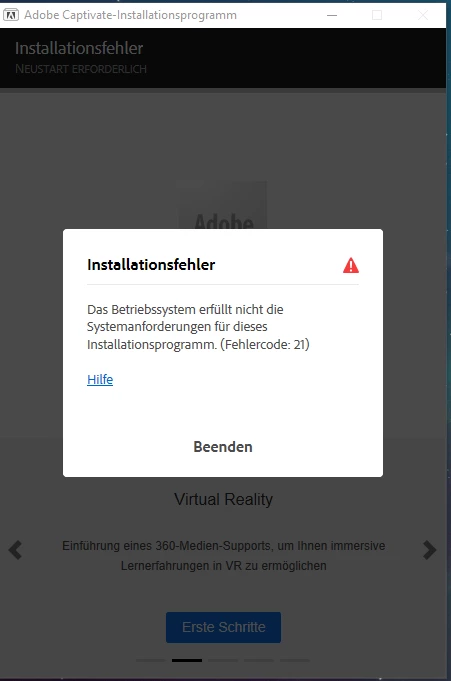
Fehler 21 bei Installation von Captivate

  • April 1, 2022
  • 1 reply
  • 425 views

Hallo,

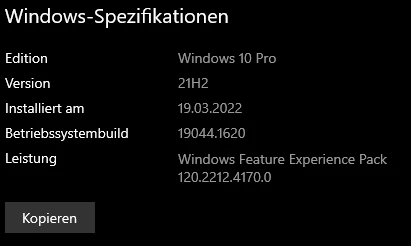
nach der Neuinstallation meines Windows Systems lässt sich Captivate nicht mehr installieren. Nach der Auswahl der Komponenten und des Installationspfades bekomme ich den Fehler 21. Windows ist auf dem aktuellen Stand, die aktuellste Version von MS Edge und Firefox sind ebenfalls installiert.

Die Setup Routine (Captivate_2019_x64_LS21.zip) habe ich mehrfach neu heruntergeladen und auch mehrfach entpackt, jedoch alles ohne Erfolg.


Gibt es dafür eine Lösung? 

This topic has been closed for replies.

1 reply

kglad
Community Expert
Community Expert
April 1, 2022

you need a 64 bit os.


here are the other requirements, Adobe Captivate system requirements

Participant
April 4, 2022

I have a 64Bit OS. This can't be the reason for my issue.


kglad
Community Expert
Community Expert
April 4, 2022

did you follow these directions (esp #2.):


Installing Adobe Captivate on Windows
1. Make sure you sign in as an Administrator.


2. Before you install, close all applications currently running on your system—including other Adobe applications, Microsoft Office applications, and browser windows. Adobe also recommends that you temporarily turn off virus protection during the installation process.


3. Ensure that you have administrative privileges or are able to validate as an administrator.


4. Insert the DVD in the DVD-ROM drive, and follow the on-screen instructions. If the installer does not launch automatically, navigate to the Adobe Captivate 2019 folder found at the root level on your disk and double-click Set-up.exe to start the installation process.


5. If you have downloaded Adobe Captivate from the web, open the downloaded folder, navigate to the Adobe Captivate 2019 folder, double-click Captivate_2019_x64_LS21.exe, and then follow the on- screen instructions.